
Multicloud AI & ERP / Cloud & AI Security, Governance & Compliance
Why it matters
AI expands the number of things that call your systems: applications, agents, evaluation jobs and pipelines. Each needs access to models, data and tools, and each is a path an attacker can use if identity is weak.
How it works
Two checks on every AI call
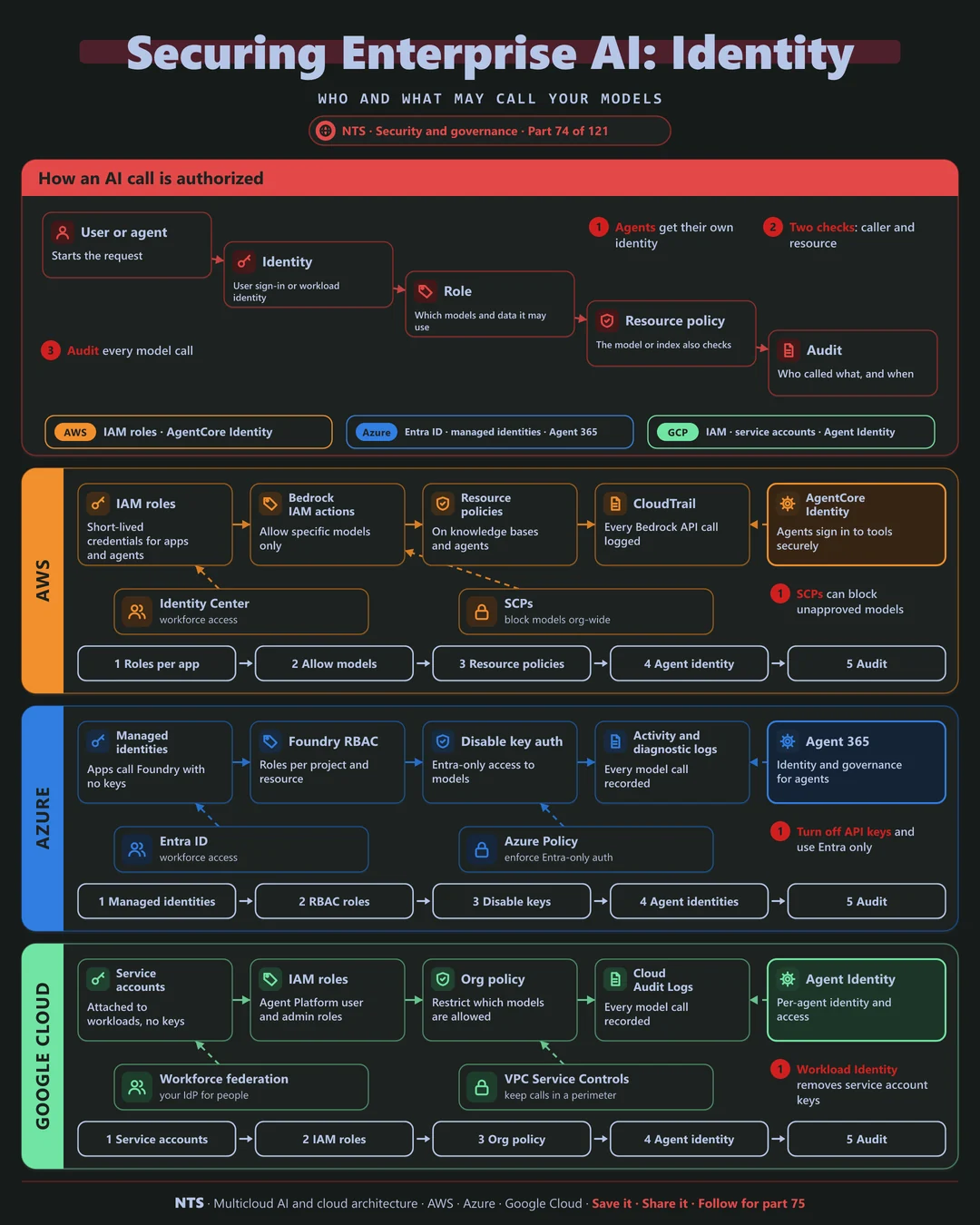
The caller proves who it is with a user sign-in or a workload identity, and its role decides which models and data it may use. The resource (a model, knowledge base or agent) applies its own policy. Every call is written to an audit log.
AWS, Azure and Google Cloud compared
| AWS | Azure | Google Cloud | |
|---|---|---|---|
| Workload identity | IAM roles | Managed identities | Service accounts |
| Model access control | Bedrock IAM actions, resource policies | Foundry RBAC | Agent Platform IAM roles |
| Agent identity | AgentCore Identity | Entra agent identities, Agent 365 | Agent Identity |
| Organization guardrail | SCPs to block models | Azure Policy, disable key auth | Organization Policy |
| Audit | CloudTrail | Activity and diagnostic logs | Cloud Audit Logs |
What makes each cloud different
AWS
On AWS, IAM policies can allow specific Bedrock models only, resource policies protect knowledge bases and agents, and service control policies can block unapproved models across the organization.
Azure
Azure lets you disable API key authentication on Foundry resources so only Entra identities work, with managed identities for apps and Agent 365 for agent identities.
Google Cloud
Google Cloud grants Agent Platform roles through IAM, uses Workload Identity to remove service account keys and gives each agent its own Agent Identity.
Design decisions that matter
- 01No API keys for models
Identity-based access only.
- 02Allow-list approved models
Block the rest at the organization level.
- 03Separate identities per app and agent
Scoped and revocable.
- 04Audit every model call
Who asked what, and when.
Common mistakes we see
- Shared API keys across teams. No accountability and easy leaks.
- Agents using human credentials. Actions cannot be told apart.
- No model allow-list. Teams use unapproved models with sensitive data.
A practical 30-day plan
- Week 1
Inventory AI callers and how they authenticate.
- Week 2
Replace keys with workload identities.
- Week 3
Add model allow-lists and resource policies.
- Week 4
Turn on auditing and review access.
How NTS helps
NTS secures AI access on AWS, Azure and Google Cloud, covering identity design for apps and agents, removal of API keys, model allow-lists and auditing aligned with your security policies.
What you get
- Identity design for AI apps and agents
- Least-privilege access to models and data
- Per-user authorization for AI answers
- Access logging and reviews
Typical outcomes
- No AI app with excessive access
- Data protected from unauthorized users
- Clean security reviews for AI projects
How we work with you
- 1Assess
A focused review of your AI identity and access security across AWS, Azure and Google Cloud. We look for the gaps we find most often: shared API keys across teams, agents using human credentials and no model allow-list.
- 2Design
A target architecture and roadmap built on the decisions that matter most: no API keys for models, allow-list approved models, separate identities per app and agent and audit every model call.
- 3Build
Hands-on delivery alongside your team. We inventory AI callers and how they authenticate, replace keys with workload identities, add model allow-lists and resource policies, and finally turn on auditing and review access.
- 4Run and improve
We review AI permissions regularly and extend controls to new apps and agents.
Why teams choose NTS for AI identity and access security
- AI-specific identity expertise
We secure the new access paths AI creates.
- User context everywhere
AI only acts with the rights of the person asking.
- Audit-ready
Every access is logged and reviewable.
Book a free 30-minute review
Talk to an NTS architect about your AI identity and access security on AWS, Azure and Google Cloud.