
Multicloud AI & ERP / Cloud Migration, Integration & AI Operations
Why it matters
Data residency, latency, existing investments and regulation keep many workloads on-premises or at the edge. Managing them with separate tools doubles effort and leaves gaps attackers can use.
How it works
One control plane
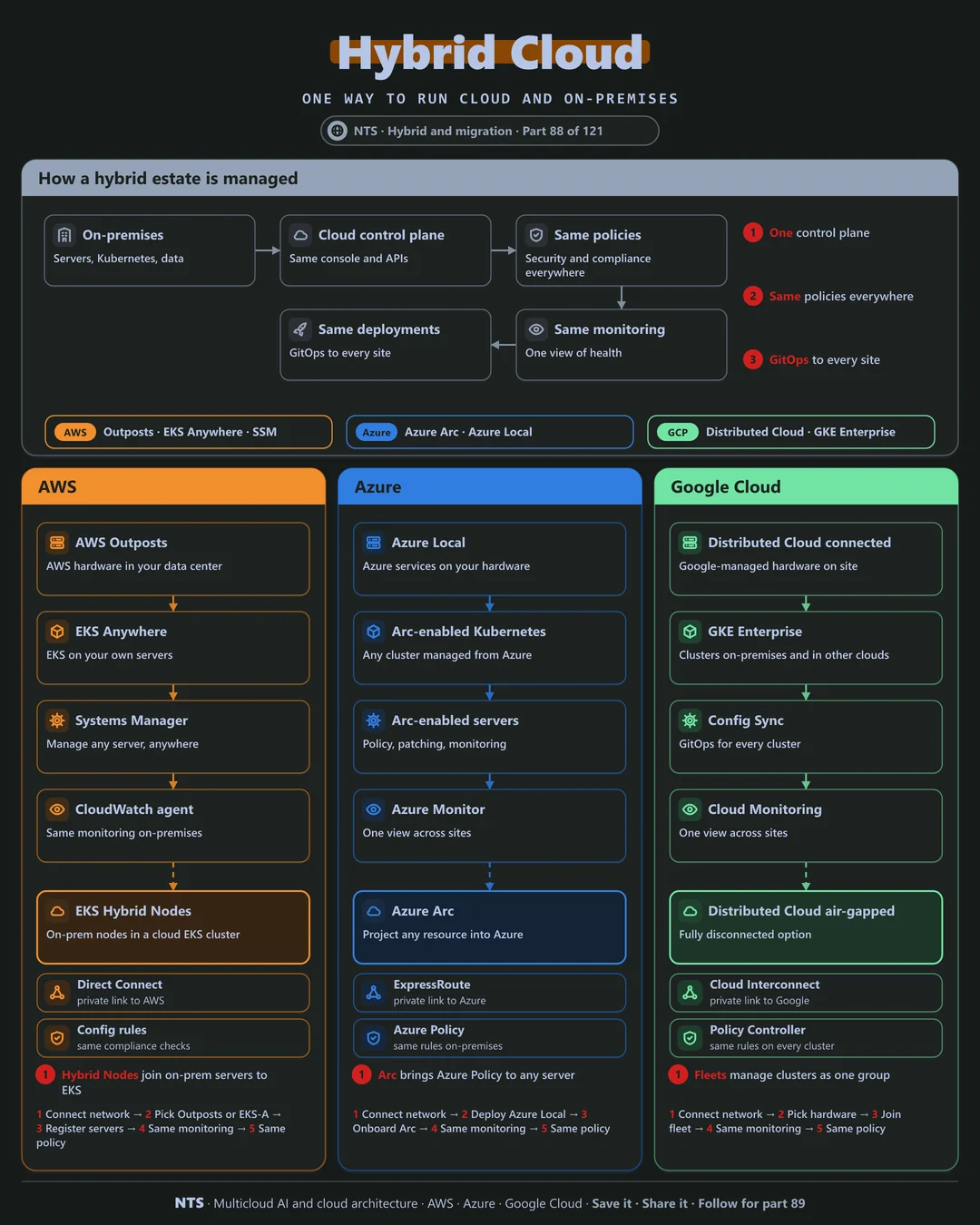
On-premises servers and clusters are projected into the cloud control plane, so the same policies, monitoring and GitOps deployments apply everywhere. Some providers also install cloud hardware on site for low-latency or disconnected needs.
AWS, Azure and Google Cloud compared
| AWS | Azure | Google Cloud | |
|---|---|---|---|
| Cloud hardware on site | AWS Outposts | Azure Local | Google Distributed Cloud |
| Kubernetes anywhere | EKS Anywhere, EKS Hybrid Nodes | Arc-enabled Kubernetes | GKE Enterprise (fleets) |
| Server management | Systems Manager | Arc-enabled servers | VM Manager, Config Sync |
| Consistent policy | Config rules | Azure Policy via Arc | Policy Controller |
| Disconnected option | Outposts (connected), Snow devices | Azure Local disconnected scenarios | Distributed Cloud air-gapped |
What makes each cloud different
AWS
AWS extends to your data center with Outposts hardware, EKS Anywhere and EKS Hybrid Nodes, which join on-premises servers to a cloud EKS cluster, while Systems Manager manages any server.
Azure
Azure Arc projects servers, Kubernetes clusters and data services anywhere into Azure, so Azure Policy, Defender and Monitor apply on-premises, and Azure Local runs Azure services on your hardware.
Google Cloud
Google Distributed Cloud offers connected and fully air-gapped options, and GKE Enterprise manages clusters on-premises and on other clouds as one fleet with Config Sync and Policy Controller.
Design decisions that matter
- 01One control plane for everything
Same tools, same policies.
- 02GitOps for every site
Declarative, versioned and auditable.
- 03Decide placement per workload
Latency, residency and cost drive it.
- 04Secure the link
Private, redundant connectivity.
Common mistakes we see
- Separate tools per environment. Double the effort, half the visibility.
- Hybrid as a permanent excuse. Plan which workloads move and when.
- Unmanaged edge sites. Drift and vulnerabilities pile up.
A practical 30-day plan
- Week 1
Inventory on-premises workloads and placement reasons.
- Week 2
Onboard servers and clusters to the cloud control plane.
- Week 3
Apply common policies and monitoring.
- Week 4
Move deployments to GitOps across sites.
How NTS helps
NTS designs hybrid estates with Outposts, Azure Arc and Google Distributed Cloud, covering placement strategy, unified management, policy, monitoring and GitOps across data centers and edge sites.
What you get
- A hybrid strategy for what stays and what moves
- Azure Arc, Outposts or Google Distributed Cloud setup
- Unified management and security across locations
- Consistent deployment pipelines
Typical outcomes
- Consistent operations across cloud and data center
- Workloads in the right place
- Lower operational complexity
How we work with you
- 1Assess
A focused review of your hybrid cloud across AWS, Azure and Google Cloud. We look for the gaps we find most often: separate tools per environment, hybrid as a permanent excuse and unmanaged edge sites.
- 2Design
A target architecture and roadmap built on the decisions that matter most: one control plane for everything, GitOps for every site, decide placement per workload and secure the link.
- 3Build
Hands-on delivery alongside your team. We inventory on-premises workloads and placement reasons, onboard servers and clusters to the cloud control plane, apply common policies and monitoring, and finally move deployments to GitOps across sites.
- 4Run and improve
We manage the hybrid platform and revisit placement as costs and needs change.
Why teams choose NTS for hybrid cloud
- Pragmatic, not dogmatic
We keep workloads where they make the most sense.
- One way to operate
The same tools and policies everywhere.
- Data center experience
We understand on-premises as well as the cloud.
Book a free 30-minute review
Talk to an NTS architect about your hybrid cloud on AWS, Azure and Google Cloud.