
Multicloud AI & ERP / AI-Ready Cloud Foundations & FinOps
Why it matters
Your account structure is the one cloud decision that is genuinely hard to reverse. Moving a running workload from one AWS account, Azure subscription or Google Cloud project to another means rebuilding identity, networking, encryption keys, billing and monitoring around it. Most organizations that skip this design end up living with the result for years.
Region and zone choices carry the same weight. They decide your latency to customers, where your data legally resides, which services you can use (new AI models often launch in only a few regions), what you pay, and whether a single data center failure takes you offline.
How it works
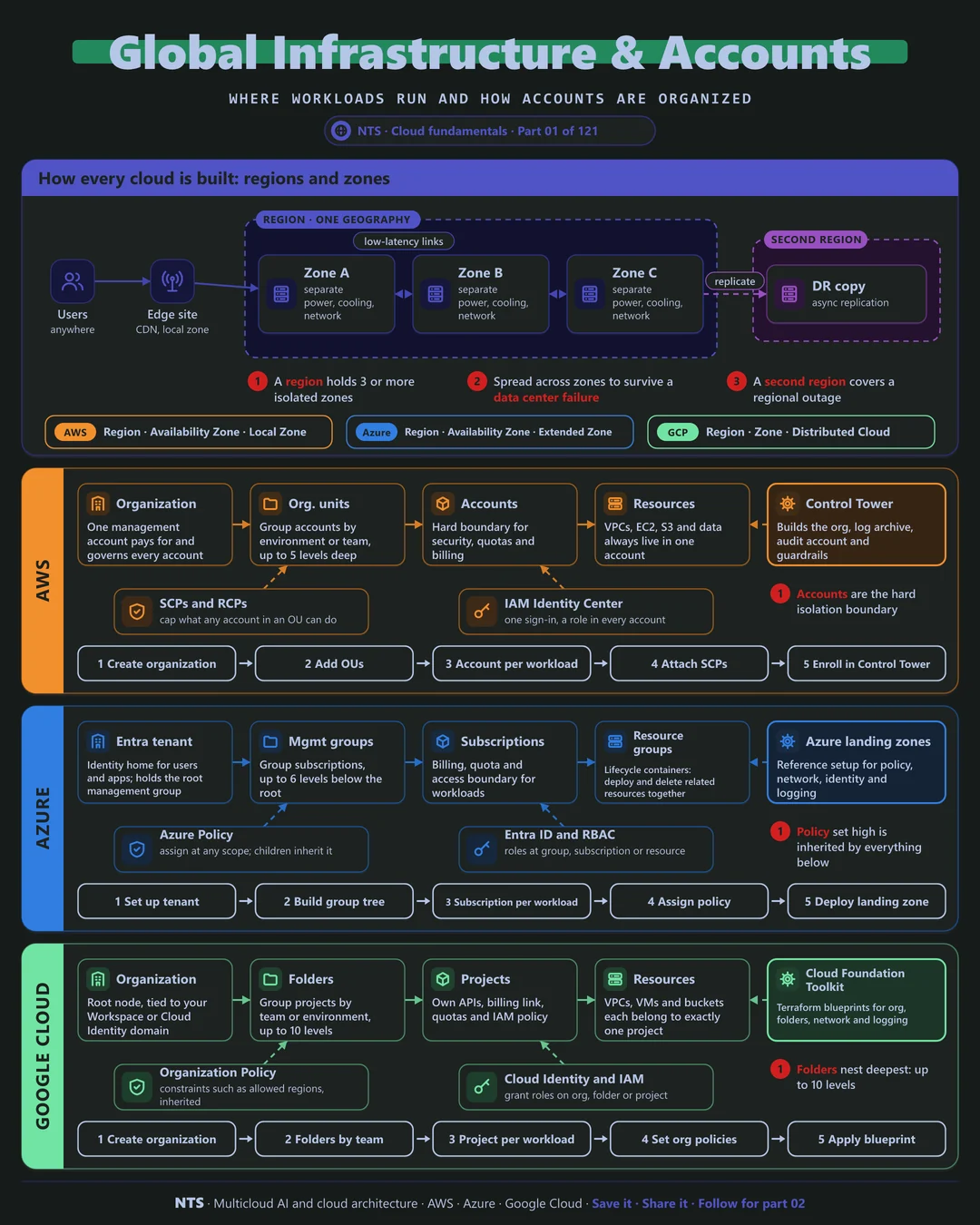
Regions and zones: the physical map
Every major cloud is built the same way. A region is a geographic area, such as Frankfurt or Northern Virginia. Inside each region sit several zones: one or more data centers with their own power, cooling and networking, placed far enough apart that a fire, flood or power fault rarely affects more than one, yet close enough to replicate data with very low latency.
The design rule follows directly. Run every tier of a production system across at least two zones, ideally three, so losing a data center becomes a non-event. Many managed services do this for you: multi-zone databases, zone-redundant storage and regional load balancers. A second region protects against something rarer, the loss of an entire region, and is usually justified by recovery targets or data residency rules rather than by default.
At the edge, each provider also offers smaller sites closer to users for latency-sensitive work: AWS Local Zones and Wavelength, Azure Extended Zones, and Google Distributed Cloud.
The account hierarchy: the logical map
On top of the physical map sits a logical one with three layers. A root represents the whole organization and is where billing rolls up. Groups in the middle collect workloads that share rules, typically by environment (production, non-production, sandbox) or by compliance needs. At the bottom is the workload boundary: the AWS account, Azure subscription or Google Cloud project where resources actually live.
The power of the hierarchy is inheritance. A guardrail attached to a group, such as "no resources outside the EU" or "logging can never be turned off", applies automatically to everything beneath it, including accounts created next year. Set the rules once, high in the tree, and every new team starts compliant.
AWS, Azure and Google Cloud compared
| AWS | Azure | Google Cloud | |
|---|---|---|---|
| Top of the hierarchy | Organization, run from a management account | Microsoft Entra tenant with a root management group | Organization node, tied to your domain |
| Grouping layer | Organizational units (up to 5 levels) | Management groups (up to 6 levels) | Folders (up to 10 levels) |
| Workload boundary | Account | Subscription | Project |
| Inside the boundary | Tags | Resource groups | Labels |
| Preventive guardrails | SCPs and RCPs | Azure Policy | Organization Policy |
| Workforce sign-in | IAM Identity Center | Microsoft Entra ID | Cloud Identity or workforce federation |
| Landing zone accelerator | Control Tower | Azure landing zones | Cloud Foundation Toolkit |
| Fault-isolation unit | Availability Zone | Availability Zone | Zone |
What makes each cloud different
AWS
On AWS the account is the hard isolation boundary for permissions, quotas and blast radius, so mature estates use many of them. The established pattern adds dedicated accounts for log archive and security tooling alongside workload accounts, and Control Tower builds this for you. Service control policies cap what any identity in an account can do; resource control policies cap what can be done to your resources, even by outsiders.
Azure
Azure puts identity above everything: the Microsoft Entra tenant is the root of trust, with management groups and subscriptions beneath it. Subscriptions are the billing and scale unit, and resource groups organize resources that share a lifecycle. Azure Policy is unusually capable: it can deny non-compliant deployments, audit existing ones and automatically deploy missing settings. The Azure landing zone reference adds platform subscriptions for identity, management and connectivity.
Google Cloud
Google Cloud ties the organization node to your Workspace or Cloud Identity domain. Folders nest the deepest of the three clouds, and the project is the unit for APIs, quotas, billing and IAM. Two features stand out: a Shared VPC lets a central team own the network while application teams own their projects, and VPC networks are global, spanning regions without extra peering. Organization Policy constraints, such as allowed resource locations, are inherited down the tree.
Design decisions that matter
- 01One boundary per application, per environment
Production and non-production never share an account, subscription or project. It is the simplest way to separate access, cost and blast radius.
- 02Dedicated platform accounts
Keep logging, security tooling, networking and shared services in their own accounts or subscriptions, owned by the platform team.
- 03Guardrails at the group level
Deny unused regions, block changes to audit logging and require encryption at the group, so every new account inherits them.
- 04Single sign-on only
People sign in through one identity provider with MFA. No local users or long-lived keys; break-glass accounts are documented and monitored.
- 05Pick regions on purpose
Weigh data residency, latency, price and service availability, especially for AI services, before the first workload lands.
Common mistakes we see
- One shared account for everything. Costs cannot be separated, permissions sprawl, and one mistake can affect every team.
- Groups that mirror the org chart. Departments change every reorganization; environments and compliance needs change far less often.
- Guardrails added after go-live. Retrofitting policy breaks running workloads, so teams ask for exceptions and the rules never land.
- Assuming every region is the same. Zones, services and AI model availability differ by region. Check before you commit.
A practical 30-day plan
- Week 1
Agree the hierarchy, naming, regions and who owns the platform.
- Week 2
Deploy the landing zone with Control Tower, Azure landing zones or the Cloud Foundation Toolkit, including logging and security accounts.
- Week 3
Connect single sign-on, apply guardrails, and set budgets and alerts.
- Week 4
Automate account or subscription creation and onboard the first workload through it.
How NTS helps
NTS designs and builds landing zones on AWS, Azure and Google Cloud, from the first design workshop to automated account vending and guardrails. Whether you are starting fresh, adding a second cloud or bringing order to an estate that grew without a plan, we can help you get the foundation right.
What you get
- A landing zone design for AWS, Azure or Google Cloud, or all three
- Automated account, subscription or project vending with guardrails
- Region strategy covering latency, residency and resilience
- Single sign-on, MFA and a documented break-glass process
Typical outcomes
- New teams onboarded in hours instead of weeks
- Clear cost ownership for every account and project
- Guardrails that stop risky changes before they happen
How we work with you
- 1Assess
A focused review of your cloud foundations and account structure across AWS, Azure and Google Cloud. We look for the gaps we find most often: one shared account for everything, groups that mirror the org chart, guardrails added after go-live and assuming every region is the same.
- 2Design
A target architecture and roadmap built on the decisions that matter most: one boundary per application, per environment, dedicated platform accounts, guardrails at the group level, single sign-on only and pick regions on purpose.
- 3Build
Hands-on delivery alongside your team. We agree the hierarchy, naming, regions and who owns the platform, deploy the landing zone with Control Tower, Azure landing zones or the Cloud Foundation Toolkit, including logging and security accounts, connect single sign-on, apply guardrails, and set budgets and alerts, and finally automate account or subscription creation and onboard the first workload through it.
- 4Run and improve
We keep the landing zone current as your organization grows, adding accounts, regions and controls as new teams and regulations arrive.
Why teams choose NTS for cloud foundations and account structure
- Foundations first, every time
We have seen what a rushed account structure costs later, so we design it to last for years, not weeks.
- Built as code from day one
Every account and guardrail is in version control, so new teams get a compliant home in minutes.
- Fits your organization
We map the hierarchy to how your business actually runs: teams, products, regulators and budgets.
Book a free 30-minute review
Talk to an NTS architect about your cloud foundations and account structure on AWS, Azure and Google Cloud.