
Multicloud AI & ERP / AI-Ready Cloud Foundations & FinOps
Why it matters
Compute is usually the largest line on a cloud invoice, and the easiest to overspend on. Oversized instances, always-on test fleets and list-price purchasing quietly double costs, while fleets that are not spread across zones turn a single data center fault into an outage.
The good news: the levers are the same on every cloud. Get images, sizing, scaling, purchasing and interruption handling right, and most cost and reliability problems never appear.
How it works
From image to running fleet
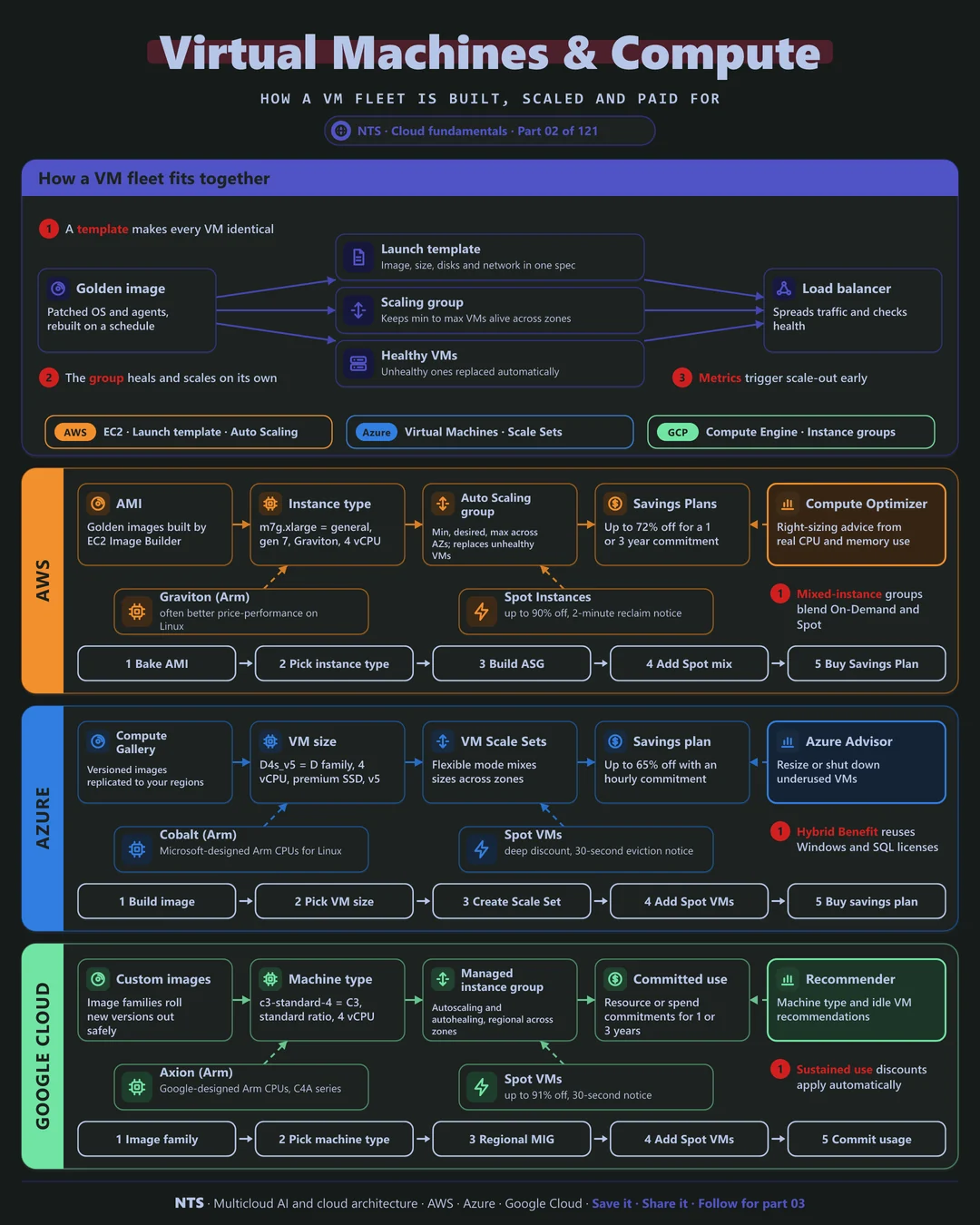
A healthy fleet starts with a golden image: a patched operating system with your agents baked in, rebuilt on a schedule rather than patched by hand. A launch template pins that image together with the machine size, disks and network, so every VM is identical.
A scaling group then keeps between a minimum and maximum number of VMs alive, spread across zones, and replaces any that fail health checks. An autoscaler adds or removes VMs from metrics such as CPU, request rate or queue depth, and a load balancer spreads traffic across whatever is running.
Paying less for the same capacity
The same VM has several prices. On demand is full flexibility at list price. Commitments (Savings Plans, Azure savings plans and reservations, Google committed use discounts) trade a one- or three-year promise for large discounts. Spot capacity is the cheapest of all, up to about 90%, but can be reclaimed at short notice.
The winning pattern combines them: commit to the baseline that always runs, autoscale on demand for predictable peaks, and put interruptible work on Spot. Arm processors (AWS Graviton, Azure Cobalt, Google Axion) often add further savings for Linux workloads.
AWS, Azure and Google Cloud compared
| AWS | Azure | Google Cloud | |
|---|---|---|---|
| VM service | Amazon EC2 | Azure Virtual Machines | Compute Engine |
| Golden images | AMIs, EC2 Image Builder | Azure Compute Gallery | Custom images and image families |
| Scaling group | Auto Scaling groups | Virtual Machine Scale Sets | Managed instance groups |
| Arm processors | Graviton | Cobalt | Axion |
| Commitment discounts | Savings Plans (up to 72%) | Savings plan (up to 65%), reservations | Committed use discounts |
| Spot notice | 2 minutes | 30 seconds | 30 seconds |
| Right-sizing advice | Compute Optimizer | Azure Advisor | Recommender |
What makes each cloud different
AWS
AWS offers the widest choice of instance families and generations, which is powerful but makes naming literacy important: m7g.xlarge reads as general purpose, seventh generation, Graviton, extra large. Mixed-instance Auto Scaling groups can blend On-Demand and Spot across many instance types in one fleet, and Savings Plans apply automatically across EC2, Fargate and Lambda.
Azure
Azure's Virtual Machine Scale Sets in flexible mode mix sizes and spread across zones, and Azure Hybrid Benefit lets you reuse existing Windows Server and SQL Server licenses, often the single biggest saving for Microsoft-heavy estates. The savings plan for compute covers many VM families with one hourly commitment.
Google Cloud
Google Cloud applies sustained use discounts automatically to steady VMs, with no contract. Machine families (E2, N2, C3, M3, A3) are clearly split by purpose, custom machine shapes let you buy exactly the CPU and memory you need, and regional managed instance groups spread VMs across zones by default.
Design decisions that matter
- 01Bake images, do not patch servers
Rebuild golden images on a schedule and roll them through the scaling group. Servers stay identical and patching becomes a deployment.
- 02Spread every fleet across zones
Set scaling groups to at least two zones, ideally three, before the first production deploy.
- 03Size from data
Start smaller than you think and use the provider's right-sizing tool after two weeks of real traffic.
- 04Layer your purchasing
Commit to the steady baseline, keep peaks on demand and move retryable work to Spot.
- 05Test Arm early
Build multi-architecture images so moving to Graviton, Cobalt or Axion is a configuration change, not a project.
Common mistakes we see
- Sizing from the old data center. On-premises servers were sized for five-year peaks; cloud VMs should be sized for today and scaled out.
- Committing before right-sizing. Discounts on oversized VMs lock in waste for one to three years.
- Spot for stateful work. Without checkpoints or a queue, a reclaim notice means lost work and failed jobs.
- Forgetting non-production. Dev and test fleets left running nights and weekends often cost as much as production.
A practical 30-day plan
- Week 1
Inventory running VMs, utilization and purchase options; tag owners.
- Week 2
Right-size the largest 20 workloads and schedule non-production shutdowns.
- Week 3
Move suitable workloads to scaling groups across zones; trial Arm and Spot.
- Week 4
Buy commitments for the proven baseline and set budgets and alerts.
How NTS helps
NTS reviews VM fleets on AWS, Azure and Google Cloud and turns the findings into action: right-sizing, golden-image pipelines, zone-spread scaling groups, Arm migrations and a commitment strategy that matches real usage. Most clients see the savings within the first billing cycle.
What you get
- A right-sizing report with savings for every major workload
- Golden images with patching and hardening built in
- Auto scaling groups tuned to real demand
- A purchase plan for Savings Plans, reservations and Spot
Typical outcomes
- Lower compute bills from right-sizing and smarter purchasing
- Faster, safer releases through golden images
- Capacity that follows demand instead of guesswork
How we work with you
- 1Assess
A focused review of your compute and virtual machine estate across AWS, Azure and Google Cloud. We look for the gaps we find most often: sizing from the old data center, committing before right-sizing, Spot for stateful work and forgetting non-production.
- 2Design
A target architecture and roadmap built on the decisions that matter most: bake images, do not patch servers, spread every fleet across zones, size from data, layer your purchasing and test Arm early.
- 3Build
Hands-on delivery alongside your team. We inventory running VMs, utilization and purchase options; tag owners, right-size the largest 20 workloads and schedule non-production shutdowns, move suitable workloads to scaling groups across zones; trial Arm and Spot, and finally buy commitments for the proven baseline and set budgets and alerts.
- 4Run and improve
Quarterly right-sizing and commitment reviews keep your compute estate efficient as workloads and instance families change.
Why teams choose NTS for compute and virtual machine estate
- Performance and price together
We size for real workload behavior, so you stop paying for idle capacity without risking slowdowns.
- Latest chip generations
We test Graviton, Cobalt and Axion Arm processors against your workloads and move what benefits.
- Immutable by design
Servers are rebuilt from images, not patched by hand, which makes every environment repeatable.
Book a free 30-minute review
Talk to an NTS architect about your compute and virtual machine estate on AWS, Azure and Google Cloud.