
Multicloud AI & ERP / AI-Ready Cloud Foundations & FinOps
Why it matters
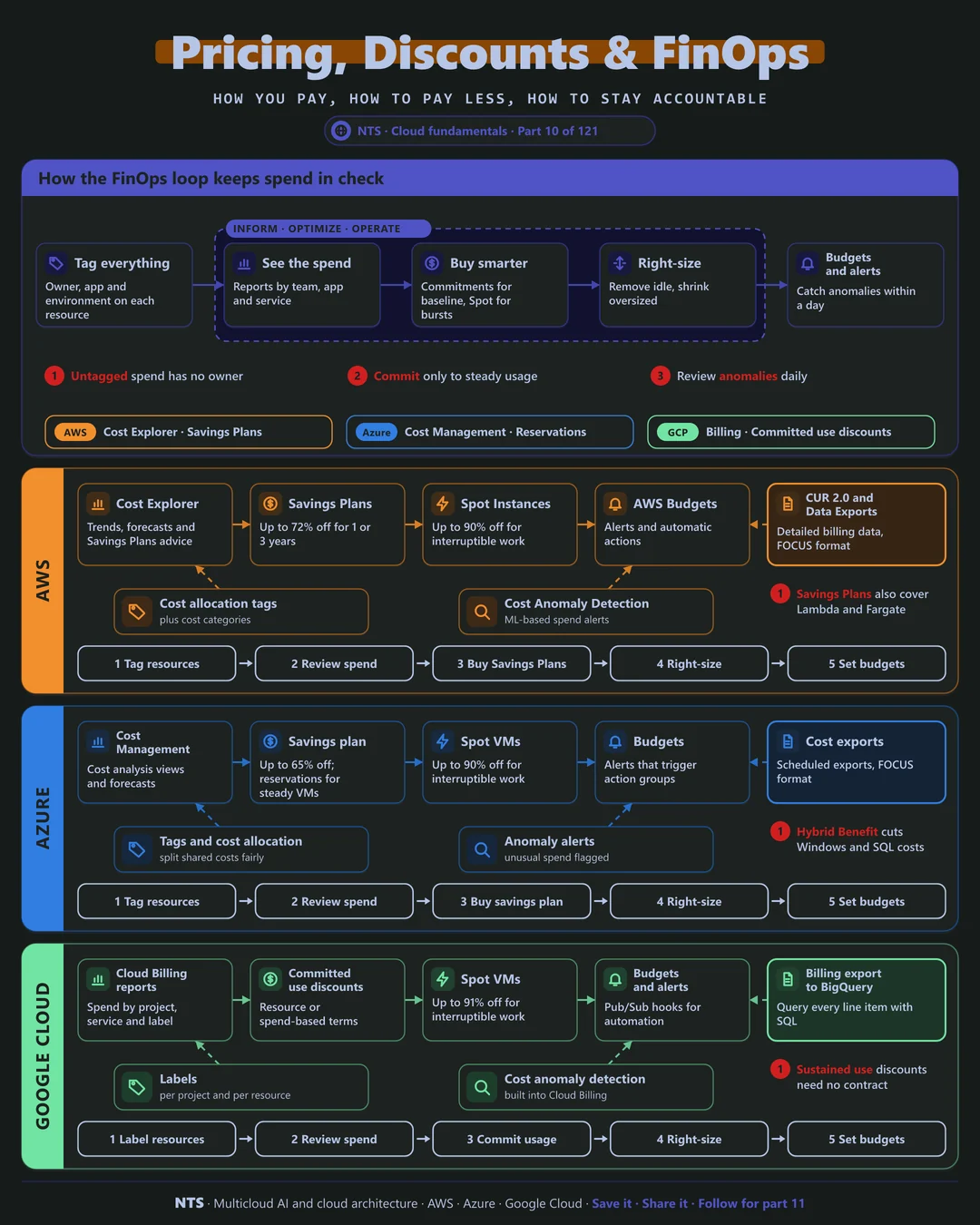
Cloud spend grows quietly: new projects, forgotten resources and list-price purchasing. Without ownership and visibility, savings efforts become one-off clean-ups that decay within months. FinOps builds a loop that keeps costs aligned with value.
How it works
Four ways to buy the same capacity
On demand offers full flexibility at list price. Automatic discounts arrive with no contract: volume tiers, Azure Hybrid Benefit and Google's sustained use discounts. Commitments trade a one- or three-year promise for large discounts. Spot capacity is cheapest of all but can be reclaimed.
The FinOps loop
Inform: tag every resource and show spend by team, product and environment. Optimize: right-size, remove idle resources and buy commitments for the steady baseline. Operate: set budgets and anomaly alerts so surprises are caught in a day, not at month end.
AWS, Azure and Google Cloud compared
| AWS | Azure | Google Cloud | |
|---|---|---|---|
| Cost visibility | Cost Explorer | Cost Management | Cloud Billing reports |
| Detailed billing data | CUR 2.0 and Data Exports | Cost exports (FOCUS) | Billing export to BigQuery |
| Commitments | Savings Plans (up to 72%) | Savings plan (up to 65%), reservations | Committed use discounts |
| Automatic discounts | Volume tiers | Azure Hybrid Benefit | Sustained use discounts |
| Spot discount | Up to 90% | Up to 90% | Up to 91% |
| Anomaly alerts | Cost Anomaly Detection | Anomaly alerts | Cost anomaly detection |
| Right-sizing | Compute Optimizer | Azure Advisor | Recommender |
What makes each cloud different
AWS
AWS Savings Plans apply automatically across EC2, Fargate and Lambda, and the Cost and Usage Report gives line-level detail for analysis. Cost Anomaly Detection uses machine learning to flag unusual spend, and cost categories group spend by business unit.
Azure
Azure Cost Management supports budgets with action groups and exports in the open FOCUS format. Azure Hybrid Benefit often delivers the biggest single saving for Windows and SQL Server estates, and the savings plan covers many compute services with one hourly commitment.
Google Cloud
Google Cloud's billing export to BigQuery makes every line item queryable with SQL, a strong base for custom FinOps reporting. Sustained use discounts apply automatically, and committed use discounts come in resource-based and spend-based forms.
Design decisions that matter
- 01Tag before you optimize
Owner, product and environment on every resource, enforced by policy.
- 02Show costs to the teams who create them
Monthly reports per team change behavior more than central clean-ups.
- 03Commit only to proven baselines
Buy commitments after right-sizing, in tranches.
- 04Automate shutdowns
Non-production stops nights and weekends.
- 05Daily anomaly alerts
Catch runaway spend within a day.
Common mistakes we see
- Buying commitments first. Discounts on oversized resources lock in waste.
- Central-only FinOps. Engineers who never see costs never optimize them.
- Ignoring data transfer. Egress and cross-zone traffic often surprise.
- One-off clean-ups. Without a loop, waste returns within months.
A practical 30-day plan
- Week 1
Enforce tagging and build spend views per team.
- Week 2
Remove idle resources and schedule non-production shutdowns.
- Week 3
Right-size the top spenders.
- Week 4
Buy commitments for the baseline and turn on budgets and anomaly alerts.
How NTS helps
NTS sets up FinOps practices across AWS, Azure and Google Cloud: tagging and allocation, dashboards per team, right-sizing, commitment strategy and anomaly alerting, including spend on AI models and GPUs. Our goal is savings that stay saved.
What you get
- A cost visibility model with tags and allocation by team
- A savings plan covering commitments, right-sizing and waste
- Budgets and anomaly alerts for every account
- A monthly FinOps report leaders can act on
Typical outcomes
- A lower monthly cloud bill
- Every dollar of spend owned by a team
- No surprise invoices
How we work with you
- 1Assess
A focused review of your cloud costs and FinOps across AWS, Azure and Google Cloud. We look for the gaps we find most often: buying commitments first, central-only FinOps, ignoring data transfer and one-off clean-ups.
- 2Design
A target architecture and roadmap built on the decisions that matter most: tag before you optimize, show costs to the teams who create them, commit only to proven baselines, automate shutdowns and daily anomaly alerts.
- 3Build
Hands-on delivery alongside your team. We enforce tagging and build spend views per team, remove idle resources and schedule non-production shutdowns, right-size the top spenders, and finally buy commitments for the baseline and turn on budgets and anomaly alerts.
- 4Run and improve
We run monthly FinOps reviews, adjust commitments as usage changes and catch cost anomalies early.
Why teams choose NTS for cloud costs and FinOps
- Savings without slowing teams
We cut waste while engineers keep the capacity they truly need.
- Commitment expertise
We model Savings Plans, reservations and committed use discounts across all three clouds.
- A lasting FinOps practice
We build the habits and reports so savings continue after we step back.
Book a free 30-minute review
Talk to an NTS architect about your cloud costs and FinOps on AWS, Azure and Google Cloud.