
Multicloud AI & ERP / Cloud Data, Analytics & BI for AI
Why it matters
Relational databases hold the most valuable data most businesses have: orders, customers, ledgers. Downtime stops revenue, data loss can end a company, and the wrong engine choice turns into an expensive migration years later.
How it works
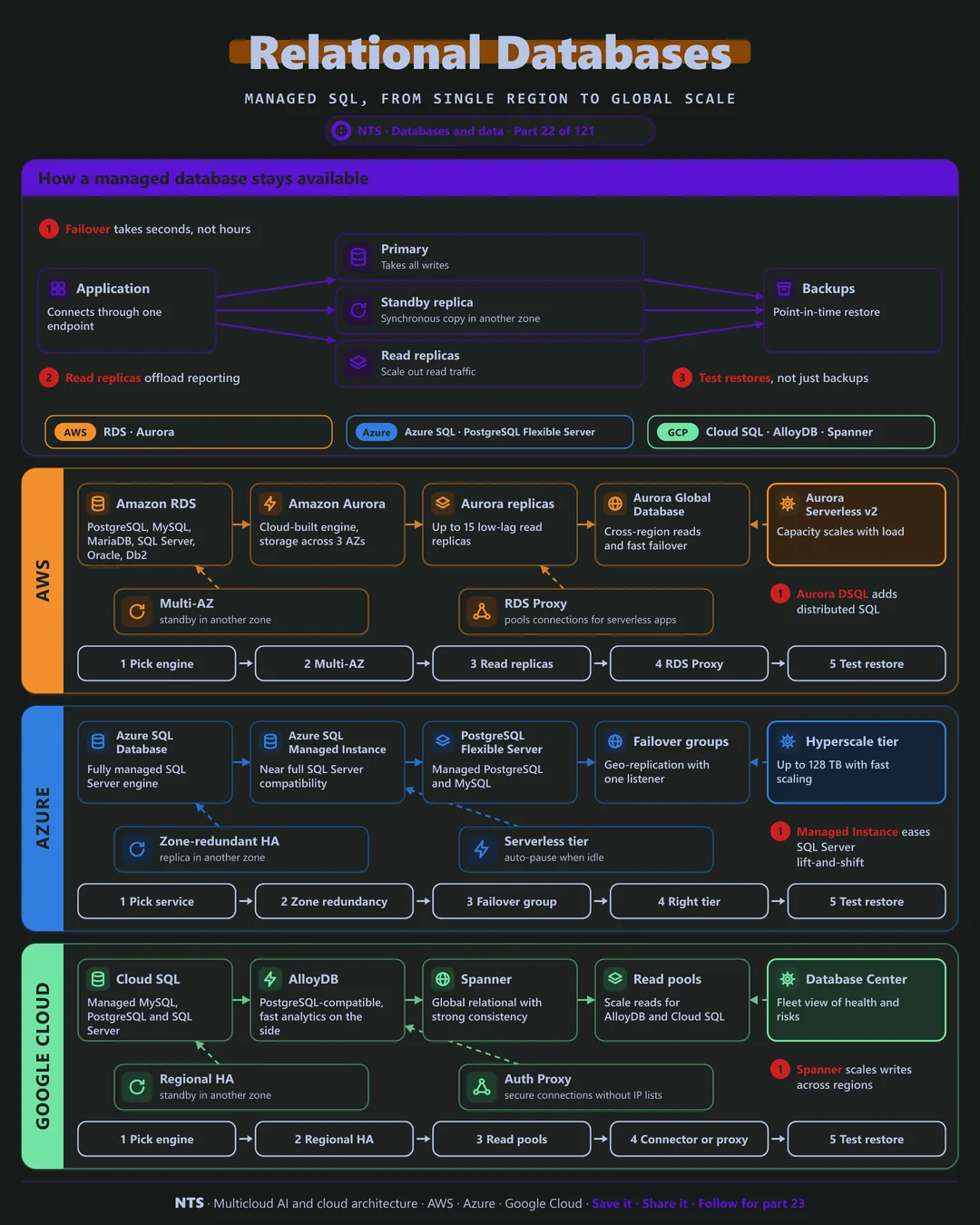
How a managed database stays available
Applications connect through a single endpoint. A primary takes all writes while a standby in another zone receives a synchronous copy. If the primary fails, the service promotes the standby, usually in under a minute, and the endpoint follows automatically.
Read replicas add capacity for reporting and read-heavy traffic, and automated backups with point-in-time restore protect against mistakes as well as failures.
When you outgrow one region
Most applications never need more than a well-run regional database. For global users or extreme write volumes, distributed SQL services spread data across regions with strong consistency, at higher cost and with some design trade-offs.
AWS, Azure and Google Cloud compared
| AWS | Azure | Google Cloud | |
|---|---|---|---|
| Managed engines | Amazon RDS | Azure SQL Database, PostgreSQL Flexible Server | Cloud SQL |
| Cloud-built engine | Amazon Aurora | Azure SQL Hyperscale | AlloyDB for PostgreSQL |
| Global distributed SQL | Aurora DSQL | Cosmos DB for PostgreSQL | Spanner |
| SQL Server compatibility | RDS for SQL Server | SQL Managed Instance | Cloud SQL for SQL Server |
| Cross-region | Aurora Global Database | Failover groups | Cross-region replicas, Spanner multi-region |
| Serverless option | Aurora Serverless v2 | SQL Database serverless | AlloyDB autoscaling |
What makes each cloud different
AWS
AWS offers RDS for six engines and Aurora, a cloud-built engine that stores six copies across three zones and supports up to 15 low-lag replicas. Aurora Global Database adds fast cross-region failover, and RDS Proxy pools connections for serverless applications.
Azure
Azure is the natural home for SQL Server: SQL Managed Instance offers near-complete compatibility for lift-and-shift, and Azure SQL Database Hyperscale grows to 128 TB with fast scaling. Failover groups provide geo-replication behind one listener.
Google Cloud
Google Cloud's AlloyDB is PostgreSQL-compatible with fast analytics alongside transactions, and Spanner is the original globally distributed relational database with strong consistency and up to 99.999% availability.
Design decisions that matter
- 01Standby in another zone for production
Automatic failover should be the default.
- 02Pick the engine for the next five years
Consider licensing, skills and compatibility.
- 03Test restores regularly
Point-in-time restore you have never tried is a hope, not a plan.
- 04Connection pooling for serverless apps
Protect the database from connection storms.
Common mistakes we see
- Single-zone production databases. One data center failure becomes a full outage.
- Reporting on the primary. Heavy queries slow down customer transactions.
- Distributed SQL by default. Global databases add cost and complexity most apps do not need.
A practical 30-day plan
- Week 1
Inventory databases, engines, versions and recovery targets.
- Week 2
Enable zone redundancy and verify backup retention.
- Week 3
Move reporting to read replicas; add connection pooling.
- Week 4
Run a restore drill and plan engine version upgrades.
How NTS helps
NTS designs, migrates and tunes relational databases on AWS, Azure and Google Cloud, including SQL Server, Oracle and PostgreSQL moves, high-availability design, performance tuning and licensing optimization.
What you get
- The right managed database engine for each workload
- High availability with automated failover
- Backups, point-in-time recovery and tested restores
- Performance tuning and right-sizing
Typical outcomes
- Fewer database incidents and faster recovery
- Lower database spend through right-sizing
- Proven restores, not hoped-for ones
How we work with you
- 1Assess
A focused review of your relational databases across AWS, Azure and Google Cloud. We look for the gaps we find most often: single-zone production databases, reporting on the primary and distributed SQL by default.
- 2Design
A target architecture and roadmap built on the decisions that matter most: standby in another zone for production, pick the engine for the next five years, test restores regularly and connection pooling for serverless apps.
- 3Build
Hands-on delivery alongside your team. We inventory databases, engines, versions and recovery targets, enable zone redundancy and verify backup retention, move reporting to read replicas; add connection pooling, and finally run a restore drill and plan engine version upgrades.
- 4Run and improve
We monitor performance, apply version upgrades and test restores on a regular schedule.
Why teams choose NTS for relational databases
- Deep database experience
We have tuned PostgreSQL, MySQL and SQL Server across all three clouds.
- Migrations without drama
We move databases with minimal downtime and full validation.
- Performance and cost balanced
We fix slow queries before buying bigger servers.
Book a free 30-minute review
Talk to an NTS architect about your relational databases on AWS, Azure and Google Cloud.