
Multicloud AI & ERP / Cloud AI: Machine Learning & Generative AI
Why it matters
Data science capacity is scarce. AutoML lets analysts and engineers solve common prediction problems quickly and frees specialists for the problems that really need them.
How it works
What AutoML does
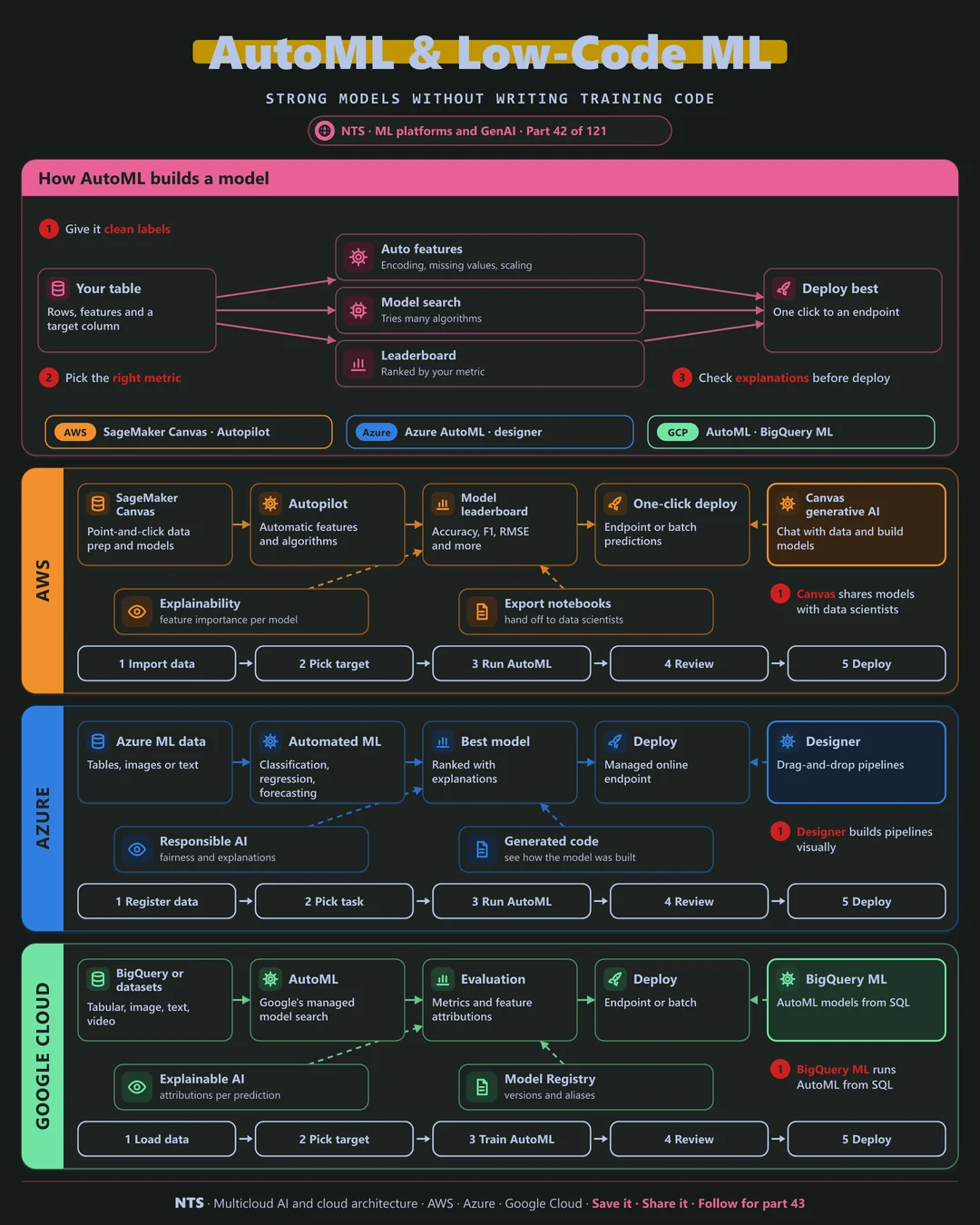
You provide a table and a target column. AutoML handles feature preparation, tries many algorithms and settings, ranks them on a leaderboard by your chosen metric and deploys the best one with explanations attached.
AWS, Azure and Google Cloud compared
| AWS | Azure | Google Cloud | |
|---|---|---|---|
| No-code ML | SageMaker Canvas | Azure ML designer | AutoML in Agent Platform |
| AutoML engine | SageMaker Autopilot | Automated ML | AutoML |
| SQL-based ML | Redshift ML | Fabric data science | BigQuery ML |
| Explanations | Feature importance | Responsible AI dashboard | Explainable AI |
| Hand-off to code | Generated notebooks | Generated code | Model Registry |
What makes each cloud different
AWS
SageMaker Canvas lets business analysts prepare data and build models with point-and-click and generative AI assistance, and share them with data scientists through generated notebooks.
Azure
Azure's Automated ML covers classification, regression and forecasting with generated code you can inspect, and the designer builds pipelines visually.
Google Cloud
Google offers AutoML for tabular, image, text and video data and BigQuery ML, which runs AutoML-style training from SQL directly on warehouse tables.
Design decisions that matter
- 01AutoML as the baseline
Custom work must beat it to be justified.
- 02Clean labels first
AutoML cannot fix bad data.
- 03Choose the right metric
The leaderboard ranks by what you tell it.
- 04Review explanations
Check the model uses sensible features.
Common mistakes we see
- Trusting the top score blindly. Leakage can make a model look great.
- No owner after deployment. AutoML models still need monitoring.
- Skipping it for custom work. Months spent beating a baseline that took hours.
A practical 30-day plan
- Week 1
Pick a prediction problem with clean historical data.
- Week 2
Run AutoML and review the leaderboard.
- Week 3
Check explanations and fairness.
- Week 4
Deploy and monitor, or set the bar for custom work.
How NTS helps
NTS helps teams adopt AutoML and low-code ML on AWS, Azure and Google Cloud, from use-case selection and data preparation to deployment and monitoring, so business teams get value fast.
What you get
- Use-case triage for AutoML fit
- Baseline models built in days
- Validation against business metrics
- A handover path to production
Typical outcomes
- Working models in days, not months
- More ML use cases explored
- Clear decisions on where to invest
How we work with you
- 1Assess
A focused review of your AutoML and low-code ML across AWS, Azure and Google Cloud. We look for the gaps we find most often: trusting the top score blindly, no owner after deployment and skipping it for custom work.
- 2Design
A target architecture and roadmap built on the decisions that matter most: AutoML as the baseline, clean labels first, choose the right metric and review explanations.
- 3Build
Hands-on delivery alongside your team. We pick a prediction problem with clean historical data, run AutoML and review the leaderboard, check explanations and fairness, and finally deploy and monitor, or set the bar for custom work.
- 4Run and improve
We monitor AutoML models, retrain them and graduate the best to custom pipelines when needed.
Why teams choose NTS for AutoML and low-code ML
- Speed to value
We use AutoML to prove value quickly before bigger investments.
- Honest limits
We tell you when custom models are needed.
- Business teams empowered
Analysts can build models with proper guardrails.
Book a free 30-minute review
Talk to an NTS architect about your AutoML and low-code ML on AWS, Azure and Google Cloud.