
Multicloud AI & ERP / Agentic AI & Cloud AI Infrastructure
Why it matters
Browser agents can automate tasks that integrations never reached, such as supplier portals and government forms. But an agent that clicks and types can also make mistakes or be manipulated by what it reads on a page.
How it works
How a browser agent works
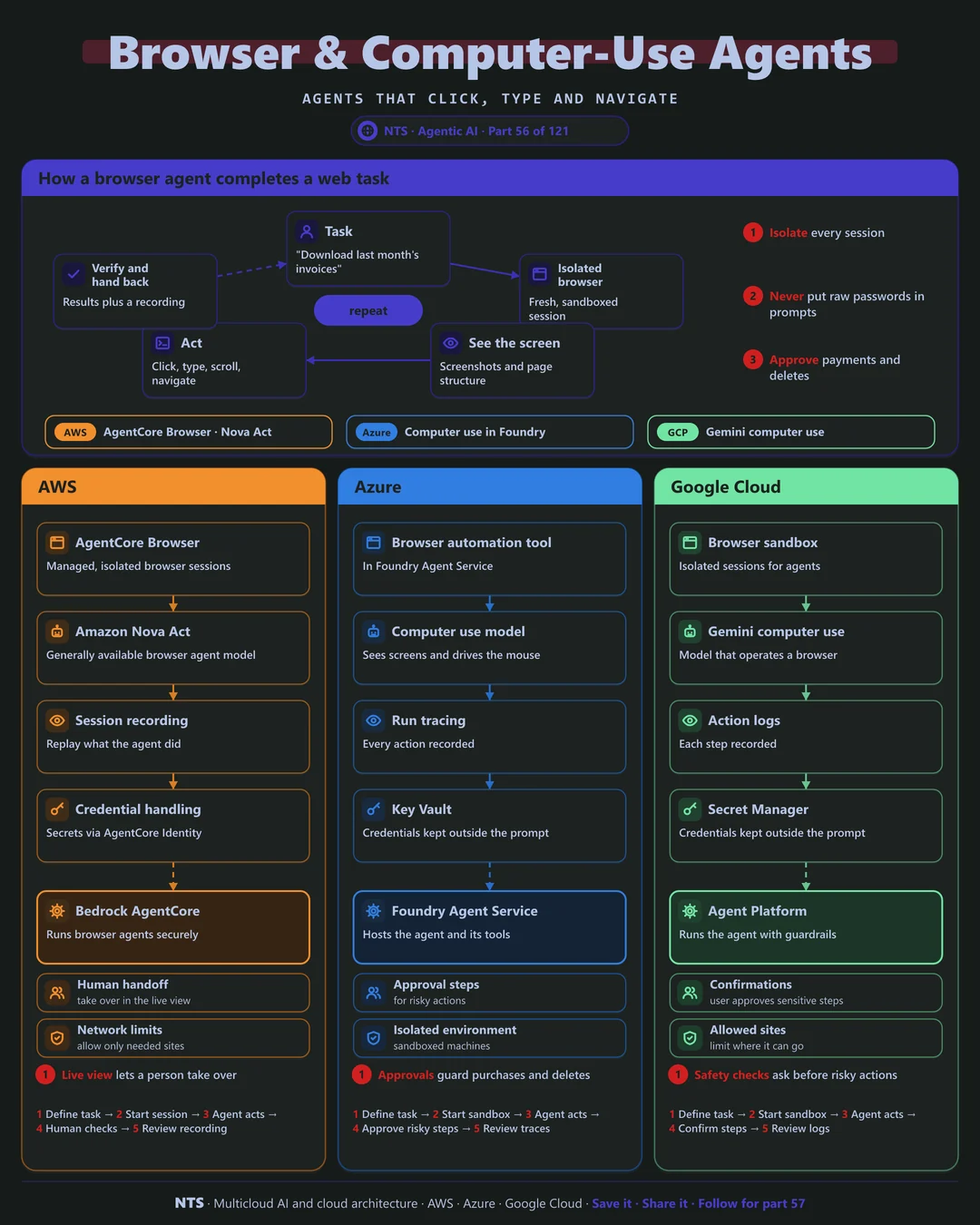
The agent receives a task and opens an isolated browser session. It reads the screen through screenshots and page structure, acts by clicking, typing and navigating, then verifies the result and hands back data plus a recording of what it did.
Safety by design
Isolate every session, keep credentials out of prompts, limit which sites the agent can visit and require human confirmation for payments, submissions and deletions.
AWS, Azure and Google Cloud compared
| AWS | Azure | Google Cloud | |
|---|---|---|---|
| Managed browser | AgentCore Browser | Browser automation tool in Foundry | Browser sandbox |
| Computer-use model | Amazon Nova Act | Computer use models | Gemini computer use |
| Session recording | Live view and replay | Run tracing | Action logs |
| Credential handling | AgentCore Identity | Key Vault | Secret Manager |
| Human control | Live takeover | Approval steps | Confirmations |
What makes each cloud different
AWS
AgentCore Browser runs isolated browser sessions with live view and replay, and Amazon Nova Act is a generally available model built for reliable browser actions.
Azure
Foundry Agent Service offers browser automation and computer-use capabilities, with approvals for risky steps and credentials kept in Key Vault.
Google Cloud
Gemini's computer-use capability operates browsers with built-in safety checks that ask for confirmation before sensitive actions, running inside sandboxed sessions.
Design decisions that matter
- 01Prefer APIs when they exist
Browser automation is the fallback.
- 02Isolated session per task
No shared cookies or state.
- 03Allow-list sites
The agent goes only where it should.
- 04Human confirmation for risky steps
Payments, submissions, deletions.
Common mistakes we see
- Passwords in prompts. Credentials leak into logs and models.
- Unrestricted browsing. Malicious pages can inject instructions.
- No recording. Nobody can check what the agent did.
A practical 30-day plan
- Week 1
Pick one portal-based task without an API.
- Week 2
Build the agent in an isolated browser.
- Week 3
Add credentials vaulting and site limits.
- Week 4
Pilot with human confirmations and review recordings.
How NTS helps
NTS builds browser and computer-use agents on AWS, Azure and Google Cloud for portal-heavy processes, with isolation, credential security and human-in-the-loop controls designed in.
What you get
- Use-case selection for UI automation
- Sandboxed environments for agents
- Human approval for sensitive actions
- Monitoring and replay of agent sessions
Typical outcomes
- Legacy UI tasks automated
- No risky unattended actions
- Full records of what agents did
How we work with you
- 1Assess
A focused review of your browser and computer-use agents across AWS, Azure and Google Cloud. We look for the gaps we find most often: passwords in prompts, unrestricted browsing and no recording.
- 2Design
A target architecture and roadmap built on the decisions that matter most: prefer APIs when they exist, isolated session per task, allow-list sites and human confirmation for risky steps.
- 3Build
Hands-on delivery alongside your team. We pick one portal-based task without an API, build the agent in an isolated browser, add credentials vaulting and site limits, and finally pilot with human confirmations and review recordings.
- 4Run and improve
We monitor sessions, fix breakages when interfaces change and expand to new tasks.
Why teams choose NTS for browser and computer-use agents
- APIs first
We use computer-use agents only where APIs do not exist.
- Safety through isolation
Agents run in sandboxes with limited access.
- Humans stay in control
Sensitive steps always need approval.
Book a free 30-minute review
Talk to an NTS architect about your browser and computer-use agents on AWS, Azure and Google Cloud.