
Multicloud AI & ERP / Agentic AI & Cloud AI Infrastructure
Why it matters
Accelerators are the most expensive line in most AI budgets. The same model can cost very different amounts to train or serve depending on the chip, and capacity is often the real constraint on AI roadmaps.
How it works
How to choose
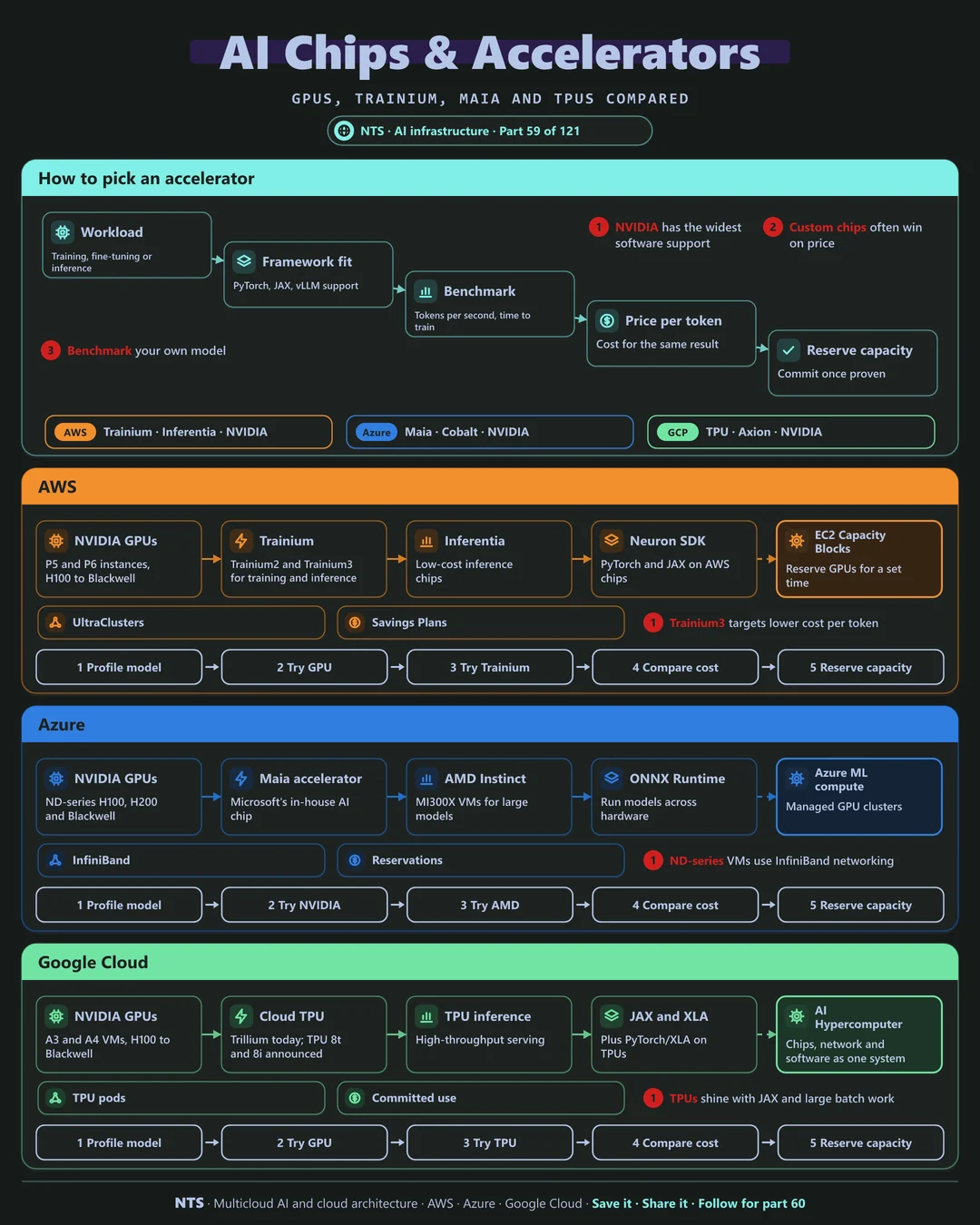
Define the workload: training, fine-tuning or inference. Check framework support for your stack. Benchmark your own model for tokens per second or time to train, convert that into price per result, and only then reserve capacity.
NVIDIA versus custom silicon
NVIDIA GPUs have the widest software support and are available on every cloud. Custom chips such as AWS Trainium and Inferentia, Microsoft Maia and Google TPUs often win on price-performance for supported models and frameworks.
AWS, Azure and Google Cloud compared
| AWS | Azure | Google Cloud | |
|---|---|---|---|
| NVIDIA GPUs | P5 and P6 instances | ND-series VMs | A3 and A4 VMs |
| Custom training chips | Trainium2, Trainium3 | Maia | Cloud TPU (Trillium; TPU 8t announced) |
| Custom inference chips | Inferentia | Maia | TPU (TPU 8i announced) |
| Software stack | Neuron SDK | ONNX Runtime, CUDA | JAX, XLA, PyTorch/XLA |
| Capacity reservation | EC2 Capacity Blocks | Reservations | Dynamic Workload Scheduler, CUDs |
What makes each cloud different
AWS
AWS combines NVIDIA instances with its own Trainium chips for training and inference, now in their third generation, and Inferentia for low-cost serving. EC2 Capacity Blocks reserve GPUs for a fixed window.
Azure
Azure offers NVIDIA ND-series VMs with InfiniBand, AMD Instinct GPUs and Microsoft's in-house Maia accelerator, with Cobalt Arm CPUs for general compute alongside.
Google Cloud
Google's TPUs have trained Google's own models for years; Trillium is available today and the TPU 8 generation splits into training (8t) and inference (8i) chips, alongside NVIDIA GPUs.
Design decisions that matter
- 01Benchmark your own model
Price per result beats spec comparisons.
- 02Keep code portable
Frameworks that run on more than one chip.
- 03Reserve once proven
Commit capacity after benchmarks, not before.
- 04Separate training and serving choices
The best chip often differs.
Common mistakes we see
- Defaulting to the biggest GPU. Inference rarely needs top-end training chips.
- Ignoring capacity. The ideal chip may not be available when you need it.
- Benchmarks on toy models. Results do not transfer to your workload.
A practical 30-day plan
- Week 1
Profile current accelerator use and cost.
- Week 2
Benchmark a GPU and a custom chip on your model.
- Week 3
Compare price per result and availability.
- Week 4
Decide, then reserve capacity for the winner.
How NTS helps
NTS benchmarks AI accelerators on AWS, Azure and Google Cloud for your actual models, ports workloads to custom silicon where it pays off and plans capacity reservations.
What you get
- A comparison of GPUs, Trainium, Inferentia, TPUs and Maia for your workloads
- Capacity reservation and purchase planning
- Benchmarks on your models
- Cost per training run and per inference
Typical outcomes
- Lower AI compute costs
- Reliable access to accelerator capacity
- Informed chip choices
How we work with you
- 1Assess
A focused review of your AI accelerator strategy across AWS, Azure and Google Cloud. We look for the gaps we find most often: defaulting to the biggest GPU, ignoring capacity and benchmarks on toy models.
- 2Design
A target architecture and roadmap built on the decisions that matter most: benchmark your own model, keep code portable, reserve once proven and separate training and serving choices.
- 3Build
Hands-on delivery alongside your team. We profile current accelerator use and cost, benchmark a GPU and a custom chip on your model, compare price per result and availability, and finally decide, then reserve capacity for the winner.
- 4Run and improve
We re-evaluate accelerators as new generations launch and adjust capacity plans.
Why teams choose NTS for AI accelerator strategy
- Chip-neutral advice
We compare all accelerators fairly, not just one vendor's.
- Capacity know-how
We help you secure scarce GPU capacity at the right price.
- Price-performance focus
We measure cost per result, not just raw speed.
Book a free 30-minute review
Talk to an NTS architect about your AI accelerator strategy on AWS, Azure and Google Cloud.