
Multicloud AI & ERP / Cloud AI Applications & Industry AI Solutions
Why it matters
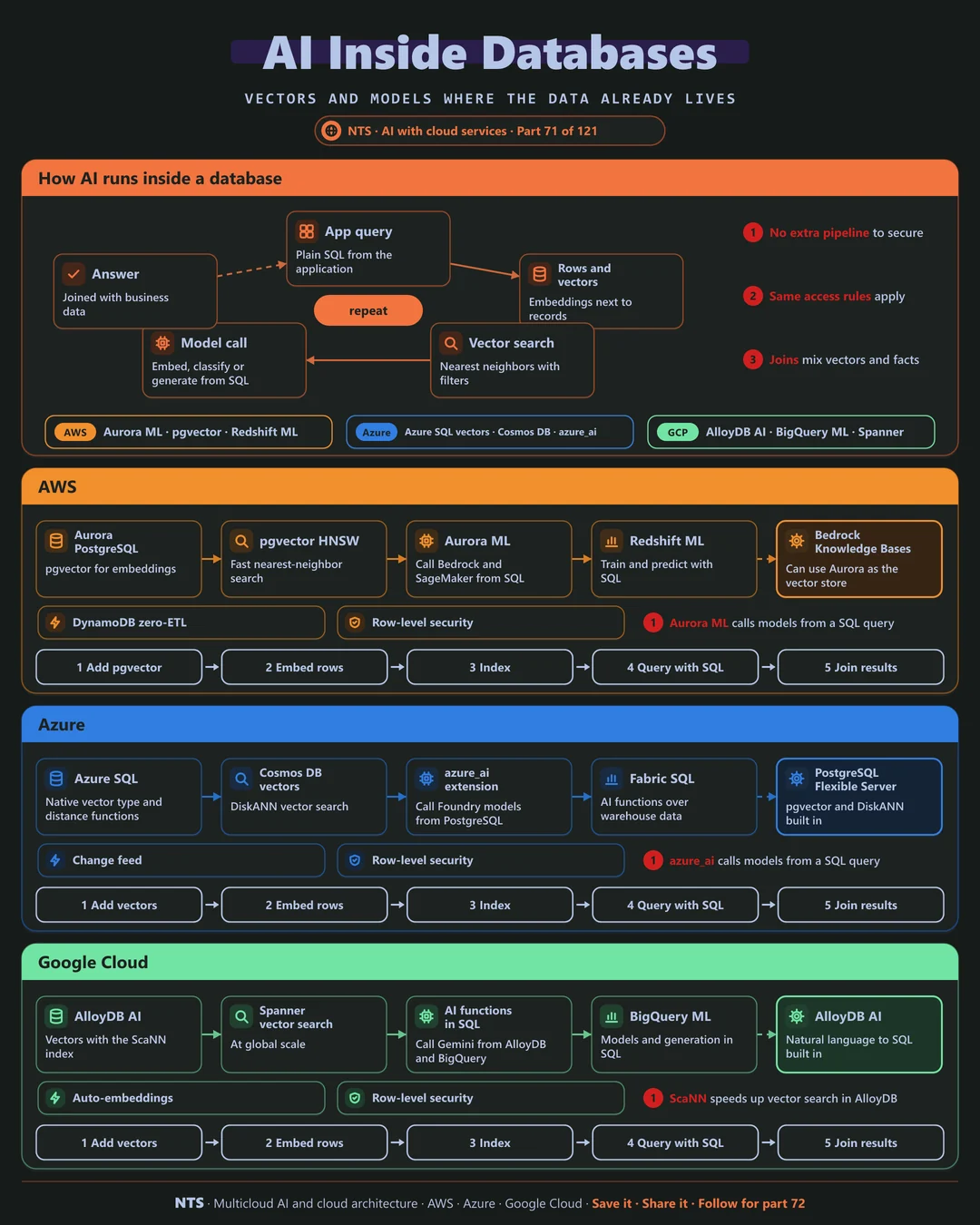
Every pipeline that copies operational data for AI is another thing to maintain and another place data can leak. Running AI inside the database keeps one copy, one set of permissions and fresher results.
How it works
AI in the database
Applications send ordinary SQL. Embeddings live next to the rows they describe, vector search finds nearest neighbors with normal filters, and AI functions call models to embed, classify or generate directly from queries, joining the answers with business data.
AWS, Azure and Google Cloud compared
| AWS | Azure | Google Cloud | |
|---|---|---|---|
| PostgreSQL vectors | Aurora and RDS with pgvector | PostgreSQL Flexible Server (pgvector, DiskANN) | AlloyDB AI (ScaNN) |
| Model calls from SQL | Aurora ML | azure_ai extension | AlloyDB and BigQuery AI functions |
| Native vector type | pgvector | Azure SQL vector type | Spanner and AlloyDB vectors |
| Warehouse ML | Redshift ML | Fabric AI functions | BigQuery ML |
| NoSQL vectors | OpenSearch via zero-ETL | Cosmos DB vector search | Firestore vector search |
What makes each cloud different
AWS
Aurora PostgreSQL supports pgvector, and Aurora ML calls Bedrock and SageMaker models from SQL. Redshift ML trains and predicts with SQL in the warehouse.
Azure
Azure SQL now has a native vector type and functions, PostgreSQL Flexible Server supports pgvector and DiskANN, and the azure_ai extension calls Foundry models from queries.
Google Cloud
AlloyDB AI combines pgvector with Google's ScaNN index and natural-language-to-SQL features, while BigQuery and Spanner run vector search and AI functions in place.
Design decisions that matter
- 01AI where the data lives
Avoid copies when the database can do it.
- 02Same security for AI queries
Row-level security applies to vectors too.
- 03Keep embeddings fresh
Re-embed on update automatically.
- 04Index for scale
HNSW, DiskANN or ScaNN as data grows.
Common mistakes we see
- Separate vector copies of operational data. Out of date within hours.
- Bypassing database permissions. AI sees rows users cannot.
- Unindexed vector queries. Slow scans as tables grow.
A practical 30-day plan
- Week 1
Pick one table and use case.
- Week 2
Add embeddings and an index in the database.
- Week 3
Call models from SQL and join with business data.
- Week 4
Automate re-embedding and check permissions.
How NTS helps
NTS adds AI to existing databases on AWS, Azure and Google Cloud, covering vector search, in-database model calls and natural-language querying, without new pipelines or data copies.
What you get
- Vector search added to your existing databases
- AI functions in SQL for analysts
- Performance and cost tuning
- Security for AI queries
Typical outcomes
- AI features without new infrastructure
- Faster insights for analysts
- Lower data movement and cost
How we work with you
- 1Assess
A focused review of your AI inside your databases across AWS, Azure and Google Cloud. We look for the gaps we find most often: separate vector copies of operational data, bypassing database permissions and unindexed vector queries.
- 2Design
A target architecture and roadmap built on the decisions that matter most: AI where the data lives, same security for AI queries, keep embeddings fresh and index for scale.
- 3Build
Hands-on delivery alongside your team. We pick one table and use case, add embeddings and an index in the database, call models from SQL and join with business data, and finally automate re-embedding and check permissions.
- 4Run and improve
We tune AI queries and indexes, and adopt new database AI features as they launch.
Why teams choose NTS for AI inside your databases
- Use what you have
We add AI to existing databases instead of new platforms.
- Analysts empowered
AI in SQL puts new capabilities in familiar tools.
- Data stays put
Less copying means less risk.
Book a free 30-minute review
Talk to an NTS architect about your AI inside your databases on AWS, Azure and Google Cloud.