
Multicloud AI & ERP / Cloud AI Applications & Industry AI Solutions
Why it matters
Enterprise assistants promise big productivity gains, but they also surface whatever people can technically reach. Oversharing that was invisible before becomes visible in seconds.
How it works
How a knowledge assistant answers
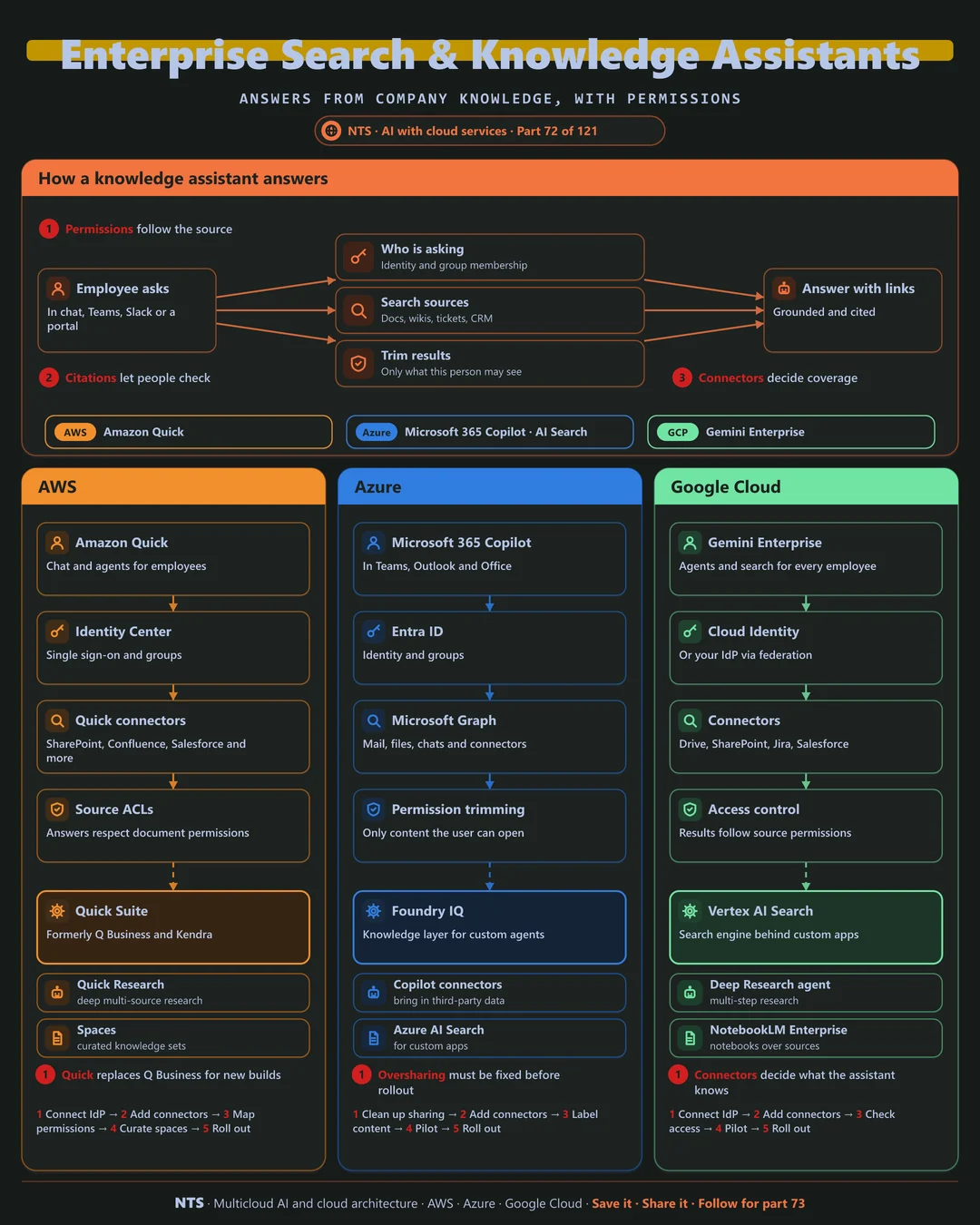
An employee asks a question in chat. The assistant knows who is asking, searches documents, wikis, tickets and CRM through connectors, trims results to what that person may see, and answers with links to sources.
AWS, Azure and Google Cloud compared
| AWS | Azure | Google Cloud | |
|---|---|---|---|
| Enterprise assistant | Amazon Quick | Microsoft 365 Copilot | Gemini Enterprise |
| Search for custom apps | OpenSearch, Bedrock Knowledge Bases | Azure AI Search | Vertex AI Search |
| Connectors | Quick connectors | Microsoft Graph, Copilot connectors | Gemini Enterprise connectors |
| Permission trimming | Source access control lists | Microsoft 365 permissions | Source permissions |
| Earlier service | Q Business and Kendra (moving to Quick) | Not applicable | Not applicable |
What makes each cloud different
AWS
Amazon Quick brings chat, research and agents over company data with source permissions respected. It succeeds Q Business and Kendra for new builds.
Azure
Microsoft 365 Copilot works inside Teams, Outlook and Office using Microsoft Graph, so it inherits Microsoft 365 permissions. Fixing oversharing in SharePoint is the key preparation step.
Google Cloud
Gemini Enterprise gives employees agents and search across Drive, SharePoint, Jira and more, with NotebookLM Enterprise for research over curated sources.
Design decisions that matter
- 01Fix oversharing first
Review broad access before rollout.
- 02Permission-aware everywhere
No index that ignores ACLs.
- 03Citations on every answer
Users verify and trust grows.
- 04Pilot, measure, then scale
Time saved per user per week.
Common mistakes we see
- Rollout before cleanup. Confidential files appear in answers.
- Too few connectors. The assistant cannot answer real questions.
- No adoption plan. Licenses bought, habits unchanged.
A practical 30-day plan
- Week 1
Audit sharing and sensitive content.
- Week 2
Connect priority sources with permissions.
- Week 3
Pilot with two teams on real tasks.
- Week 4
Measure value and plan the wider rollout.
How NTS helps
NTS rolls out enterprise assistants with Amazon Quick, Microsoft 365 Copilot and Gemini Enterprise, covering readiness and oversharing cleanup, connectors, pilots and adoption measurement.
What you get
- Connectors to your document systems
- Permission-aware search and answers
- A knowledge assistant with citations
- Usage and quality analytics
Typical outcomes
- Employees find answers in seconds
- Less time searching across tools
- Trusted, cited answers
How we work with you
- 1Assess
A focused review of your enterprise search and knowledge assistants across AWS, Azure and Google Cloud. We look for the gaps we find most often: rollout before cleanup, too few connectors and no adoption plan.
- 2Design
A target architecture and roadmap built on the decisions that matter most: fix oversharing first, permission-aware everywhere, citations on every answer and pilot, measure, then scale.
- 3Build
Hands-on delivery alongside your team. We audit sharing and sensitive content, connect priority sources with permissions, pilot with two teams on real tasks, and finally measure value and plan the wider rollout.
- 4Run and improve
We add sources, improve relevance and track adoption over time.
Why teams choose NTS for enterprise search and knowledge assistants
- Respects permissions
People only find what they are allowed to see.
- Answers with sources
Every answer links to the original documents.
- Connected to everything
We integrate SharePoint, Confluence, drives and more.
Book a free 30-minute review
Talk to an NTS architect about your enterprise search and knowledge assistants on AWS, Azure and Google Cloud.