
Multicloud AI & ERP / Cloud & AI Security, Governance & Compliance
Why it matters
Misconfigurations and known vulnerabilities cause most cloud incidents. Native tools see them quickly, but only in the accounts and regions where they are enabled, and only if someone acts on the findings.
How it works
Detect, prioritize, respond
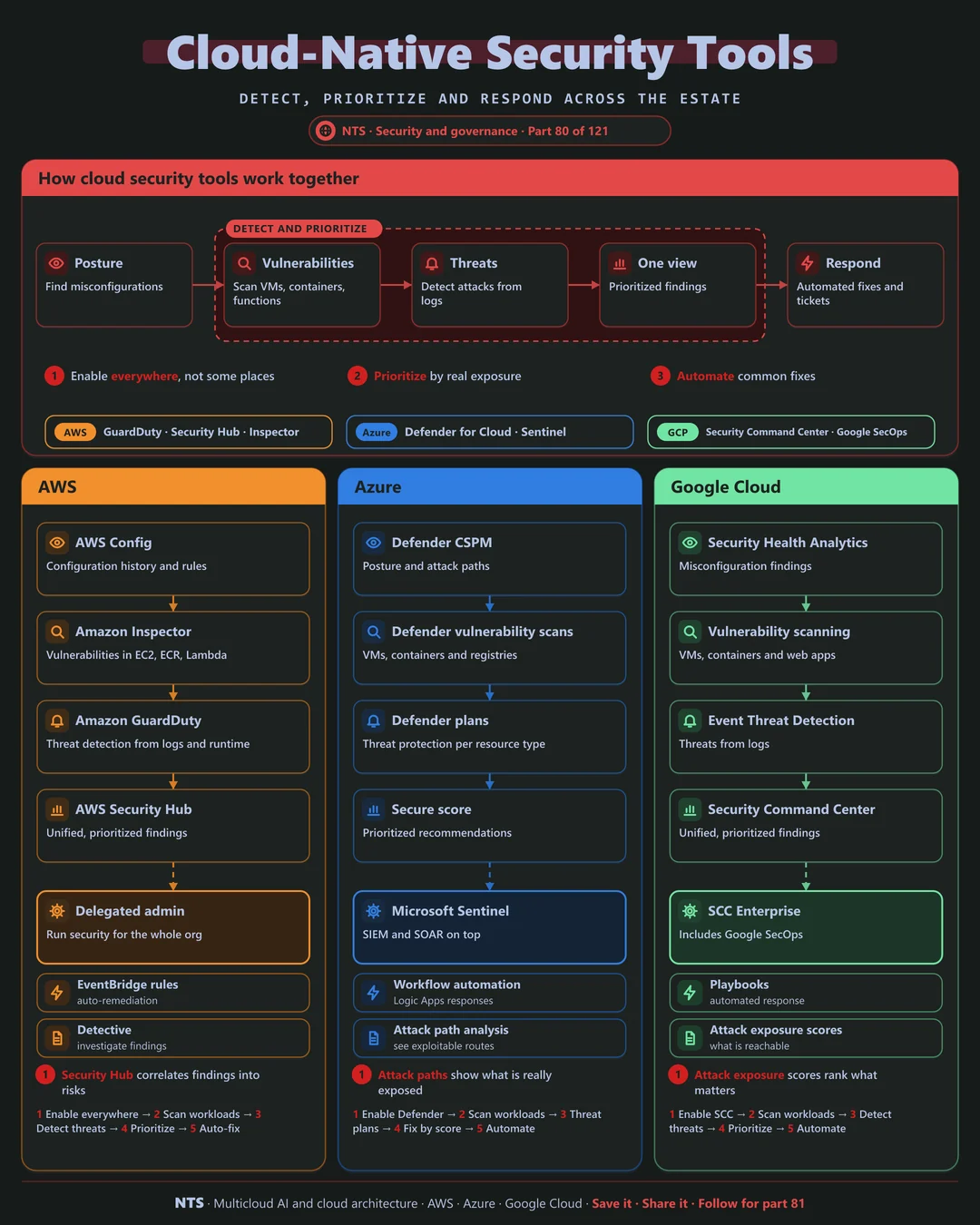
Posture management finds misconfigurations. Vulnerability scanning checks VMs, containers and functions. Threat detection watches logs and runtime for attacks. A single view ranks findings by real exposure, and automation fixes common issues or opens tickets.
AWS, Azure and Google Cloud compared
| AWS | Azure | Google Cloud | |
|---|---|---|---|
| Threat detection | Amazon GuardDuty | Microsoft Defender for Cloud plans | Event Threat Detection |
| Vulnerability scanning | Amazon Inspector | Defender vulnerability management | Vulnerability scanning in SCC |
| Posture management | AWS Config, Security Hub | Defender CSPM | Security Health Analytics |
| Unified view | AWS Security Hub | Defender for Cloud | Security Command Center |
| SIEM integration | Security Lake | Microsoft Sentinel | Google SecOps |
What makes each cloud different
AWS
AWS combines GuardDuty, Inspector and Config, with Security Hub correlating findings into prioritized risks and delegated admin running security for the whole organization.
Azure
Microsoft Defender for Cloud covers Azure, AWS and Google Cloud, with attack path analysis that shows what an attacker could actually reach, feeding Microsoft Sentinel.
Google Cloud
Security Command Center unifies posture, vulnerabilities and threats, with attack exposure scores ranking fixes by impact; the Enterprise tier includes Google SecOps.
Design decisions that matter
- 01Enable everywhere on day one
All accounts and regions, enforced by policy.
- 02Prioritize by exposure
Internet-reachable and exploitable first.
- 03Automate common fixes
Public buckets, open ports, missing encryption.
- 04Route findings to owners
Tickets to the team that can fix them.
Common mistakes we see
- Partial coverage. Attackers use the region you did not watch.
- Alert floods. Thousands of findings and no priorities.
- Security team fixes everything. Owners never learn.
A practical 30-day plan
- Week 1
Enable the native tools organization-wide.
- Week 2
Tune and rank findings by exposure.
- Week 3
Automate the five most common fixes.
- Week 4
Route findings to owners with SLAs.
How NTS helps
NTS deploys and tunes cloud-native security on AWS, Azure and Google Cloud, covering organization-wide coverage, prioritization, automated remediation and integration with your SOC.
What you get
- Security Hub, Defender for Cloud or Security Command Center rollout
- Prioritized findings with owners
- Automated remediation for common issues
- Security posture reporting
Typical outcomes
- Fewer critical security findings
- Faster remediation
- Clear security posture for leadership
How we work with you
- 1Assess
A focused review of your cloud security tooling across AWS, Azure and Google Cloud. We look for the gaps we find most often: partial coverage, alert floods and security team fixes everything.
- 2Design
A target architecture and roadmap built on the decisions that matter most: enable everywhere on day one, prioritize by exposure, automate common fixes and route findings to owners.
- 3Build
Hands-on delivery alongside your team. We enable the native tools organization-wide, tune and rank findings by exposure, automate the five most common fixes, and finally route findings to owners with SLAs.
- 4Run and improve
We triage new findings, tune rules and expand automated remediation over time.
Why teams choose NTS for cloud security tooling
- Signal over noise
We prioritize the findings that truly matter.
- Fixes, not just alerts
Automation resolves common issues instantly.
- Three-cloud coverage
One security view across AWS, Azure and Google Cloud.
Book a free 30-minute review
Talk to an NTS architect about your cloud security tooling on AWS, Azure and Google Cloud.