
Multicloud AI & ERP / Cloud AI Applications & Industry AI Solutions
Why it matters
Enterprise assistants can save each employee hours a week, but rollouts fail when assistants surface overshared files or when nobody measures whether time is actually saved.
How it works
A successful rollout
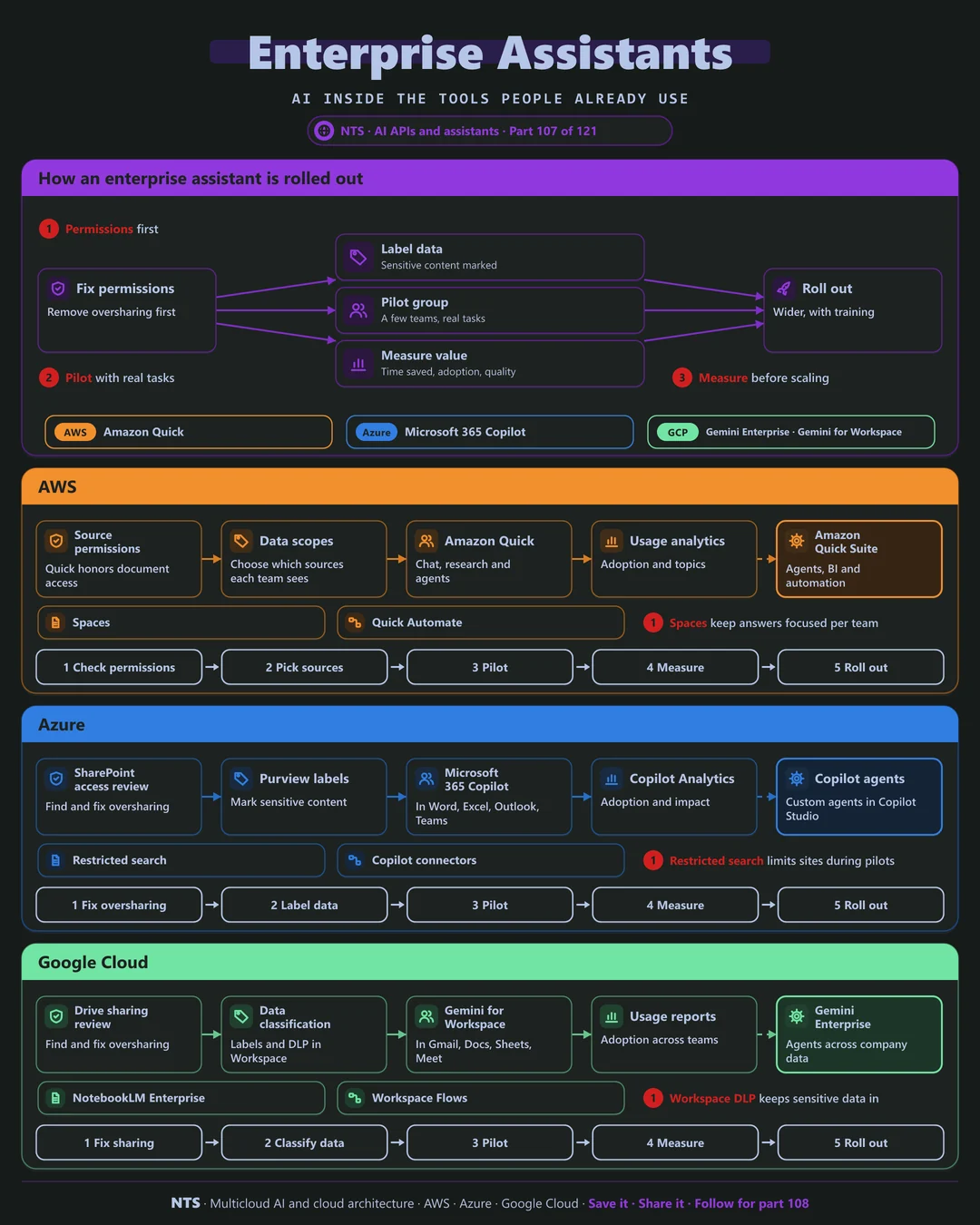
Fix permissions and remove oversharing first. Label sensitive data. Run a pilot with a few teams on real tasks, measure value in time saved and adoption, then roll out wider with training and champions.
AWS, Azure and Google Cloud compared
| AWS | Azure | Google Cloud | |
|---|---|---|---|
| Enterprise assistant | Amazon Quick | Microsoft 365 Copilot | Gemini Enterprise, Gemini for Workspace |
| Works inside | Quick apps and connected tools | Word, Excel, Outlook, Teams | Gmail, Docs, Sheets, Meet |
| Custom agents | Quick agents | Copilot Studio agents | Agent Designer |
| Data protection | Source permissions, admin scopes | Purview labels and DLP | Workspace DLP, classification |
| Adoption analytics | Usage insights | Copilot Analytics | Usage reports |
What makes each cloud different
AWS
Amazon Quick gives employees chat, research and automation over connected business data, with spaces that keep answers focused per team.
Azure
Microsoft 365 Copilot works inside the Office apps people use every day; restricted search and SharePoint access reviews help limit oversharing during rollout.
Google Cloud
Gemini for Workspace works inside Gmail, Docs and Meet, and Gemini Enterprise adds agents across company data, with NotebookLM Enterprise for research.
Design decisions that matter
- 01Readiness before licenses
Fix sharing and labels first.
- 02Pilot with real tasks
Not demos.
- 03Measure time saved
Per role, per week.
- 04Champions in every team
Peers drive adoption.
Common mistakes we see
- Buying licenses for everyone at once. Low adoption, wasted spend.
- Ignoring oversharing. Confidential data appears in answers.
- No training. Users try once and give up.
A practical 30-day plan
- Week 1
Run a readiness and oversharing review.
- Week 2
Label sensitive content and fix access.
- Week 3
Pilot with two teams and champions.
- Week 4
Measure value and plan the rollout.
How NTS helps
NTS runs enterprise assistant programs with Amazon Quick, Microsoft 365 Copilot and Gemini, covering readiness assessments, data protection, pilots, training and value measurement.
What you get
- A rollout plan for Microsoft 365 Copilot, Gemini Enterprise or Amazon Quick Suite
- Data readiness and permission cleanup
- Training and adoption programs
- Usage and value measurement
Typical outcomes
- High adoption across teams
- No oversharing of sensitive files
- Clear return on assistant licenses
How we work with you
- 1Assess
A focused review of your enterprise assistant rollout across AWS, Azure and Google Cloud. We look for the gaps we find most often: buying licenses for everyone at once, ignoring oversharing and no training.
- 2Design
A target architecture and roadmap built on the decisions that matter most: readiness before licenses, pilot with real tasks, measure time saved and champions in every team.
- 3Build
Hands-on delivery alongside your team. We run a readiness and oversharing review, label sensitive content and fix access, pilot with two teams and champions, and finally measure value and plan the rollout.
- 4Run and improve
We track usage, share best practices and expand to new teams and scenarios.
Why teams choose NTS for enterprise assistant rollout
- Adoption, not just licenses
We help people use assistants every day.
- Data readiness first
We fix oversharing before assistants expose it.
- Value proven
We measure time saved to justify investment.
Book a free 30-minute review
Talk to an NTS architect about your enterprise assistant rollout on AWS, Azure and Google Cloud.