
Multicloud AI & ERP / Cloud Data, Analytics & BI for AI
Why it matters
Migrations, data center exits and AI projects often start with moving terabytes or petabytes. Underestimating transfer time is one of the most common reasons migration timelines slip.
How it works
Picking a transfer method
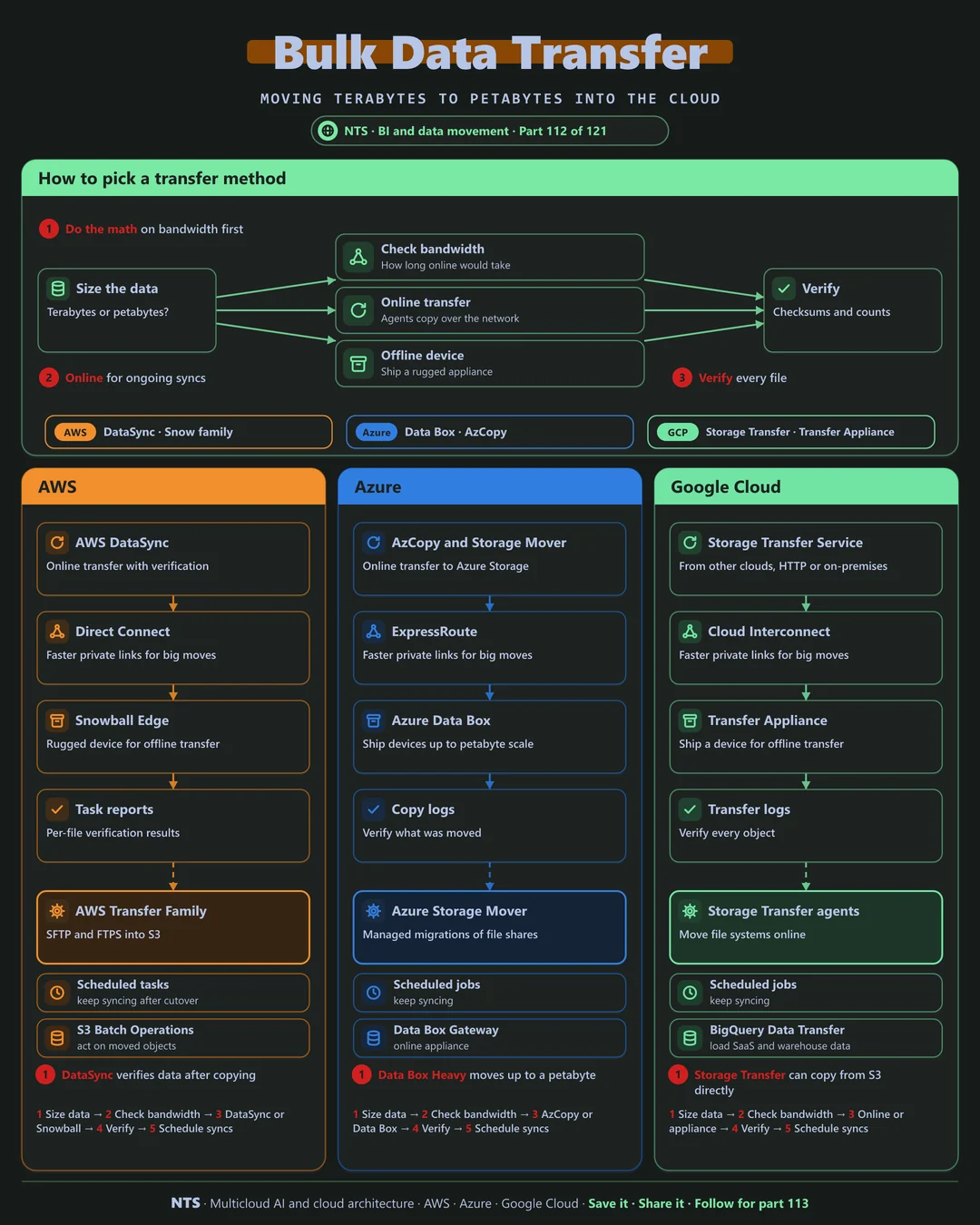
Size the data and check bandwidth: divide the volume by real throughput to see how long an online transfer would take. If it fits the timeline, use an online transfer service; if not, ship an offline device. Either way, verify every file with checksums and counts.
AWS, Azure and Google Cloud compared
| AWS | Azure | Google Cloud | |
|---|---|---|---|
| Online transfer | AWS DataSync | AzCopy, Azure Storage Mover | Storage Transfer Service |
| Offline device | Snowball Edge | Azure Data Box | Transfer Appliance |
| File protocols in | AWS Transfer Family (SFTP, FTPS) | SFTP for Blob Storage | Storage Transfer agents |
| Private network path | Direct Connect | ExpressRoute | Cloud Interconnect |
| Cloud-to-cloud | DataSync from other clouds | AzCopy from S3 | Storage Transfer from S3 and Azure |
What makes each cloud different
AWS
AWS DataSync moves data online with built-in verification and scheduling, Snowball Edge handles large offline transfers and Transfer Family brings SFTP and FTPS into S3.
Azure
Azure offers AzCopy and Azure Storage Mover for online migrations of file shares, and the Data Box family for offline transfers at large scale.
Google Cloud
Google's Storage Transfer Service copies from on-premises, HTTP sources and other clouds including S3, and Transfer Appliance handles offline moves.
Design decisions that matter
- 01Do the bandwidth math first
Before committing a date.
- 02Online for ongoing syncs
Keep copying until cutover.
- 03Verify every transfer
Checksums and counts.
- 04Use private links for large moves
Faster and more predictable.
Common mistakes we see
- Assuming full link speed. Real throughput is often far lower.
- One big final copy. Cutover windows overrun.
- No verification. Silent corruption discovered later.
A practical 30-day plan
- Week 1
Inventory data volumes and change rates.
- Week 2
Test real throughput and choose the method.
- Week 3
Run the bulk transfer with verification.
- Week 4
Keep syncing deltas until cutover.
How NTS helps
NTS plans and runs large data transfers to AWS, Azure and Google Cloud, covering sizing, method selection, verification and delta syncs, so migrations land on time.
What you get
- A transfer plan for online and offline options
- Network sizing and timeline estimates
- Secure, verified data movement
- Cutover and sync planning
Typical outcomes
- Large datasets moved on schedule
- Verified, complete data
- Minimal disruption to operations
How we work with you
- 1Assess
A focused review of your bulk data transfer across AWS, Azure and Google Cloud. We look for the gaps we find most often: assuming full link speed, one big final copy and no verification.
- 2Design
A target architecture and roadmap built on the decisions that matter most: do the bandwidth math first, online for ongoing syncs, verify every transfer and use private links for large moves.
- 3Build
Hands-on delivery alongside your team. We inventory data volumes and change rates, test real throughput and choose the method, run the bulk transfer with verification, and finally keep syncing deltas until cutover.
- 4Run and improve
We keep data in sync until cutover and help retire the old storage safely.
Why teams choose NTS for bulk data transfer
- Right method for the volume
We choose between network transfer and physical devices based on time and cost.
- Nothing lost
Every file is verified after transfer.
- Secure end to end
Encryption and chain of custody protect your data.
Book a free 30-minute review
Talk to an NTS architect about your bulk data transfer on AWS, Azure and Google Cloud.