
Multicloud AI & ERP / Cloud Data, Analytics & BI for AI
Why it matters
Log volumes grow every year and often become one of the larger observability and security costs. Yet logs are essential for troubleshooting, security investigations and compliance.
How it works
A log pipeline
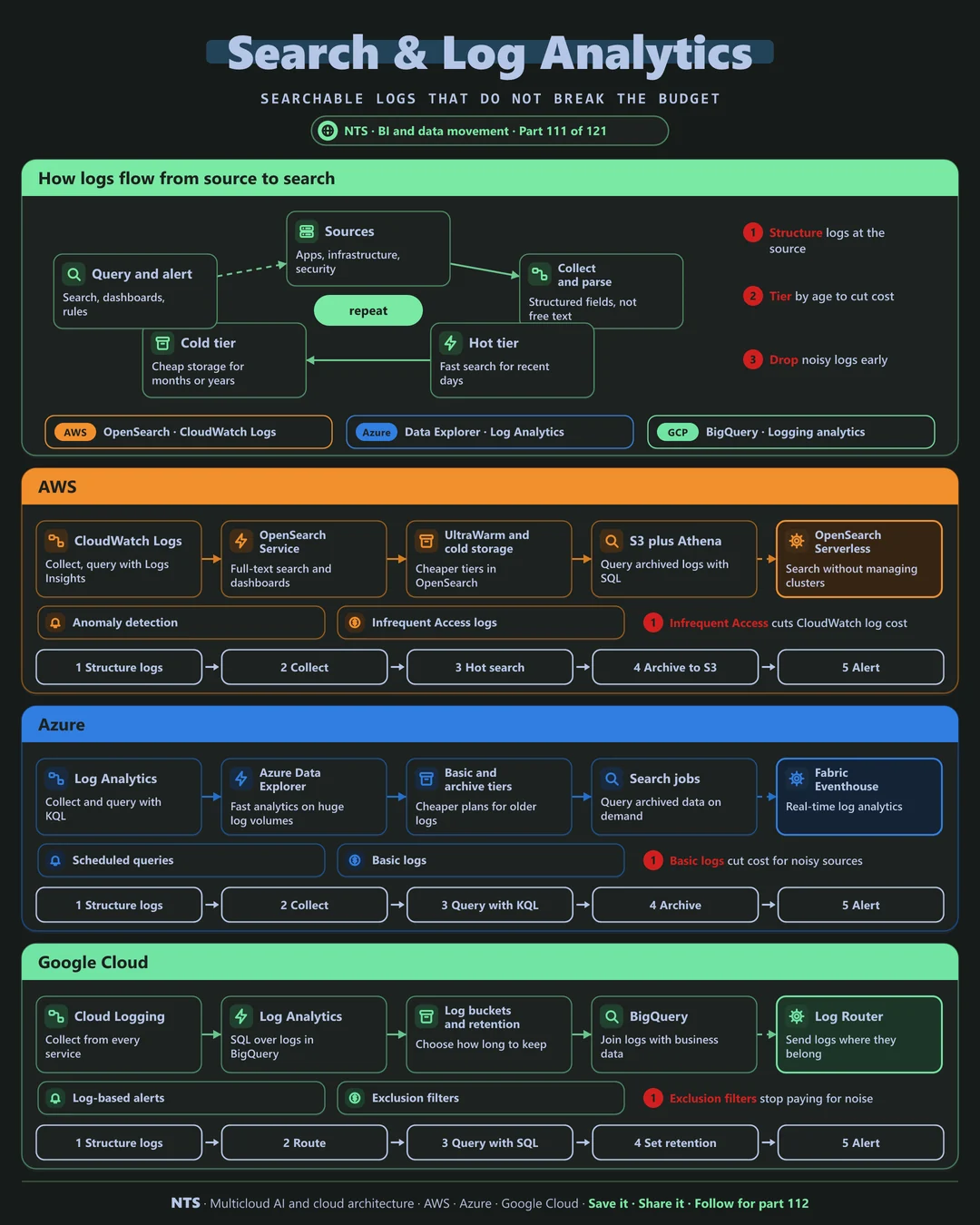
Sources across apps, infrastructure and security send logs that are collected and parsed into structured fields. Recent data sits in a hot tier for fast search, older data moves to a cold tier for cheap retention, and teams query and alert across both.
AWS, Azure and Google Cloud compared
| AWS | Azure | Google Cloud | |
|---|---|---|---|
| Log collection | CloudWatch Logs | Log Analytics | Cloud Logging |
| Search and analytics | OpenSearch, Logs Insights | Azure Data Explorer, KQL | Log Analytics in BigQuery (SQL) |
| Cheaper tiers | Infrequent Access log class, UltraWarm | Basic and archive tiers | Log buckets and retention |
| Archive query | S3 with Athena | Search jobs | BigQuery |
| Noise reduction | Subscription filters | Transformations, data collection rules | Exclusion filters |
What makes each cloud different
AWS
AWS offers CloudWatch Logs with the cheaper Infrequent Access class, OpenSearch for full-text search with UltraWarm and cold tiers, and S3 with Athena for archived logs.
Azure
Azure Monitor's Log Analytics uses KQL, with Basic logs for noisy sources, archive tiers with search jobs and Azure Data Explorer for very large volumes.
Google Cloud
Google Cloud Logging routes logs anywhere with the Log Router, Log Analytics queries logs with SQL in BigQuery and exclusion filters stop you paying for noise.
Design decisions that matter
- 01Structured logs at the source
Fields, not free text.
- 02Tier by age and value
Hot for days, cold for years.
- 03Drop noise early
Filter before ingestion.
- 04Retention by regulation
Not by default settings.
Common mistakes we see
- Debug logs in production. Volume explodes.
- One retention period for everything. Paying hot prices for cold data.
- Logs nobody can query. Archived but useless.
A practical 30-day plan
- Week 1
Measure log volume and cost by source.
- Week 2
Filter noisy sources and fix log levels.
- Week 3
Set up tiering and retention by category.
- Week 4
Test investigations across hot and cold data.
How NTS helps
NTS optimizes logging platforms on AWS, Azure and Google Cloud, covering structured logging, tiering, retention policies and query tooling, typically reducing log costs significantly.
What you get
- A log analytics platform with smart retention
- Search and dashboards for operations and security
- Cost tiers for hot and cold data
- Alerting on important patterns
Typical outcomes
- Faster troubleshooting
- Lower logging costs
- Better security visibility
How we work with you
- 1Assess
A focused review of your search and log analytics across AWS, Azure and Google Cloud. We look for the gaps we find most often: debug logs in production, one retention period for everything and logs nobody can query.
- 2Design
A target architecture and roadmap built on the decisions that matter most: structured logs at the source, tier by age and value, drop noise early and retention by regulation.
- 3Build
Hands-on delivery alongside your team. We measure log volume and cost by source, filter noisy sources and fix log levels, set up tiering and retention by category, and finally test investigations across hot and cold data.
- 4Run and improve
We tune retention, parsing and costs as log volumes grow.
Why teams choose NTS for search and log analytics
- Find answers fast
Well-structured logs turn hours of searching into seconds.
- Costs under control
Tiering and filtering stop log bills from exploding.
- Shared by teams
One platform serves operations, security and developers.
Book a free 30-minute review
Talk to an NTS architect about your search and log analytics on AWS, Azure and Google Cloud.