
Multicloud AI & ERP / Cloud Migration, Integration & AI Operations
Why it matters
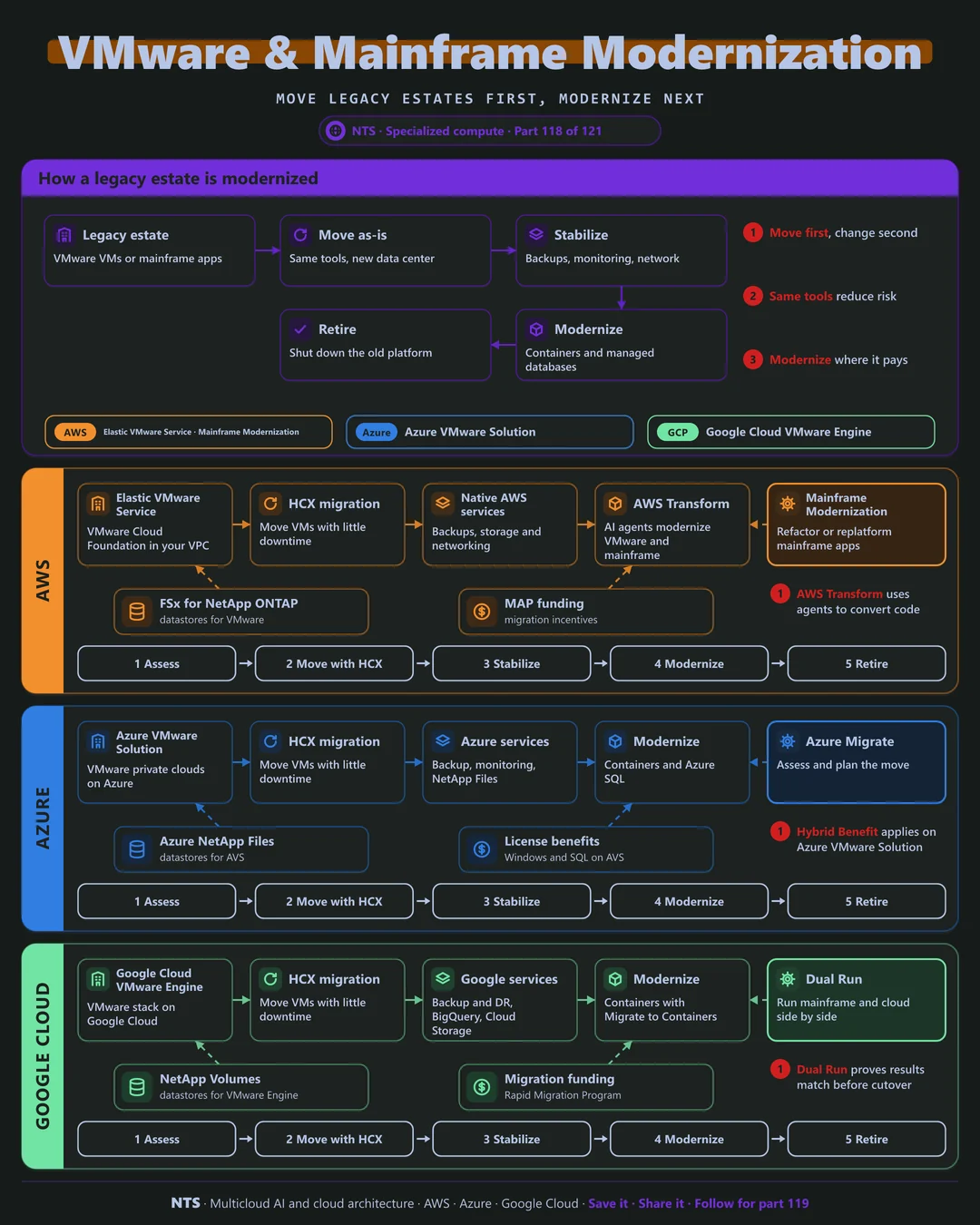
Licensing changes and data center exits are pushing VMware and mainframe workloads to the cloud. Re-architecting everything first takes years; a two-step approach delivers savings sooner with less risk.
How it works
A two-step path
Move as-is with the same VMware tools, using HCX to migrate VMs with little downtime. Stabilize with cloud backups, monitoring and networking. Then modernize service by service into containers and managed databases, and retire the old platform.
Mainframes
Mainframe applications can be refactored, replatformed or run side by side while results are compared. AI coding tools now accelerate understanding and converting legacy code.
AWS, Azure and Google Cloud compared
| AWS | Azure | Google Cloud | |
|---|---|---|---|
| VMware in the cloud | Amazon Elastic VMware Service | Azure VMware Solution | Google Cloud VMware Engine |
| VM migration | VMware HCX | VMware HCX | VMware HCX |
| Datastores | FSx for NetApp ONTAP | Azure NetApp Files | NetApp Volumes |
| Mainframe modernization | AWS Mainframe Modernization, AWS Transform | Partner solutions, Azure migration tools | Dual Run, partner solutions |
| License benefits | Bring your own licenses where allowed | Azure Hybrid Benefit on AVS | Bring your own licenses where allowed |
What makes each cloud different
AWS
AWS runs VMware Cloud Foundation inside your VPC with Amazon Elastic VMware Service, and AWS Transform uses AI agents to modernize VMware and mainframe workloads alongside AWS Mainframe Modernization.
Azure
Azure VMware Solution provides VMware private clouds on Azure with Azure NetApp Files datastores and Azure Hybrid Benefit for Windows and SQL Server.
Google Cloud
Google Cloud VMware Engine runs the VMware stack on Google Cloud, and Dual Run lets mainframe and cloud versions run side by side to prove results match before cutover.
Design decisions that matter
- 01Move first, change second
Reduce risk and start saving sooner.
- 02Stabilize with cloud services
Backup, monitoring, networking.
- 03Modernize by business value
Not everything needs rewriting.
- 04Prove parity before cutover
Especially for mainframes.
Common mistakes we see
- Rewriting everything before moving. Years of delay and cost.
- Staying on VMware forever. Missing the cloud's benefits.
- Ignoring licensing. Unexpected costs after the move.
A practical 30-day plan
- Week 1
Assess VMware and mainframe estates.
- Week 2
Deploy the cloud VMware environment.
- Week 3
Migrate a first wave with HCX.
- Week 4
Pick the first services to modernize.
How NTS helps
NTS migrates VMware and mainframe workloads to AWS, Azure and Google Cloud, covering assessment, HCX migration, stabilization and AI-assisted modernization, with licensing and cost planning included.
What you get
- Assessment of VMware and mainframe estates
- Cloud VMware environment deployed
- HCX migration waves with minimal downtime
- A modernization roadmap service by service
Typical outcomes
- Data center and VMware exits on schedule
- Lower licensing and infrastructure costs
- A clear path to modern applications
How we work with you
- 1Assess
A focused review of your VMware and mainframe modernization across AWS, Azure and Google Cloud. We look for the gaps we find most often: rewriting everything before moving, staying on VMware forever and ignoring licensing.
- 2Design
A target architecture and roadmap built on the decisions that matter most: move first, change second, stabilize with cloud services, modernize by business value and prove parity before cutover.
- 3Build
Hands-on delivery alongside your team. We assess VMware and mainframe estates, deploy the cloud VMware environment, migrate a first wave with HCX, and finally pick the first services to modernize.
- 4Run and improve
We stabilize migrated workloads and modernize them in priority order.
Why teams choose NTS for VMware and mainframe modernization
- Move first, modernize next
We deliver savings sooner with less risk.
- Licensing aware
We plan around VMware and software licensing changes.
- Legacy experience
We understand mainframes and VMware as well as the cloud.
Book a free 30-minute review
Talk to an NTS architect about your VMware and mainframe modernization on AWS, Azure and Google Cloud.