
Multicloud AI & ERP / AI-Ready Cloud Foundations & FinOps
Why it matters
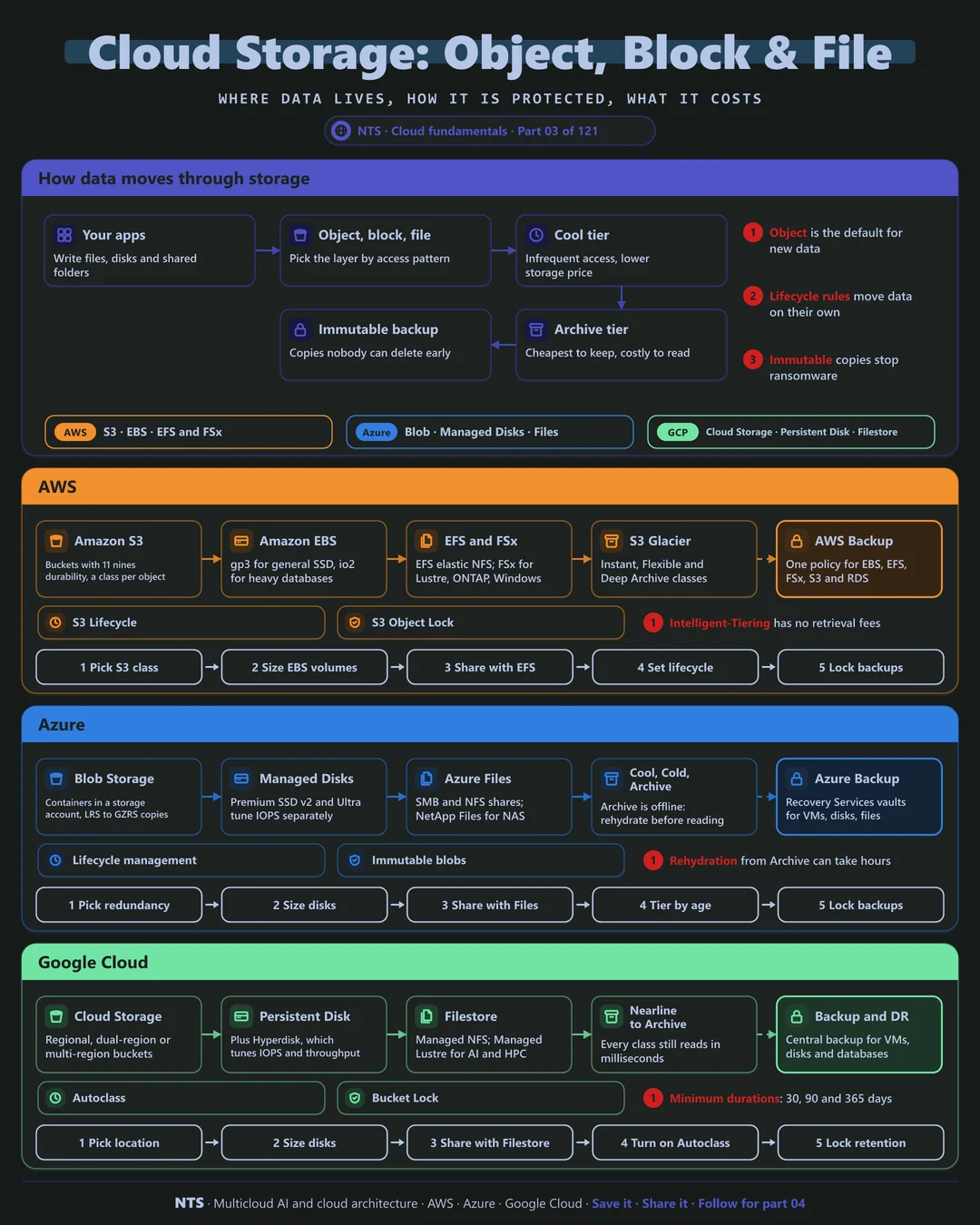
Data grows every day and rarely gets deleted, so storage costs compound. At the same time, ransomware and accidental deletion make backup and immutability board-level topics. The right design keeps hot data fast, cold data cheap and critical data impossible to destroy.
How it works
Three kinds of storage
Object storage (S3, Blob Storage, Cloud Storage) holds files and blobs behind an HTTPS API. It scales without limit, is extremely durable and is the default home for new data, backups, data lakes and AI training sets.
Block storage is a virtual disk attached to one VM, the right choice for databases and boot volumes. File storage gives many machines a shared folder over NFS or SMB, and high-performance parallel file systems serve AI training and HPC.
Tiers, lifecycle and protection
Object stores offer tiers: hot for frequent access, then cool, cold and archive at progressively lower storage prices but higher retrieval costs. Lifecycle rules move data down the tiers automatically by age or access pattern.
Protection comes in layers: snapshots for quick recovery, a backup service with policies and vaults, and immutable storage (write once, read many) so not even an administrator, or an attacker with stolen credentials, can delete copies before their retention ends.
AWS, Azure and Google Cloud compared
| AWS | Azure | Google Cloud | |
|---|---|---|---|
| Object storage | Amazon S3 | Azure Blob Storage | Cloud Storage |
| Block storage | Amazon EBS | Azure Managed Disks | Persistent Disk, Hyperdisk |
| File storage | Amazon EFS, FSx | Azure Files, NetApp Files | Filestore, Managed Lustre |
| Archive tier | S3 Glacier classes | Cool, Cold, Archive tiers | Nearline, Coldline, Archive |
| Automatic tiering | S3 Intelligent-Tiering | Lifecycle management | Autoclass |
| Immutability | S3 Object Lock | Immutable blob storage | Bucket Lock |
| Central backup | AWS Backup | Azure Backup | Backup and DR Service |
What makes each cloud different
AWS
Amazon S3 is the reference object store, with many storage classes and S3 Intelligent-Tiering moving objects between tiers by access with no retrieval fees. EBS gp3 decouples performance from size, FSx offers managed Lustre, NetApp ONTAP, Windows and OpenZFS, and AWS Backup applies one policy across many services.
Azure
Azure Blob Storage lives inside storage accounts whose redundancy (LRS, ZRS, GRS, GZRS) you choose explicitly. The Archive tier is offline, so data must be rehydrated before it can be read, which can take hours. Azure Files and Azure NetApp Files cover SMB, NFS and enterprise NAS needs.
Google Cloud
Google Cloud Storage keeps the same API and millisecond access across every class, including Archive, which simplifies design but brings minimum storage durations of 30, 90 and 365 days. Dual-region and multi-region buckets give built-in geo-redundancy, and Autoclass moves objects between classes automatically.
Design decisions that matter
- 01Object storage by default
Use block or file storage only when an application genuinely needs a disk or a shared folder.
- 02Lifecycle rules on day one
Every bucket gets a rule; let automatic tiering handle unpredictable access patterns.
- 03Choose redundancy deliberately
Match zone, region and geo-redundancy to each dataset's recovery needs and cost.
- 04Immutable backups for critical data
Lock retention so ransomware cannot delete your last good copy.
- 05Test restores, not just backups
Schedule restore drills and measure how long they really take.
Common mistakes we see
- Archiving data you still read. Retrieval and early-deletion fees can exceed the storage savings.
- Unattached disks and old snapshots. Orphaned volumes keep billing long after the VM is gone.
- Public buckets by accident. Block public access at the account or organization level and allow exceptions explicitly.
- Backups in the same blast radius. Copies in the same account and region fall with the original.
A practical 30-day plan
- Week 1
Inventory buckets, disks and file shares with size, access and owner.
- Week 2
Apply lifecycle rules and delete orphaned disks and snapshots.
- Week 3
Set backup policies with immutable vaults for critical data.
- Week 4
Run a restore drill and block public access organization-wide.
How NTS helps
NTS designs storage architectures across AWS, Azure and Google Cloud: tiering and lifecycle strategies, backup and immutability for ransomware resilience, and high-performance file systems for AI and analytics. We also find and remove storage waste that has built up over years.
What you get
- A storage map of object, block and file data with access patterns
- Lifecycle and tiering rules that move cold data automatically
- Encryption, versioning and public-access controls on every bucket
- A backup and immutability plan for critical data
Typical outcomes
- Lower storage costs from tiering and cleanup
- No accidentally public buckets
- Recoverable data, even after ransomware or mistakes
How we work with you
- 1Assess
A focused review of your cloud storage across AWS, Azure and Google Cloud. We look for the gaps we find most often: archiving data you still read, unattached disks and old snapshots, public buckets by accident and backups in the same blast radius.
- 2Design
A target architecture and roadmap built on the decisions that matter most: object storage by default, lifecycle rules on day one, choose redundancy deliberately, immutable backups for critical data and test restores, not just backups.
- 3Build
Hands-on delivery alongside your team. We inventory buckets, disks and file shares with size, access and owner, apply lifecycle rules and delete orphaned disks and snapshots, set backup policies with immutable vaults for critical data, and finally run a restore drill and block public access organization-wide.
- 4Run and improve
We monitor storage growth and access patterns, tune lifecycle rules and clean up orphaned volumes and snapshots on a regular schedule.
Why teams choose NTS for cloud storage
- The right storage for each job
We match object, block and file storage to how data is really used, instead of defaulting to the most expensive option.
- Security without friction
We lock down public access and encryption by policy, so nobody has to remember to do it.
- Savings that keep compounding
Lifecycle rules keep cutting costs every month as data ages.
Book a free 30-minute review
Talk to an NTS architect about your cloud storage on AWS, Azure and Google Cloud.