
Multicloud AI & ERP / AI-Ready Cloud Foundations & FinOps
Why it matters
In the cloud, identity is the perimeter. A leaked access key or an over-privileged role gives an attacker the same reach as your administrators, from anywhere in the world. Identity design therefore decides how big any incident can become.
It also decides speed. Teams that sign in once and get the right access automatically move faster than teams waiting on tickets for shared credentials.
How it works
People: sign in once, get just enough access
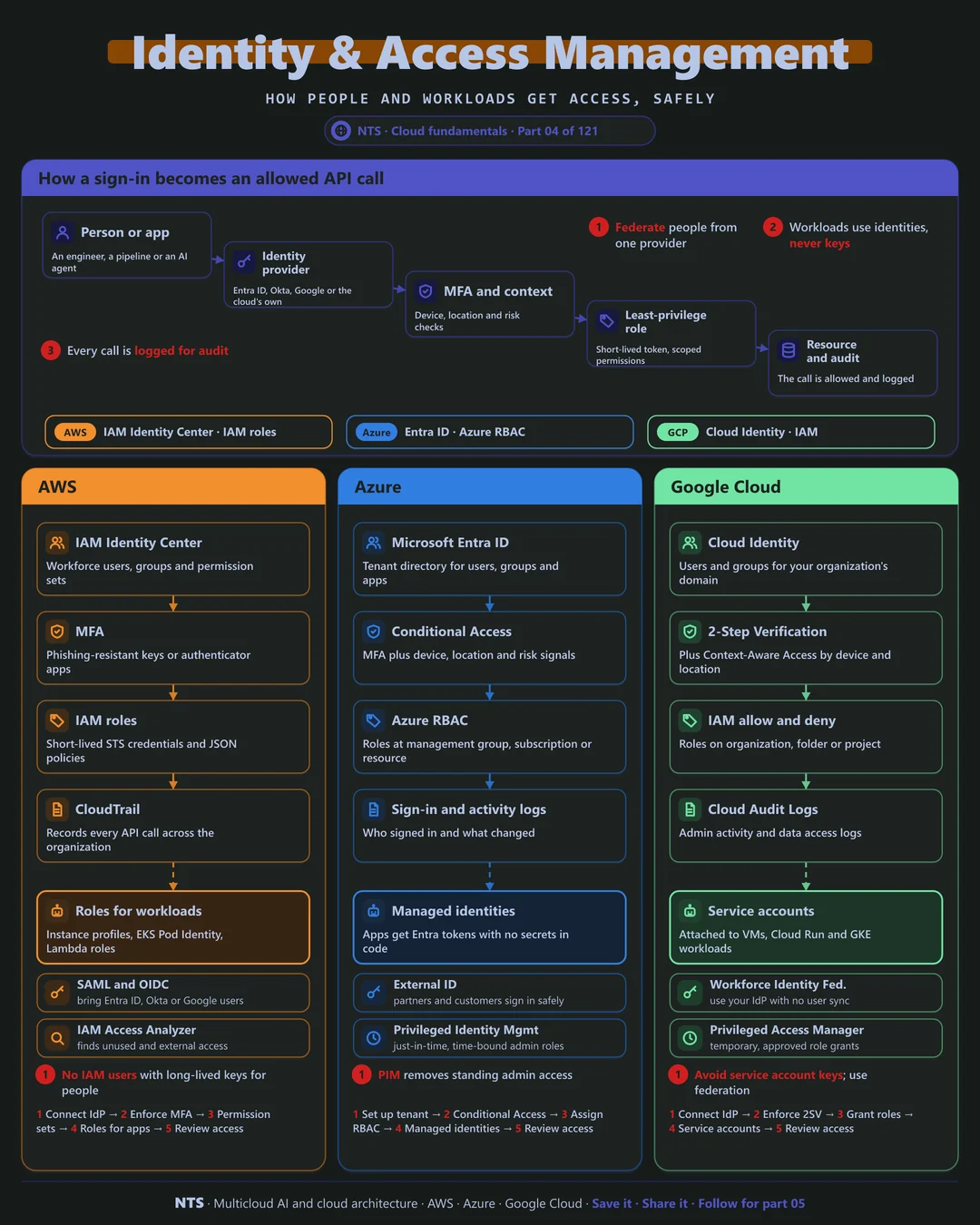
Engineers should sign in through one identity provider (Microsoft Entra ID, Okta, Google or the cloud's own), with multi-factor authentication and checks on device and location. The cloud then grants a role scoped to the job, using short-lived credentials that expire on their own.
Standing admin rights are the biggest risk. Just-in-time access tools grant elevated roles for a limited time with approval, and access reviews remove permissions nobody uses.
Workloads: identities, never keys
Applications, pipelines and AI agents need identities too. Instead of access keys stored in configuration, each workload gets an attached identity (an IAM role, a managed identity or a service account) and receives short-lived tokens automatically.
Every call is then checked against policy and recorded in an audit log, so you can always answer who did what, when and from where.
AWS, Azure and Google Cloud compared
| AWS | Azure | Google Cloud | |
|---|---|---|---|
| Workforce sign-in | IAM Identity Center | Microsoft Entra ID | Cloud Identity |
| Conditional checks | MFA, permission sets | Conditional Access | Context-Aware Access |
| Permissions model | IAM roles and policies | Azure RBAC | IAM allow and deny policies |
| Workload identity | IAM roles, EKS Pod Identity | Managed identities | Service accounts, Workload Identity |
| Just-in-time access | Temporary elevated access patterns | Privileged Identity Management | Privileged Access Manager |
| Unused access finder | IAM Access Analyzer | Access reviews | IAM Recommender |
| Audit log | CloudTrail | Activity and sign-in logs | Cloud Audit Logs |
What makes each cloud different
AWS
AWS separates workforce access (IAM Identity Center with permission sets across accounts) from fine-grained IAM policies written in JSON. Roles issue short-lived STS credentials, and IAM Access Analyzer finds unused permissions and access shared outside your organization. CloudTrail records every API call.
Azure
Azure builds on Microsoft Entra ID, which many organizations already use for Microsoft 365. Conditional Access combines MFA with device and risk signals, Privileged Identity Management removes standing admin rights, and managed identities let applications call Azure services without any secret.
Google Cloud
Google Cloud grants IAM roles on the organization, folders or projects, with deny policies for hard limits. Workforce Identity Federation lets people sign in with your existing provider without syncing users, and Workload Identity Federation lets external pipelines and GKE workloads authenticate without service account keys.
Design decisions that matter
- 01One identity provider for people
Federate every cloud to it; no local cloud users for humans.
- 02Phishing-resistant MFA everywhere
Security keys or platform authenticators for admins first, everyone next.
- 03No long-lived keys
Workloads use attached identities; CI/CD uses OIDC federation.
- 04Just-in-time admin
Elevated roles are requested, approved and expire automatically.
- 05Review access quarterly
Use the provider's analyzer to remove unused permissions.
Common mistakes we see
- Access keys in code or config. They leak through repositories, logs and laptops and never expire.
- Wildcard permissions. Policies with broad actions or resources turn small bugs into big breaches.
- Shared admin accounts. No accountability and no way to revoke one person's access.
- Forgetting non-human identities. Service accounts and agents often hold more access than any person.
A practical 30-day plan
- Week 1
Connect the identity provider and enforce MFA for all admins.
- Week 2
Replace shared and local users with federated roles.
- Week 3
Move workloads and pipelines from keys to attached identities.
- Week 4
Enable just-in-time admin and run the first access review.
How NTS helps
NTS designs and implements identity and access across AWS, Azure and Google Cloud: federation, Conditional Access and MFA rollout, least-privilege role design, removal of long-lived keys and just-in-time admin. We also extend the same controls to AI agents.
What you get
- Single sign-on across all three clouds with one identity provider
- Least-privilege role designs for people and workloads
- Removal of long-lived keys in favor of workload identity
- Access reviews and privileged access with just-in-time approval
Typical outcomes
- No long-lived access keys in code or pipelines
- Faster onboarding and instant offboarding
- Clean results in identity and access audits
How we work with you
- 1Assess
A focused review of your identity and access management across AWS, Azure and Google Cloud. We look for the gaps we find most often: access keys in code or config, wildcard permissions, shared admin accounts and forgetting non-human identities.
- 2Design
A target architecture and roadmap built on the decisions that matter most: one identity provider for people, phishing-resistant MFA everywhere, no long-lived keys, just-in-time admin and review access quarterly.
- 3Build
Hands-on delivery alongside your team. We connect the identity provider and enforce MFA for all admins, replace shared and local users with federated roles, move workloads and pipelines from keys to attached identities, and finally enable just-in-time admin and run the first access review.
- 4Run and improve
We run regular access reviews, remove unused permissions and keep identity policies aligned with new services and teams.
Why teams choose NTS for identity and access management
- Identity is the new perimeter
We treat access as the first line of defense and design it before anything else.
- Cross-cloud identity expertise
We connect Entra ID, IAM Identity Center and Google Cloud identity so people sign in once, everywhere.
- Least privilege that people accept
We right-size permissions from real usage data, so teams keep working while risk drops.
Book a free 30-minute review
Talk to an NTS architect about your identity and access management on AWS, Azure and Google Cloud.