
Multicloud AI & ERP / AI-Ready Cloud Foundations & FinOps
Why it matters
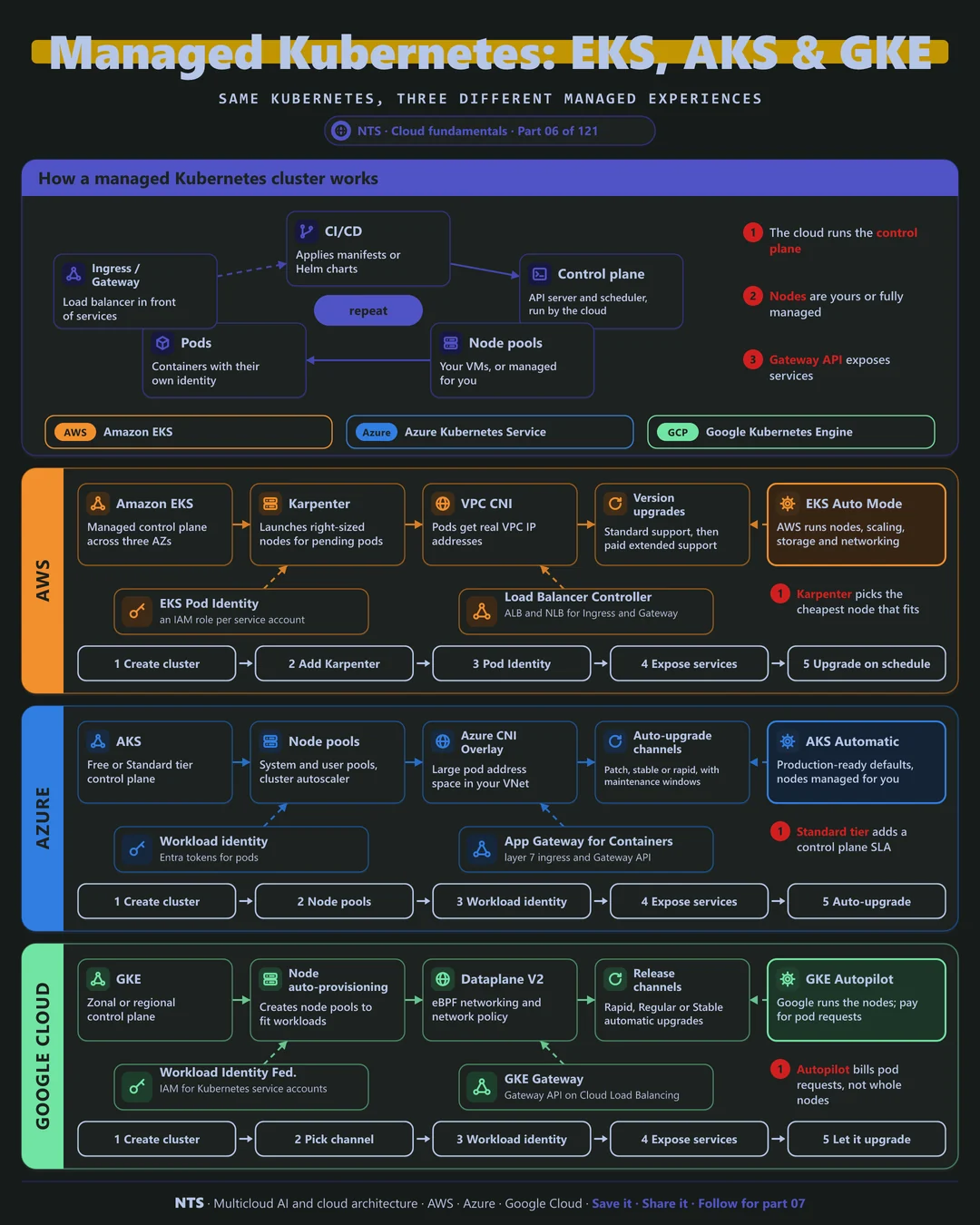
Kubernetes promises portability, but most of the effort lies in the managed layer around it. How nodes scale, how pods get IP addresses, how workloads authenticate and how upgrades happen decide both your operations burden and your security posture.
How it works
What the cloud runs and what you run
The cloud runs the control plane: the API server, scheduler and cluster state, across zones. You decide how much of the data plane to own. Classic node pools are VMs you size and patch; hands-off modes (EKS Auto Mode, AKS Automatic, GKE Autopilot) let the provider manage nodes so you only define pods.
Traffic enters through an ingress or Gateway API controller backed by a cloud load balancer, and pods reach cloud services using workload identity rather than shared node credentials.
Upgrades are a feature, not a chore
Kubernetes releases roughly three minor versions a year and each is supported for a limited time. Falling behind means paying for extended support or facing a risky multi-version jump. Release channels and maintenance windows turn upgrades into a routine event.
AWS, Azure and Google Cloud compared
| AWS | Azure | Google Cloud | |
|---|---|---|---|
| Service | Amazon EKS | Azure Kubernetes Service | Google Kubernetes Engine |
| Hands-off mode | EKS Auto Mode | AKS Automatic | GKE Autopilot |
| Node scaling | Karpenter | Cluster autoscaler, node autoprovisioning | Node auto-provisioning |
| Pod networking | VPC CNI | Azure CNI Overlay | Dataplane V2 (eBPF) |
| Pod identity | EKS Pod Identity | Workload identity | Workload Identity Federation |
| Upgrades | Standard, then paid extended support | Auto-upgrade channels | Release channels |
| Multi-cluster | EKS Hybrid Nodes | Arc-enabled Kubernetes | GKE fleets |
What makes each cloud different
AWS
EKS gives pods real VPC IP addresses through the VPC CNI and pairs well with Karpenter, which launches the cheapest right-sized node for pending pods in seconds. EKS Auto Mode hands nodes, scaling, storage and load balancing to AWS. Older versions move to paid extended support, so upgrade discipline saves money.
Azure
AKS offers a free control plane tier and a Standard tier with an uptime SLA. Azure CNI Overlay gives large pod address spaces without consuming VNet IPs, the managed Istio add-on provides a supported service mesh, and AKS Automatic applies production-ready defaults out of the box.
Google Cloud
GKE comes from Kubernetes' original authors. Autopilot bills for pod requests rather than whole nodes, Dataplane V2 provides eBPF networking and built-in network policy, and release channels keep clusters upgraded automatically. Fleets manage many clusters, including on other clouds, as one group.
Design decisions that matter
- 01Start with the hands-off mode
Choose Auto Mode, Automatic or Autopilot unless you need custom node control.
- 02Workload identity for every pod
Never share node credentials across applications.
- 03Upgrades on a calendar
Use release channels or a quarterly upgrade cadence with maintenance windows.
- 04GitOps for configuration
Declare clusters and apps in Git and let a controller apply them.
- 05Right-size requests
Pod resource requests drive both scheduling and cost.
Common mistakes we see
- Kubernetes as the default for everything. Small apps often run better on serverless containers.
- Falling several versions behind. Upgrades become risky and extended support costs extra.
- Overprovisioned requests. Inflated CPU and memory requests waste whole nodes.
- No network policy. Every pod can talk to every other pod by default.
A practical 30-day plan
- Week 1
Assess clusters: versions, node usage, identity and network policy.
- Week 2
Enable workload identity and network policies; remove shared credentials.
- Week 3
Move to a hands-off mode or Karpenter-style autoscaling; right-size requests.
- Week 4
Set release channels and GitOps, and document the upgrade runbook.
How NTS helps
NTS builds and operates Kubernetes platforms on EKS, AKS and GKE: cluster design, autoscaling, workload identity, GitOps, upgrades and cost optimization. We help platform teams run Kubernetes as a product, not a project.
What you get
- A production-grade EKS, AKS or GKE cluster blueprint
- GitOps delivery with Argo CD or Flux
- Autoscaling with Karpenter or node auto-provisioning
- Policy, security scanning and upgrade runbooks
Typical outcomes
- Consistent clusters across environments and clouds
- Routine, low-risk Kubernetes upgrades
- Lower node costs through smarter autoscaling
How we work with you
- 1Assess
A focused review of your Kubernetes platform across AWS, Azure and Google Cloud. We look for the gaps we find most often: Kubernetes as the default for everything, falling several versions behind, overprovisioned requests and no network policy.
- 2Design
A target architecture and roadmap built on the decisions that matter most: start with the hands-off mode, workload identity for every pod, upgrades on a calendar, GitOps for configuration and right-size requests.
- 3Build
Hands-on delivery alongside your team. We assess clusters: versions, node usage, identity and network policy, enable workload identity and network policies; remove shared credentials, move to a hands-off mode or Karpenter-style autoscaling; right-size requests, and finally set release channels and GitOps, and document the upgrade runbook.
- 4Run and improve
We manage upgrades, add-on updates and capacity tuning, and review cluster security and cost every quarter.
Why teams choose NTS for Kubernetes platform
- Platform engineering experience
We build Kubernetes as an internal product your developers enjoy using.
- Upgrades without fear
Tested upgrade paths and version policies keep clusters supported and safe.
- Cost under control
Right-sized nodes, Spot capacity and bin packing cut cluster spend.
Book a free 30-minute review
Talk to an NTS architect about your Kubernetes platform on AWS, Azure and Google Cloud.