
Multicloud AI & ERP / Cloud Data, Analytics & BI for AI
Why it matters
Caching is one of the cheapest performance wins available: fewer database reads, faster pages and protection during traffic spikes. Done badly, it serves stale data or collapses the database when it restarts empty.
How it works
Cache-aside
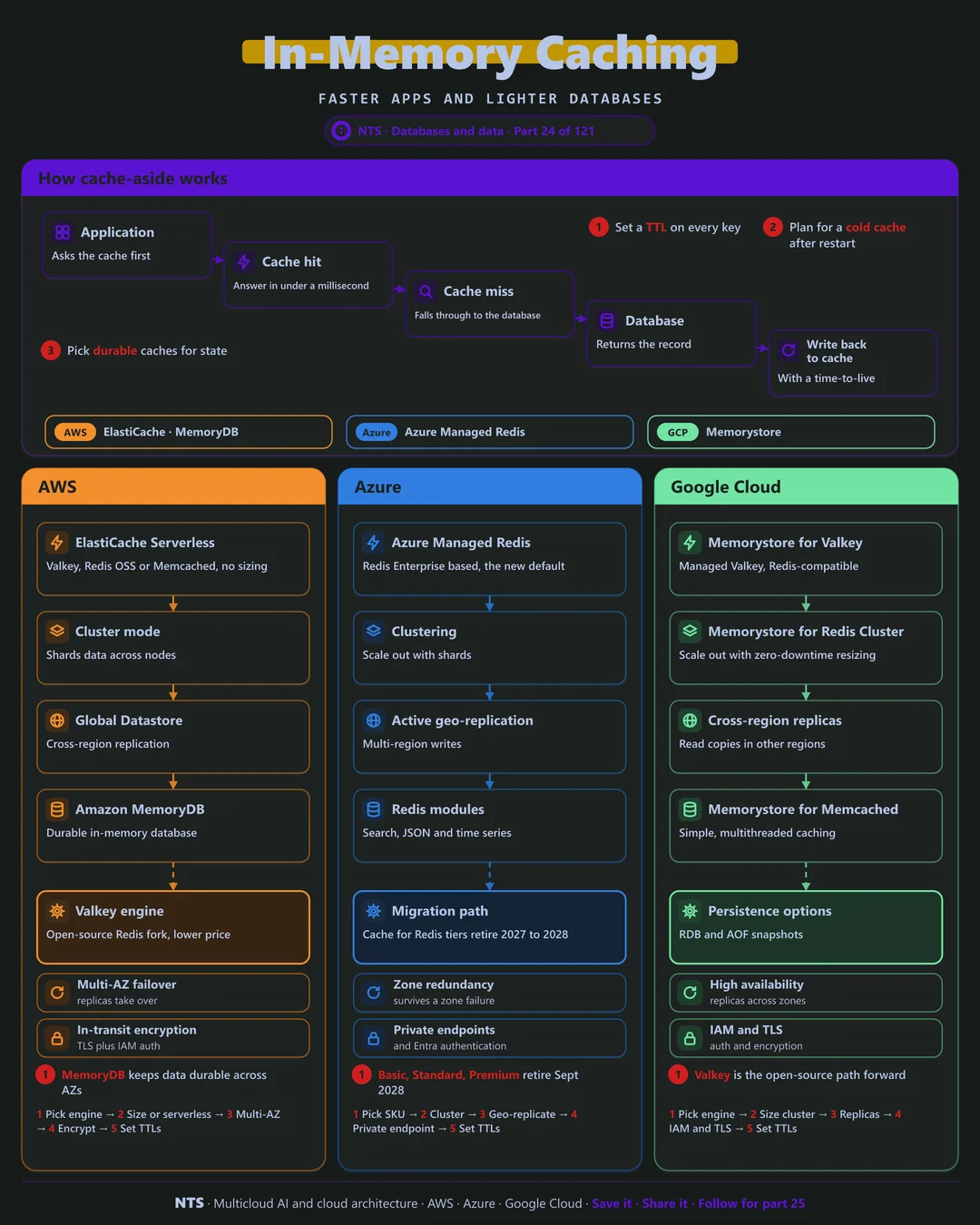
The application asks the cache first. On a hit, the answer returns in under a millisecond. On a miss, it reads from the database and writes the result back to the cache with a time-to-live so data refreshes on its own.
Cache or in-memory database
A cache can lose data and recover from the database. An in-memory database keeps data durable across failures and can be the system of record. Know which one you are running before you rely on it.
AWS, Azure and Google Cloud compared
| AWS | Azure | Google Cloud | |
|---|---|---|---|
| Managed Redis-compatible | ElastiCache (Valkey, Redis OSS) | Azure Managed Redis | Memorystore for Valkey, Redis |
| Durable in-memory DB | Amazon MemoryDB | Azure Managed Redis with persistence | Memorystore with persistence |
| Serverless option | ElastiCache Serverless | Not applicable | Not applicable |
| Cross-region | Global Datastore | Active geo-replication | Cross-region replicas |
| Retiring service | Not applicable | Azure Cache for Redis tiers (2027-2028) | Not applicable |
| Memcached | ElastiCache for Memcached | Not offered | Memorystore for Memcached |
What makes each cloud different
AWS
ElastiCache supports Valkey, the open-source Redis fork, at lower prices, plus Redis OSS and Memcached, with a serverless mode that removes sizing. MemoryDB provides a durable in-memory database across zones.
Azure
Azure Managed Redis, based on Redis Enterprise, is the new default. Azure Cache for Redis Basic, Standard and Premium tiers retire in September 2028 and Enterprise tiers in March 2027, so migration planning should start now.
Google Cloud
Memorystore offers Valkey, Redis Cluster with zero-downtime resizing and Memcached. Valkey is the open-source path forward, and persistence options add durability where needed.
Design decisions that matter
- 01TTL on every key
Stale data should expire on its own.
- 02Plan for a cold cache
Rate-limit refills so a restart does not flood the database.
- 03Know cache from database
Use durable services if the data cannot be rebuilt.
- 04Plan Azure Redis migrations now
Retirement dates are fixed.
Common mistakes we see
- No expiry. Users see old prices and stock levels.
- Treating a cache as storage. Data disappears on failover.
- Caching everything. Memory costs more than database reads for rarely used data.
A practical 30-day plan
- Week 1
Measure the top read queries and their repeat rate.
- Week 2
Add cache-aside with TTLs for the top queries.
- Week 3
Set up zone redundancy, encryption and private access.
- Week 4
Plan any Azure Cache for Redis migration and test failover.
How NTS helps
NTS designs caching layers on AWS, Azure and Google Cloud and runs migrations to Valkey and Azure Managed Redis, with performance testing before and after.
What you get
- Caching strategy with clear patterns and TTLs
- Managed Redis or Valkey clusters with high availability
- Cache invalidation that keeps data fresh
- Hit-rate and latency monitoring
Typical outcomes
- Faster response times for users
- Lower load and cost on databases
- Smooth handling of traffic spikes
How we work with you
- 1Assess
A focused review of your in-memory caching across AWS, Azure and Google Cloud. We look for the gaps we find most often: no expiry, treating a cache as storage and caching everything.
- 2Design
A target architecture and roadmap built on the decisions that matter most: TTL on every key, plan for a cold cache, know cache from database and plan Azure Redis migrations now.
- 3Build
Hands-on delivery alongside your team. We measure the top read queries and their repeat rate, add cache-aside with TTLs for the top queries, set up zone redundancy, encryption and private access, and finally plan any Azure Cache for Redis migration and test failover.
- 4Run and improve
We tune memory, eviction and TTLs, and plan capacity as traffic grows.
Why teams choose NTS for in-memory caching
- Speed where it matters
We cache the calls that slow users down, not everything.
- Fresh data, always
Our invalidation patterns avoid stale results.
- Resilient design
Applications keep working even when the cache restarts.
Book a free 30-minute review
Talk to an NTS architect about your in-memory caching on AWS, Azure and Google Cloud.