
Multicloud AI & ERP / Cloud Data, Analytics & BI for AI
Why it matters
Vector search is the memory layer behind AI search, chat over company documents and recommendations. Its design decides answer quality, latency, cost and, crucially, whether users only see documents they are allowed to see.
How it works
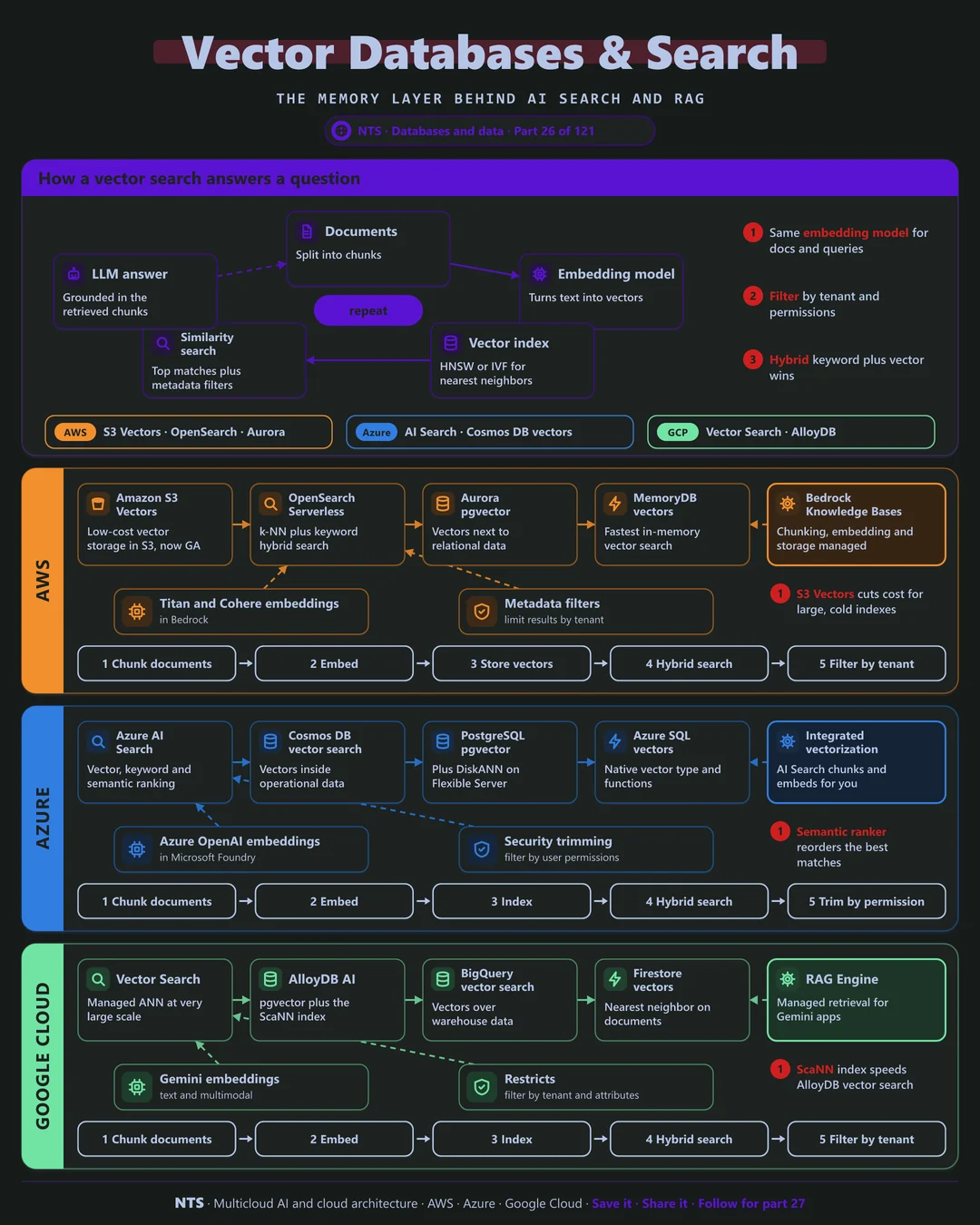
How a vector search works
Documents are split into chunks and converted into embeddings by a model. The vectors go into an index such as HNSW that finds nearest neighbors quickly. At query time, the question is embedded with the same model, the closest chunks are retrieved with metadata filters, and an LLM answers from them.
Where to keep vectors
Start with vectors in the database you already run: PostgreSQL, your document database or your search engine. It keeps one copy of data and one security model. Move to a dedicated vector service when scale, latency or cost demands it.
AWS, Azure and Google Cloud compared
| AWS | Azure | Google Cloud | |
|---|---|---|---|
| Vectors in PostgreSQL | Aurora and RDS with pgvector | PostgreSQL Flexible Server (pgvector, DiskANN) | AlloyDB AI (pgvector, ScaNN) |
| Search engine | OpenSearch Service and Serverless | Azure AI Search | Vertex AI Search |
| Low-cost large scale | Amazon S3 Vectors | Cosmos DB vector search | Vector Search |
| Warehouse vectors | Redshift with ML | Fabric and Azure SQL vectors | BigQuery vector search |
| Managed RAG | Bedrock Knowledge Bases | Foundry IQ, AI Search integrated vectorization | RAG Engine |
What makes each cloud different
AWS
AWS now offers Amazon S3 Vectors, generally available since December 2025, for low-cost storage of very large vector sets, alongside OpenSearch for hybrid keyword and vector search and pgvector on Aurora. Bedrock Knowledge Bases can manage chunking, embedding and storage for you.
Azure
Azure AI Search combines vector, keyword and a semantic ranker, with integrated vectorization that chunks and embeds documents during indexing and security trimming by user permissions. Azure SQL, Cosmos DB and PostgreSQL also support vectors natively.
Google Cloud
Google's Vector Search uses the ScaNN algorithm for very large indexes, AlloyDB AI brings ScaNN to PostgreSQL, and BigQuery runs vector search over warehouse data. RAG Engine manages retrieval for Gemini applications.
Design decisions that matter
- 01Start where your data lives
Vectors in your existing database first.
- 02Same embedding model for documents and queries
And version the index when the model changes.
- 03Filter by tenant and permission
Security trimming at query time, every time.
- 04Hybrid keyword plus vector search
It beats pure vector search for most business content.
Common mistakes we see
- Mixing embedding models. Vectors from different models are not comparable.
- No permission filters. Users retrieve documents they should never see.
- A dedicated vector store too early. Two copies of data, two security models.
A practical 30-day plan
- Week 1
Pick the use case and the embedding model.
- Week 2
Prototype vectors in your current database.
- Week 3
Add metadata filters, hybrid search and a re-ranker.
- Week 4
Measure retrieval quality and decide whether to scale out.
How NTS helps
NTS designs vector search and RAG data layers on AWS, Azure and Google Cloud: store selection, chunking and embedding strategy, permission-aware retrieval and quality measurement.
What you get
- A vector store choice for your scale and stack
- Chunking and embedding pipelines
- Hybrid keyword and vector search with re-ranking
- Search quality evaluation
Typical outcomes
- More relevant search results
- Better answers from AI assistants
- Lower cost than standalone vector platforms where possible
How we work with you
- 1Assess
A focused review of your vector databases and search across AWS, Azure and Google Cloud. We look for the gaps we find most often: mixing embedding models, no permission filters and a dedicated vector store too early.
- 2Design
A target architecture and roadmap built on the decisions that matter most: start where your data lives, same embedding model for documents and queries, filter by tenant and permission and hybrid keyword plus vector search.
- 3Build
Hands-on delivery alongside your team. We pick the use case and the embedding model, prototype vectors in your current database, add metadata filters, hybrid search and a re-ranker, and finally measure retrieval quality and decide whether to scale out.
- 4Run and improve
We re-evaluate search quality, refresh embeddings and tune indexes as content grows.
Why teams choose NTS for vector databases and search
- Search quality is measured
We test retrieval against real questions, not intuition.
- Use what you already have
We often add vectors to existing databases instead of new platforms.
- Built for AI applications
Our designs power RAG, assistants and semantic search.
Book a free 30-minute review
Talk to an NTS architect about your vector databases and search on AWS, Azure and Google Cloud.