
Multicloud AI & ERP / Cloud Data, Analytics & BI for AI
Why it matters
The warehouse is where business questions get answered and, increasingly, where AI features are built. Slow queries, capacity contention and runaway costs erode trust in data faster than almost anything else.
How it works
How data reaches a dashboard
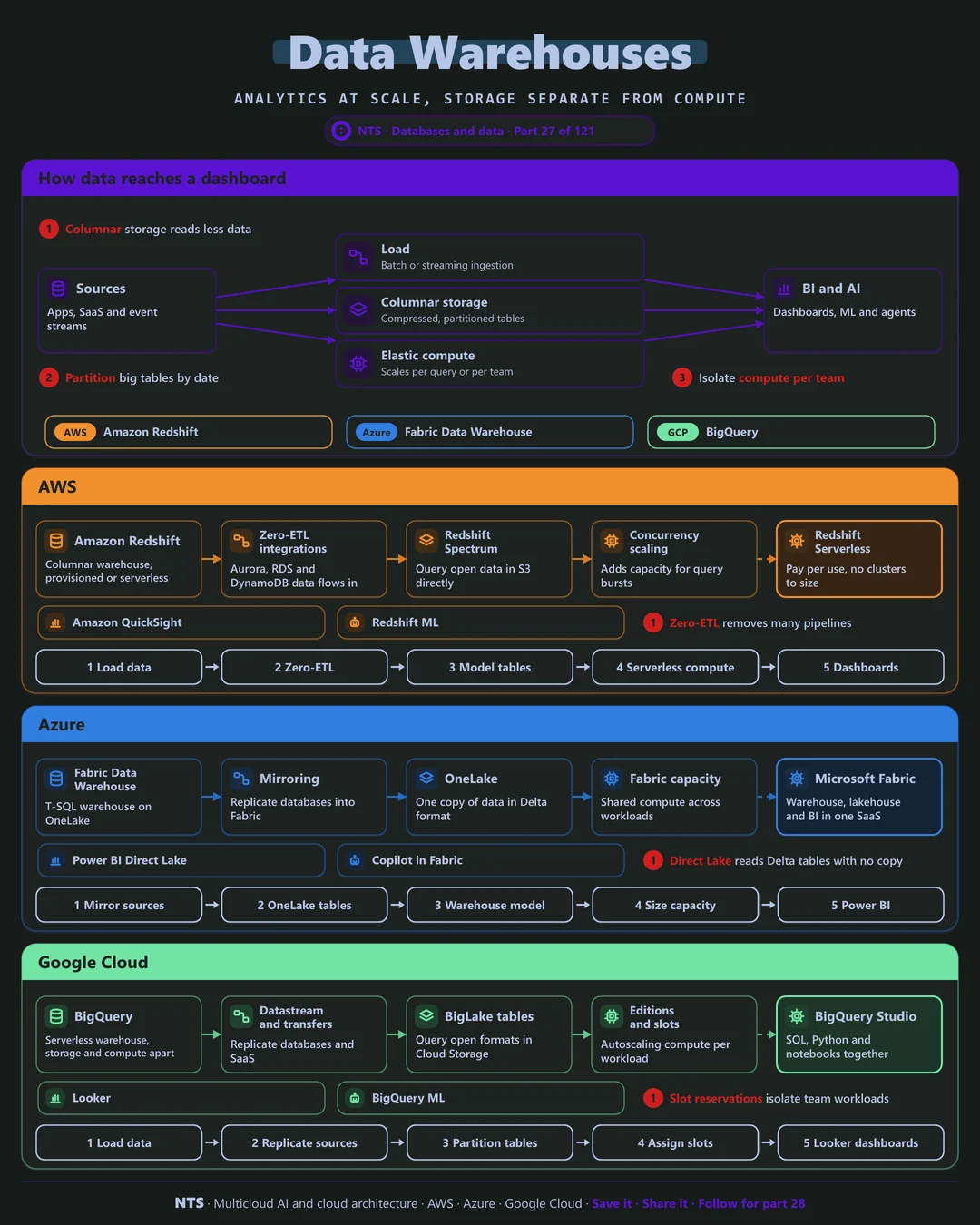
Data flows in from applications, SaaS tools and streams, by batch or near real time. It lands in columnar storage, compressed and partitioned so queries read only what they need. Elastic compute scales per query or per team, and BI tools, notebooks and AI services read the results.
Fewer pipelines
Zero-ETL integrations and database mirroring now replicate operational data into the warehouse automatically, removing many fragile hand-built pipelines.
AWS, Azure and Google Cloud compared
| AWS | Azure | Google Cloud | |
|---|---|---|---|
| Warehouse | Amazon Redshift | Fabric Data Warehouse | BigQuery |
| Serverless option | Redshift Serverless | Fabric capacity (SaaS) | Serverless by design |
| Automatic replication | Zero-ETL integrations | Mirroring | Datastream |
| Open data access | Redshift Spectrum | OneLake shortcuts | BigLake tables |
| Built-in ML | Redshift ML | Fabric data science | BigQuery ML |
| BI | Amazon Quick (QuickSight) | Power BI | Looker |
What makes each cloud different
AWS
Amazon Redshift offers provisioned and serverless warehouses, zero-ETL integrations from Aurora, RDS and DynamoDB, Spectrum queries over open data in S3 and concurrency scaling for bursts.
Azure
Microsoft has centered analytics on Microsoft Fabric: a T-SQL warehouse over OneLake, mirroring from operational databases and Power BI Direct Lake reading Delta tables without imports. Synapse workloads are steadily moving there.
Google Cloud
BigQuery is serverless from the start, with storage and compute fully separated, slot reservations to isolate team workloads, BigLake for open formats and Gemini assistance built into BigQuery Studio.
Design decisions that matter
- 01Separate compute per team or workload
Finance month-end never waits for data science.
- 02Partition and cluster large tables
Queries scan less data and cost less.
- 03Replicate, do not hand-build
Use zero-ETL, mirroring or CDC instead of custom pipelines.
- 04Watch cost per query
Set quotas and alerts on expensive patterns.
Common mistakes we see
- SELECT * on huge tables. Columnar warehouses bill by data scanned or compute used.
- One shared capacity pool. Heavy jobs slow everyone down.
- Copying data into several warehouses. Multiple truths and multiple bills.
A practical 30-day plan
- Week 1
Profile the most expensive and slowest queries.
- Week 2
Partition, cluster and rewrite the worst offenders.
- Week 3
Isolate compute per workload and set quotas.
- Week 4
Replace a hand-built pipeline with replication.
How NTS helps
NTS designs, migrates and optimizes data warehouses on Redshift, Fabric and BigQuery: modeling, performance tuning, cost control and migrations from Teradata, Netezza or on-premises SQL Server.
What you get
- A warehouse design on Redshift, Synapse, Fabric or BigQuery
- Data models built for analytics
- Workload management and cost controls
- Migration from legacy warehouses
Typical outcomes
- Faster, trusted reports
- Lower warehouse costs
- Self-service analytics for business teams
How we work with you
- 1Assess
A focused review of your data warehouse across AWS, Azure and Google Cloud. We look for the gaps we find most often: SELECT * on huge tables, one shared capacity pool and copying data into several warehouses.
- 2Design
A target architecture and roadmap built on the decisions that matter most: separate compute per team or workload, partition and cluster large tables, replicate, do not hand-build and watch cost per query.
- 3Build
Hands-on delivery alongside your team. We profile the most expensive and slowest queries, partition, cluster and rewrite the worst offenders, isolate compute per workload and set quotas, and finally replace a hand-built pipeline with replication.
- 4Run and improve
We monitor query performance and costs, and evolve models as new data sources arrive.
Why teams choose NTS for data warehouse
- Analytics that answer questions
We model data around business decisions, not source systems.
- Migration experience
We move legacy warehouses with validated results.
- Cost under control
Query limits and workload isolation prevent runaway bills.
Book a free 30-minute review
Talk to an NTS architect about your data warehouse on AWS, Azure and Google Cloud.