
Multicloud AI & ERP / Agentic AI & Cloud AI Infrastructure
Why it matters
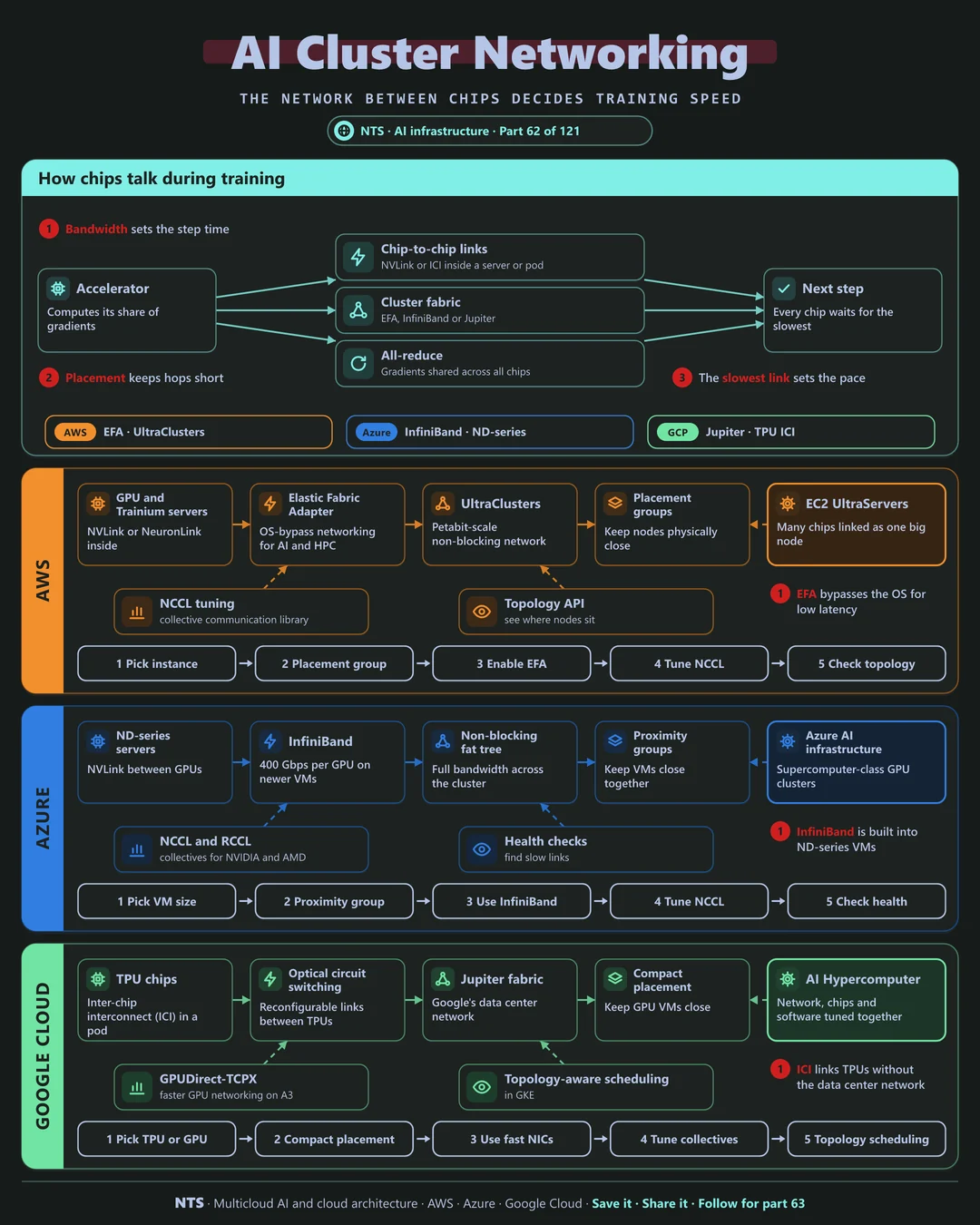
In distributed training, every step ends with chips exchanging results. If the network is slow, thousands of expensive accelerators wait for the slowest link. Network design directly sets training time and cost.
How it works
How chips talk
Inside a server or pod, chips use fast chip-to-chip links. Between servers, a dedicated cluster fabric carries traffic. After each step, an all-reduce shares gradients across every chip, and the next step starts only when the slowest exchange completes.
AWS, Azure and Google Cloud compared
| AWS | Azure | Google Cloud | |
|---|---|---|---|
| Cluster fabric | Elastic Fabric Adapter, UltraClusters | InfiniBand | Jupiter fabric |
| Inside a node or pod | NVLink, NeuronLink, UltraServers | NVLink | TPU inter-chip interconnect, NVLink |
| Placement | Cluster placement groups | Proximity placement groups | Compact placement, topology-aware scheduling |
| Collectives library | NCCL with EFA | NCCL, RCCL | NCCL, XLA collectives |
| Reconfigurable links | Not applicable | Not applicable | Optical circuit switching for TPUs |
What makes each cloud different
AWS
AWS's Elastic Fabric Adapter bypasses the operating system for low-latency communication, UltraClusters provide non-blocking networks at very large scale, and UltraServers link many chips as one large node.
Azure
Azure's ND-series VMs include InfiniBand in a non-blocking fat-tree topology, the same approach used in traditional supercomputers, with NCCL and RCCL for NVIDIA and AMD GPUs.
Google Cloud
Google links TPUs through inter-chip interconnect within pods and uses optical circuit switching to reconfigure links between them, on top of the Jupiter data center fabric.
Design decisions that matter
- 01Keep jobs inside one placement group
Short, uniform network paths.
- 02Use the cloud's fabric
EFA, InfiniBand or ICI, never ordinary networking.
- 03Tune collectives
NCCL settings matter at scale.
- 04Watch for slow links
One degraded link slows everything.
Common mistakes we see
- Spreading jobs across zones. Latency kills step time.
- Default network settings. Leaving bandwidth unused.
- Ignoring topology. Schedulers placing ranks far apart.
A practical 30-day plan
- Week 1
Measure step time and communication share.
- Week 2
Enable the cloud fabric and placement groups.
- Week 3
Tune collective settings and topology-aware scheduling.
- Week 4
Add link health monitoring.
How NTS helps
NTS tunes AI cluster networking on AWS, Azure and Google Cloud, covering fabric setup, placement, collective tuning and health monitoring, to cut step time on large training jobs.
What you get
- High-bandwidth network design for GPU clusters
- EFA, InfiniBand or RDMA configuration
- Placement and topology planning
- Network performance testing
Typical outcomes
- Higher GPU utilization
- Shorter training times
- Predictable cluster performance
How we work with you
- 1Assess
A focused review of your AI cluster networking across AWS, Azure and Google Cloud. We look for the gaps we find most often: spreading jobs across zones, default network settings and ignoring topology.
- 2Design
A target architecture and roadmap built on the decisions that matter most: keep jobs inside one placement group, use the cloud's fabric, tune collectives and watch for slow links.
- 3Build
Hands-on delivery alongside your team. We measure step time and communication share, enable the cloud fabric and placement groups, tune collective settings and topology-aware scheduling, and finally add link health monitoring.
- 4Run and improve
We monitor network performance and tune configuration as clusters grow.
Why teams choose NTS for AI cluster networking
- Networking that keeps GPUs busy
We remove the bottlenecks that slow distributed training.
- Specialist knowledge
We understand EFA, InfiniBand and RDMA in depth.
- Measured performance
We benchmark before and after every change.
Book a free 30-minute review
Talk to an NTS architect about your AI cluster networking on AWS, Azure and Google Cloud.