
Multicloud AI & ERP / Cloud AI Applications & Industry AI Solutions
Why it matters
Document processing, claims and onboarding mix AI steps with business rules and human decisions. Chaining functions directly makes these flows fragile; a workflow engine keeps state, retries failures and waits for people.
How it works
A serverless AI workflow
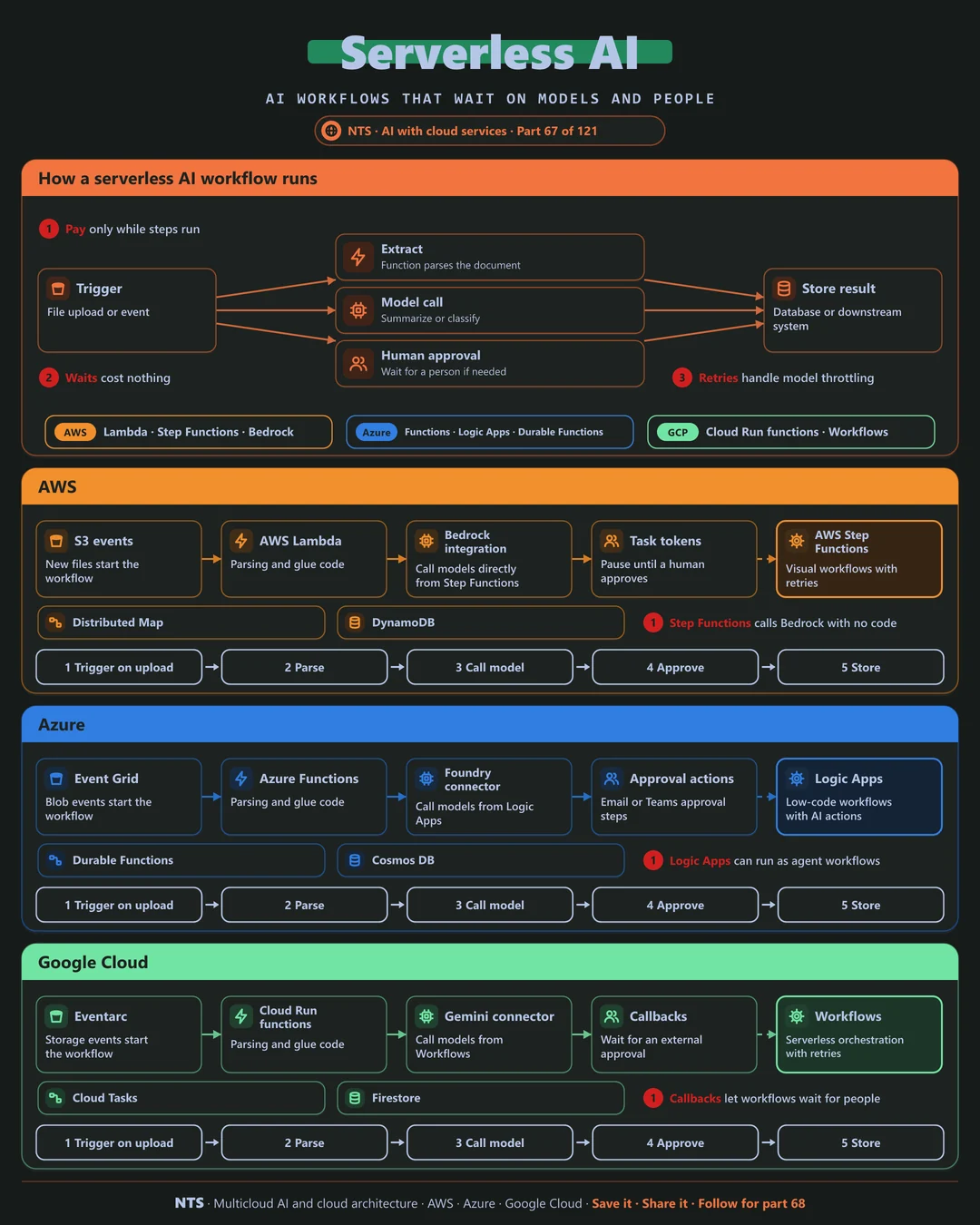
A trigger such as a file upload starts the workflow. A function extracts text, a model call summarizes or classifies it, a human approval step waits if needed and the result is stored or sent onward, with every step recorded.
AWS, Azure and Google Cloud compared
| AWS | Azure | Google Cloud | |
|---|---|---|---|
| Workflow engine | AWS Step Functions | Logic Apps, Durable Functions | Workflows |
| Functions | AWS Lambda | Azure Functions | Cloud Run functions |
| Native model calls | Bedrock integration | Foundry and AI connectors | Gemini connector |
| Human approval | Task tokens | Approval actions | Callbacks |
| Large-scale fan-out | Distributed Map | Durable fan-out | Parallel steps, Cloud Tasks |
What makes each cloud different
AWS
Step Functions calls Bedrock directly without glue code, pauses on task tokens for human approval and processes millions of items with Distributed Map.
Azure
Logic Apps offers low-code workflows with AI actions and approvals in email or Teams, while Durable Functions handles code-first orchestration.
Google Cloud
Google Workflows orchestrates steps and API calls serverlessly, with connectors for Gemini and callbacks that wait for external approvals.
Design decisions that matter
- 01Workflow engine for multi-step AI
Not chains of functions.
- 02Retries for model throttling
With exponential backoff.
- 03Human steps where risk is high
Built into the flow.
- 04Idempotent steps
Safe to retry without side effects.
Common mistakes we see
- Functions waiting on functions. Paying for idle time and losing state.
- No retry strategy. Throttling causes failed documents.
- Approvals by email outside the flow. No record and no timeout.
A practical 30-day plan
- Week 1
Map the process steps and decision points.
- Week 2
Build the workflow with model calls.
- Week 3
Add approvals, retries and error paths.
- Week 4
Run at volume and measure cost per item.
How NTS helps
NTS builds serverless AI workflows on AWS, Azure and Google Cloud for document processing, claims and onboarding, with human approvals, error handling and cost per item tracked.
What you get
- Serverless AI workflows with functions and managed models
- Async patterns for long-running AI tasks
- Timeouts, retries and error handling
- Cost controls per workflow
Typical outcomes
- AI features without servers to manage
- Lower costs for variable workloads
- Reliable handling of slow AI calls
How we work with you
- 1Assess
A focused review of your serverless AI across AWS, Azure and Google Cloud. We look for the gaps we find most often: functions waiting on functions, no retry strategy and approvals by email outside the flow.
- 2Design
A target architecture and roadmap built on the decisions that matter most: workflow engine for multi-step AI, retries for model throttling, human steps where risk is high and idempotent steps.
- 3Build
Hands-on delivery alongside your team. We map the process steps and decision points, build the workflow with model calls, add approvals, retries and error paths, and finally run at volume and measure cost per item.
- 4Run and improve
We tune timeouts, concurrency and costs as usage patterns change.
Why teams choose NTS for serverless AI
- Pay only for use
Serverless keeps AI costs aligned with real demand.
- Robust patterns
We handle slow models and failures gracefully.
- Fast delivery
Small teams can ship AI features quickly.
Book a free 30-minute review
Talk to an NTS architect about your serverless AI on AWS, Azure and Google Cloud.