
Multicloud AI & ERP / Cloud AI Applications & Industry AI Solutions
Why it matters
Self-hosting open models on Kubernetes can cut cost and keep data in your environment, but GPUs are expensive and scarce. Poor scheduling and CPU-based autoscaling waste them.
How it works
Serving models on Kubernetes
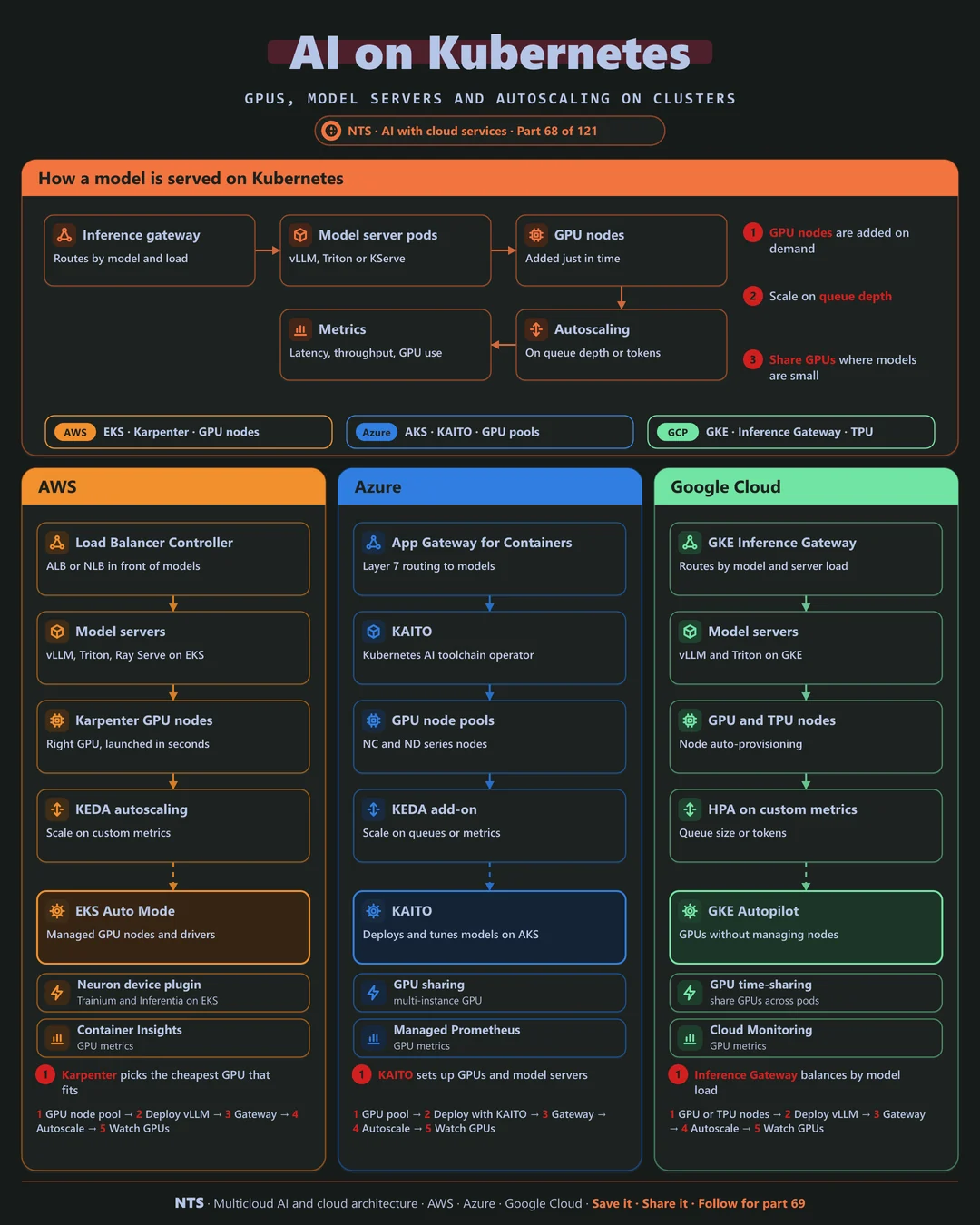
An inference gateway routes requests by model and server load to model server pods such as vLLM or Triton. GPU nodes are added just in time, and autoscaling follows queue depth or tokens, with metrics on latency, throughput and GPU use.
AWS, Azure and Google Cloud compared
| AWS | Azure | Google Cloud | |
|---|---|---|---|
| Managed Kubernetes | Amazon EKS | Azure Kubernetes Service | Google Kubernetes Engine |
| GPU node provisioning | Karpenter, EKS Auto Mode | GPU node pools | Node auto-provisioning, Autopilot |
| Model deployment helper | Helm charts, Ray on EKS | KAITO | GKE inference quickstarts |
| Inference routing | Load Balancer Controller | App Gateway for Containers | GKE Inference Gateway |
| Custom accelerators | Trainium, Inferentia via Neuron | Not applicable | TPUs on GKE |
What makes each cloud different
AWS
On EKS, Karpenter launches the right GPU instance in seconds for pending pods, and the Neuron device plugin brings Trainium and Inferentia to Kubernetes.
Azure
AKS offers KAITO, the Kubernetes AI toolchain operator, which provisions GPU nodes and deploys and tunes open models with little configuration.
Google Cloud
GKE's Inference Gateway balances requests by model server load and cache, GPU time-sharing packs small models, and TPUs are available as Kubernetes resources.
Design decisions that matter
- 01Scale on queue depth or tokens
Not CPU.
- 02Just-in-time GPU nodes
No idle accelerators overnight.
- 03Share GPUs for small models
Time-slicing or partitioning.
- 04Use a model-aware gateway
Route by load, not round-robin.
Common mistakes we see
- Static GPU node pools. Paying for peak all day.
- One model per GPU by default. Small models waste big chips.
- Kubernetes when an API would do. Hosted models may be cheaper overall.
A practical 30-day plan
- Week 1
Decide which models justify self-hosting.
- Week 2
Set up GPU autoscaling and a model server.
- Week 3
Add an inference gateway and custom metrics.
- Week 4
Load test and compare cost with hosted APIs.
How NTS helps
NTS runs AI inference on EKS, AKS and GKE, covering GPU autoscaling, model servers, inference gateways and cost comparisons with hosted APIs, so you self-host only where it pays.
What you get
- GPU-enabled Kubernetes clusters
- Model serving with vLLM, KServe or similar
- GPU sharing and autoscaling
- Scheduling for training and inference
Typical outcomes
- Higher GPU utilization
- Consistent AI platform across clouds
- Faster model deployment
How we work with you
- 1Assess
A focused review of your AI on Kubernetes across AWS, Azure and Google Cloud. We look for the gaps we find most often: static GPU node pools, one model per GPU by default and Kubernetes when an API would do.
- 2Design
A target architecture and roadmap built on the decisions that matter most: scale on queue depth or tokens, just-in-time GPU nodes, share GPUs for small models and use a model-aware gateway.
- 3Build
Hands-on delivery alongside your team. We decide which models justify self-hosting, set up GPU autoscaling and a model server, add an inference gateway and custom metrics, and finally load test and compare cost with hosted APIs.
- 4Run and improve
We manage cluster upgrades, GPU drivers and serving engines as they evolve.
Why teams choose NTS for AI on Kubernetes
- Kubernetes and AI expertise together
We know both worlds well.
- GPU efficiency
Sharing and autoscaling keep expensive GPUs busy.
- Portable across clouds
The same platform runs on EKS, AKS and GKE.
Book a free 30-minute review
Talk to an NTS architect about your AI on Kubernetes on AWS, Azure and Google Cloud.