
Multicloud AI & ERP / Cloud Migration, Integration & AI Operations
Why it matters
Long-running business processes built from scripts and chained functions lose state, retry badly and leave no audit trail. Workflow engines make them reliable and visible.
How it works
How a workflow runs
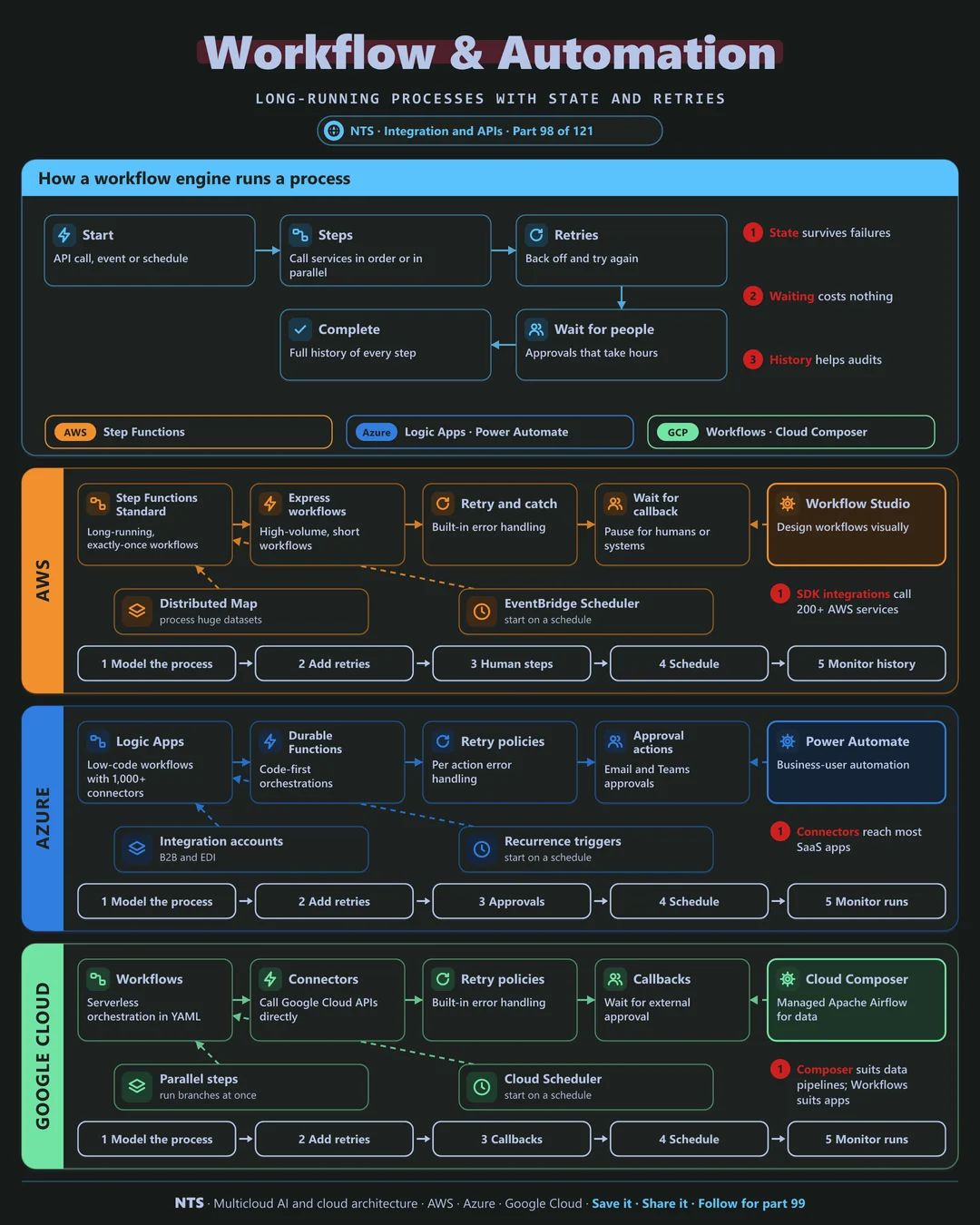
A start event triggers the workflow. Steps call services in order or in parallel, retries back off and try again, waits pause for people or external systems, and the engine records a full history of every step.
AWS, Azure and Google Cloud compared
| AWS | Azure | Google Cloud | |
|---|---|---|---|
| Workflow engine | AWS Step Functions | Azure Logic Apps | Workflows |
| Code-first orchestration | Step Functions SDK integrations | Durable Functions | Workflows with connectors |
| Business automation | Amazon Quick Automate | Power Automate | AppSheet automation |
| Data pipeline orchestration | Managed Airflow (MWAA) | Fabric pipelines | Cloud Composer |
| Scheduling | EventBridge Scheduler | Recurrence triggers | Cloud Scheduler |
What makes each cloud different
AWS
Step Functions offers Standard workflows for long-running, exactly-once processes and Express workflows for high volume, with direct integrations to more than 200 AWS services.
Azure
Logic Apps provides low-code workflows with a large connector library, while Durable Functions handles code-first orchestration and Power Automate serves business users.
Google Cloud
Google Workflows orchestrates services and APIs serverlessly, with callbacks for external approvals; Cloud Composer manages Airflow for data pipelines.
Design decisions that matter
- 01Workflow engine for long processes
Not chains of functions.
- 02Retries and timeouts on every step
Defined, not default.
- 03Human steps inside the flow
With deadlines and escalation.
- 04Use history for audits
Every step recorded.
Common mistakes we see
- State in function memory. Lost on every failure.
- Infinite retries. Stuck processes and runaway costs.
- Approvals outside the system. No record and no timeout.
A practical 30-day plan
- Week 1
Map one business process end to end.
- Week 2
Model it in the workflow engine.
- Week 3
Add retries, timeouts and human steps.
- Week 4
Go live and use history for reporting.
How NTS helps
NTS automates business processes with Step Functions, Logic Apps and Google Workflows, covering process design, error handling, human approvals and integration with your systems and AI services.
What you get
- Workflow designs with Step Functions, Logic Apps or Workflows
- Integration with business systems
- Error handling and human approval steps
- Monitoring of every workflow run
Typical outcomes
- Manual processes automated
- Faster turnaround for requests
- Fewer errors from manual handoffs
How we work with you
- 1Assess
A focused review of your workflow automation across AWS, Azure and Google Cloud. We look for the gaps we find most often: state in function memory, infinite retries and approvals outside the system.
- 2Design
A target architecture and roadmap built on the decisions that matter most: workflow engine for long processes, retries and timeouts on every step, human steps inside the flow and use history for audits.
- 3Build
Hands-on delivery alongside your team. We map one business process end to end, model it in the workflow engine, add retries, timeouts and human steps, and finally go live and use history for reporting.
- 4Run and improve
We extend automation to new processes and tune workflows over time.
Why teams choose NTS for workflow automation
- Automation that is reliable
We design workflows that recover from failures.
- Business and IT together
We automate real processes, not just technical tasks.
- Visible end to end
Every step can be traced and audited.
Book a free 30-minute review
Talk to an NTS architect about your workflow automation on AWS, Azure and Google Cloud.