
Multicloud AI & ERP / Cloud Migration, Integration & AI Operations
Why it matters
Many applications do not need Kubernetes or custom infrastructure. Platform-as-a-service hosting gets them to production faster, with HTTPS, scaling and patching handled for you.
How it works
From push to production
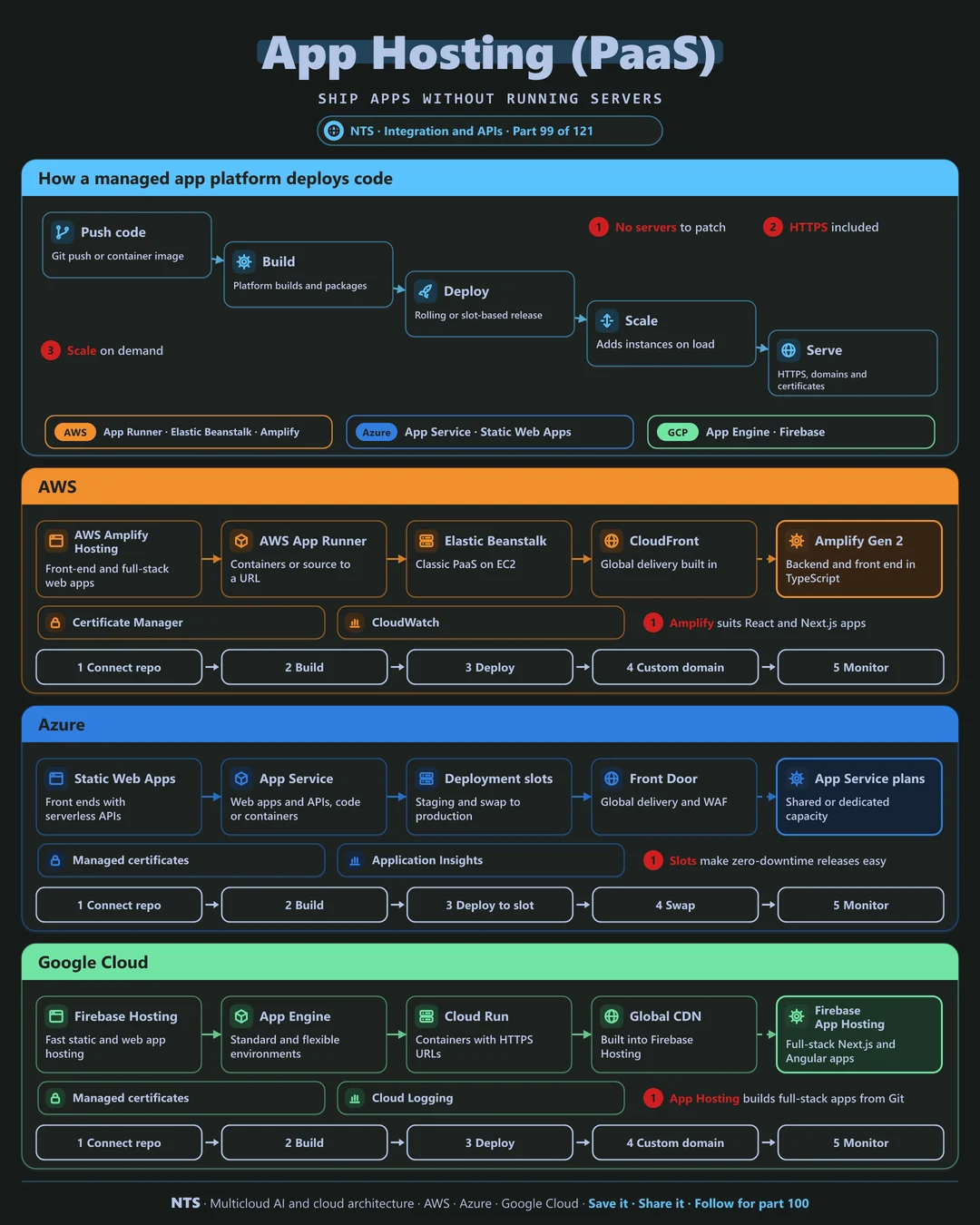
Developers push code or a container image. The platform builds and deploys it with rolling or slot-based releases, scales instances with load and serves it over HTTPS with custom domains and managed certificates.
AWS, Azure and Google Cloud compared
| AWS | Azure | Google Cloud | |
|---|---|---|---|
| Full-stack web hosting | AWS Amplify Hosting | Azure Static Web Apps | Firebase App Hosting |
| App platform | AWS App Runner, Elastic Beanstalk | Azure App Service | App Engine |
| Serverless containers | AWS Fargate | Azure Container Apps | Cloud Run |
| Safe releases | Traffic shifting | Deployment slots | Traffic splitting |
| Global delivery | CloudFront | Front Door | Firebase CDN, Cloud CDN |
What makes each cloud different
AWS
AWS Amplify hosts front-end and full-stack apps with Gen 2 backends in TypeScript, App Runner turns source or images into HTTPS services and Elastic Beanstalk offers classic PaaS on EC2.
Azure
Azure App Service runs web apps and APIs in code or containers with deployment slots for zero-downtime swaps, and Static Web Apps pairs front ends with serverless APIs.
Google Cloud
Firebase Hosting and Firebase App Hosting serve web and full-stack Next.js or Angular apps, while App Engine and Cloud Run host services with automatic scaling.
Design decisions that matter
- 01PaaS first for web apps
Move to containers only when needed.
- 02Staging slots for releases
Swap after testing.
- 03Managed certificates and domains
No manual renewals.
- 04Autoscaling limits
Protect databases and budgets.
Common mistakes we see
- Kubernetes for a simple website. Operations cost with no benefit.
- Deploying straight to production. No safe rollback.
- No scaling limits. A traffic spike becomes a bill spike.
A practical 30-day plan
- Week 1
List apps suitable for PaaS.
- Week 2
Move one app with CI/CD.
- Week 3
Add staging, custom domain and monitoring.
- Week 4
Migrate the next apps using the same template.
How NTS helps
NTS moves web applications onto managed platforms such as Amplify, App Service, Firebase and Cloud Run, with CI/CD, safe release patterns and monitoring, so small teams ship faster.
What you get
- The right platform for each app: PaaS, containers or serverless
- Deployment pipelines with staging and rollback
- Custom domains, TLS and scaling
- Cost and performance tuning
Typical outcomes
- Faster releases with less effort
- Lower hosting costs
- Reliable, scalable applications
How we work with you
- 1Assess
A focused review of your application hosting across AWS, Azure and Google Cloud. We look for the gaps we find most often: Kubernetes for a simple website, deploying straight to production and no scaling limits.
- 2Design
A target architecture and roadmap built on the decisions that matter most: PaaS first for web apps, staging slots for releases, managed certificates and domains and autoscaling limits.
- 3Build
Hands-on delivery alongside your team. We list apps suitable for PaaS, move one app with CI/CD, add staging, custom domain and monitoring, and finally migrate the next apps using the same template.
- 4Run and improve
We keep platforms updated, tune scaling and optimize hosting costs.
Why teams choose NTS for application hosting
- Less infrastructure work
Managed platforms let teams focus on features.
- Right platform for each app
We match hosting to each application's needs.
- Production-ready from day one
Scaling, monitoring and security included.
Book a free 30-minute review
Talk to an NTS architect about your application hosting on AWS, Azure and Google Cloud.