
Multicloud AI & ERP / Cloud Migration, Integration & AI Operations
Why it matters
Attackers exploit known vulnerabilities within days of disclosure, and configuration drift quietly breaks compliance. Manual patching cannot keep pace with large or hybrid estates.
How it works
Patching at scale
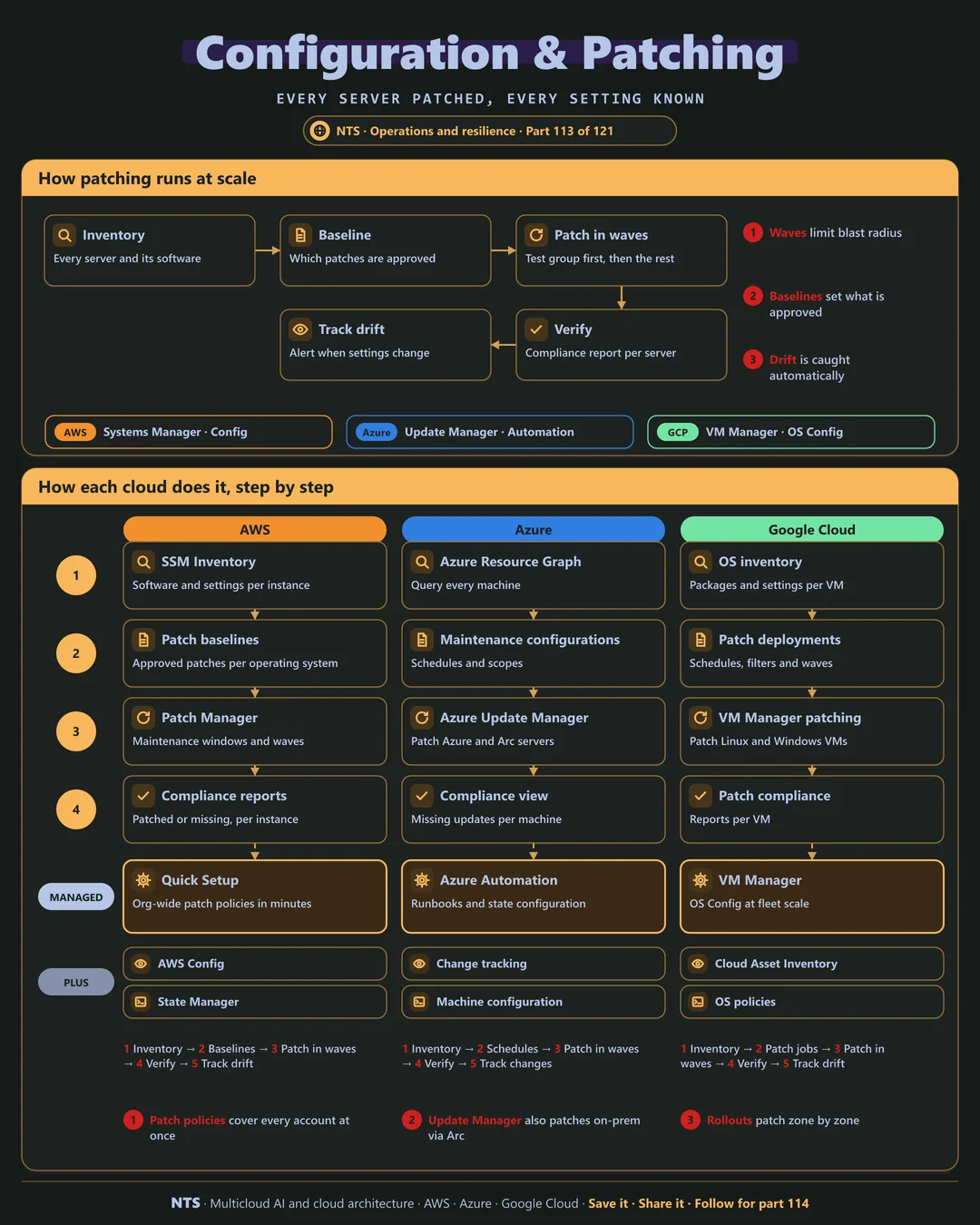
Start with an inventory of every server and its software. Define a baseline of approved patches. Patch in waves, test group first, during maintenance windows, then verify compliance per server and track drift when settings change.
AWS, Azure and Google Cloud compared
| AWS | Azure | Google Cloud | |
|---|---|---|---|
| Patching | Systems Manager Patch Manager | Azure Update Manager | VM Manager patching |
| Inventory | Systems Manager Inventory | Azure Resource Graph | OS inventory |
| Configuration enforcement | State Manager | Machine configuration (policy) | OS policies |
| Change tracking | AWS Config | Change tracking | Cloud Asset Inventory |
| Hybrid servers | Systems Manager hybrid nodes | Azure Arc-enabled servers | VM Manager with partners |
What makes each cloud different
AWS
AWS Systems Manager handles inventory, patch baselines and maintenance windows, and Quick Setup applies organization-wide patch policies across every account in minutes.
Azure
Azure Update Manager patches Azure VMs and, through Arc, on-premises and other-cloud servers, with maintenance configurations and compliance views in one place.
Google Cloud
Google's VM Manager patches Linux and Windows VMs with zone-by-zone rollouts, OS policies enforce settings and Cloud Asset Inventory tracks configuration history.
Design decisions that matter
- 01Patch on a fixed schedule
With emergency paths for critical flaws.
- 02Waves with a test group
Limit the blast radius.
- 03Golden images for new servers
Start patched, stay patched.
- 04Report compliance automatically
No manual spreadsheets.
Common mistakes we see
- Patching only when convenient. Exposure windows grow to months.
- No test group. A bad patch hits everything at once.
- Ignoring on-premises servers. The oldest systems stay the most exposed.
A practical 30-day plan
- Week 1
Build a complete server inventory.
- Week 2
Define baselines and maintenance windows.
- Week 3
Patch in waves and verify compliance.
- Week 4
Enable drift tracking and reports.
How NTS helps
NTS automates patching and configuration management across AWS, Azure, Google Cloud and on-premises servers, with schedules, waves, compliance reporting and drift alerts.
What you get
- A complete server inventory across clouds and data centers
- Patch baselines and maintenance windows
- Wave-based patching with test groups
- Compliance and drift reporting
Typical outcomes
- Critical vulnerabilities patched in days, not months
- Clean compliance reports
- No configuration drift surprises
How we work with you
- 1Assess
A focused review of your configuration and patch management across AWS, Azure and Google Cloud. We look for the gaps we find most often: patching only when convenient, no test group and ignoring on-premises servers.
- 2Design
A target architecture and roadmap built on the decisions that matter most: patch on a fixed schedule, waves with a test group, golden images for new servers and report compliance automatically.
- 3Build
Hands-on delivery alongside your team. We build a complete server inventory, define baselines and maintenance windows, patch in waves and verify compliance, and finally enable drift tracking and reports.
- 4Run and improve
We run patch cycles, track compliance and handle emergency patches when critical flaws appear.
Why teams choose NTS for configuration and patch management
- Patching that never slips
Schedules and automation keep every server current.
- Safe rollouts
Test groups and waves stop bad patches from spreading.
- Hybrid coverage
On-premises servers get the same care as cloud ones.
Book a free 30-minute review
Talk to an NTS architect about your configuration and patch management on AWS, Azure and Google Cloud.