
Multicloud AI & ERP / Cloud Migration, Integration & AI Operations
Why it matters
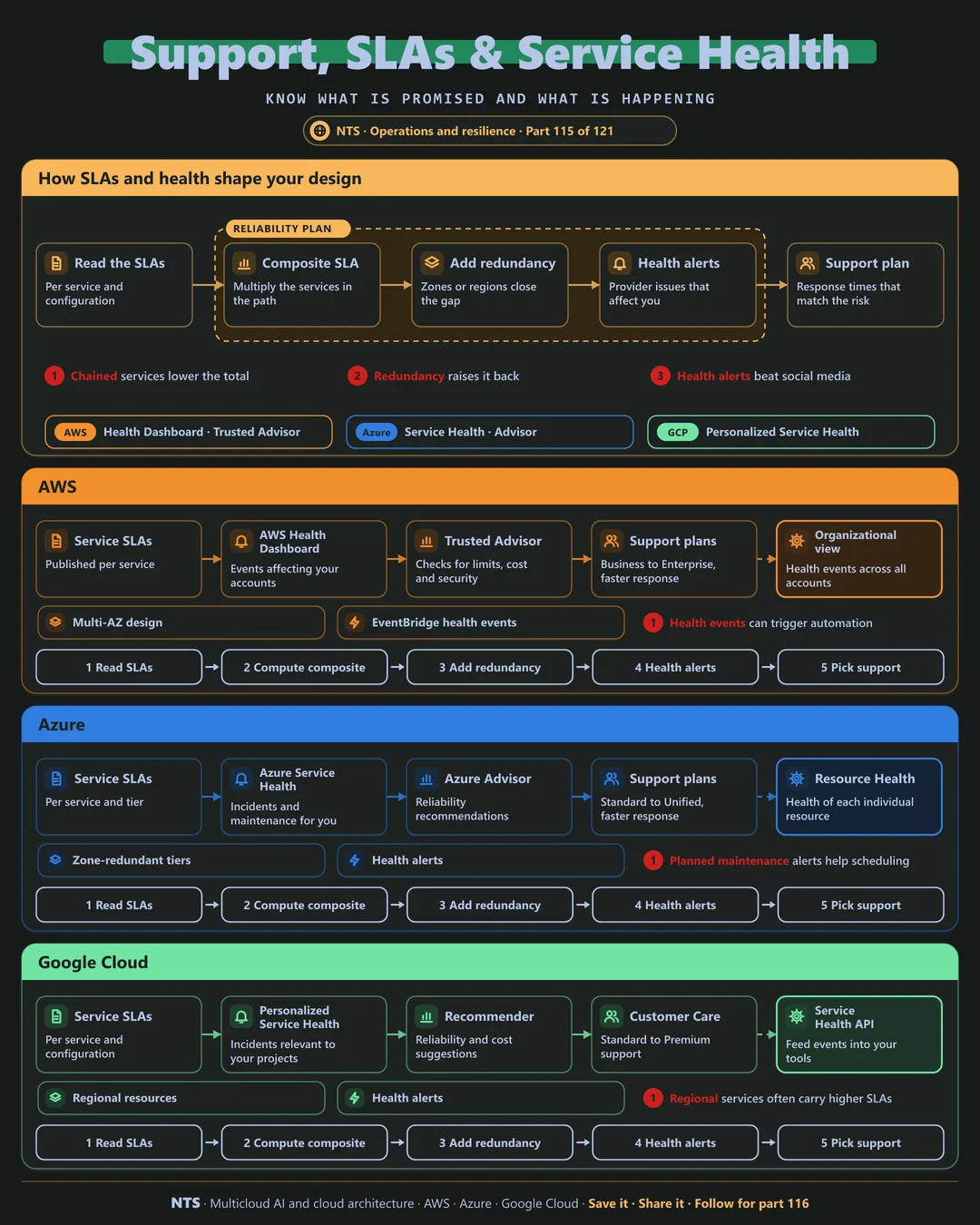
An application built from several services inherits their combined risk. Without redundancy, three services at 99.9% each give noticeably less than 99.9% together. Knowing this shapes design and support choices.
How it works
From SLAs to design
Read the SLAs for each service and configuration. Calculate the composite SLA by multiplying the services in the request path. Add redundancy across zones or regions to close the gap, subscribe to health alerts and choose a support plan whose response times match the risk.
AWS, Azure and Google Cloud compared
| AWS | Azure | Google Cloud | |
|---|---|---|---|
| Service health | AWS Health Dashboard | Azure Service Health | Personalized Service Health |
| Resource health | AWS Health events | Resource Health | Service Health API |
| Best-practice checks | Trusted Advisor | Azure Advisor | Recommender |
| Support plans | Business, Enterprise On-Ramp, Enterprise | Standard, Professional Direct, Unified | Standard, Enhanced, Premium |
| Automation on events | EventBridge health events | Service Health alerts with action groups | Alerts in Cloud Monitoring |
What makes each cloud different
AWS
The AWS Health Dashboard shows events affecting your accounts, with an organizational view across all accounts, and health events can trigger EventBridge automation. Trusted Advisor checks limits, cost and security.
Azure
Azure Service Health reports incidents and planned maintenance relevant to you, Resource Health shows the state of each resource and Azure Advisor gives reliability recommendations.
Google Cloud
Personalized Service Health shows incidents affecting your projects and feeds them into your tools through an API, and regional resources often carry higher SLAs than zonal ones.
Design decisions that matter
- 01Calculate composite SLAs
For every critical user journey.
- 02Design redundancy for the gaps
Zones first, regions where justified.
- 03Health alerts to on-call
Know before customers tell you.
- 04Support matched to risk
Response times for critical systems.
Common mistakes we see
- Assuming the cloud is always up. Every service has documented downtime.
- Learning about incidents from social media. Hours lost.
- Basic support for critical systems. Slow help when it matters most.
A practical 30-day plan
- Week 1
Map services in critical request paths.
- Week 2
Calculate composite SLAs and find gaps.
- Week 3
Subscribe to health alerts and route to on-call.
- Week 4
Review support plans against business risk.
How NTS helps
NTS reviews availability across AWS, Azure and Google Cloud, covering composite SLA analysis, redundancy design, health-event automation and support plan advice matched to business risk.
What you get
- Composite SLA analysis for critical user journeys
- Redundancy designs to close availability gaps
- Health alerts routed to on-call
- Support plan recommendations
Typical outcomes
- Higher real-world availability
- Incidents known before customers report them
- Support costs aligned with business risk
How we work with you
- 1Assess
A focused review of your availability and support planning across AWS, Azure and Google Cloud. We look for the gaps we find most often: assuming the cloud is always up, learning about incidents from social media and basic support for critical systems.
- 2Design
A target architecture and roadmap built on the decisions that matter most: calculate composite SLAs, design redundancy for the gaps, health alerts to on-call and support matched to risk.
- 3Build
Hands-on delivery alongside your team. We map services in critical request paths, calculate composite SLAs and find gaps, subscribe to health alerts and route to on-call, and finally review support plans against business risk.
- 4Run and improve
We review availability, incidents and support usage every quarter.
Why teams choose NTS for availability and support planning
- Know your real availability
We calculate what your customers actually experience.
- Targeted redundancy
We invest where it closes real gaps.
- Faster help when needed
The right support plan for the right systems.
Book a free 30-minute review
Talk to an NTS architect about your availability and support planning on AWS, Azure and Google Cloud.